
Benchmarking isn’t optional—it’s how you prove your code can actually perform under pressure.
At its core, benchmarking establishes a performance baseline for your code. It helps you uncover bottlenecks, compare competing algorithms that solve the same problem, and choose the most efficient approach in terms of execution time and memory usage. In .NET, there are countless ways to implement the same functionality, which raises a critical question:
Which one is actually faster?
In .NET, there are countless ways to solve the same problem—but not all of them scale. Poor choices don’t just slow your app down. They increase memory usage, reduce throughput, and drive up cloud costs.
That’s where most developers go wrong.
A poll I ran showed that many developers don’t benchmark their code—or don’t realize how critical it is. That’s a serious gap, especially in modern, cloud-driven systems where inefficient code directly impacts your bottom line.

This article is here to fix that.
Benchmarking requires an upfront investment, but the payoff is massive. I’ve uncovered issues during benchmark runs that never appeared in unit tests. Unit tests run once. Benchmarks run thousands—or millions—of times.
That’s where the truth shows up.
If you’re not benchmarking your code, you’re guessing.
And guessing is how performance problems ship to production.
Benchmarking Code Before Release
Benchmarking should be a required step before releasing any code. In cloud environments, performance problems don’t just slow things down—they cost money. When you’re billed based on execution time and resource usage, inefficient code hits your budget directly.
For years, I’ve relied on BenchmarkDotNet in my professional work, my open-source projects, and my book Rock Your Code: Code & App Performance for Microsoft .NET. It’s rock-solid, battle-tested, and trusted—even Microsoft uses it to benchmark .NET itself.
Everything in this article is drawn from the DotNetTips.Spargine.Benchmarking assembly and NuGet package.
Source code and packages:
GitHub: Benchmarking Projects
NuGet: http://bit.ly/dotNetDaveNuGet
When to Benchmark
Benchmark your code when:
- You’re comparing multiple implementations
- You’re optimizing performance-critical paths
- You’re preparing code for production release
- You’re working in high-scale or cloud environments
If performance matters—even a little—benchmark it.
To make benchmarking practical—not painful, I built tooling into Spargine that removes the usual setup overhead.
Overview of Benchmarking with Spargine
The DotNetTips.Spargine.Benchmarking assembly removes the friction from setting up BenchmarkDotNet. It provides preconfigured reporting, realistic test data, and reusable base classes so you can focus on measuring performance—not wiring things together.
Here’s a simple example benchmarking Spargine’s BytesToString() method in FastStringBuilder:
[Benchmark(Description = nameof(FastStringBuilder.BytesToString) + ": Array")]
[BenchmarkCategory(Categories.Array, Categories.Strings)]
public void ArrayBytesToString()
{
    var result = FastStringBuilder.BytesToString(ref this._byteArray);
    this.Consume(result);
}
The [Benchmark] attribute is the backbone of every test. I always include a description because it shows up directly in the reports. I also frequently use [BenchmarkCategory] so I can group and execute related tests together.
All report columns and diagnostics are configured centrally in the Spargine Benchmark base class.
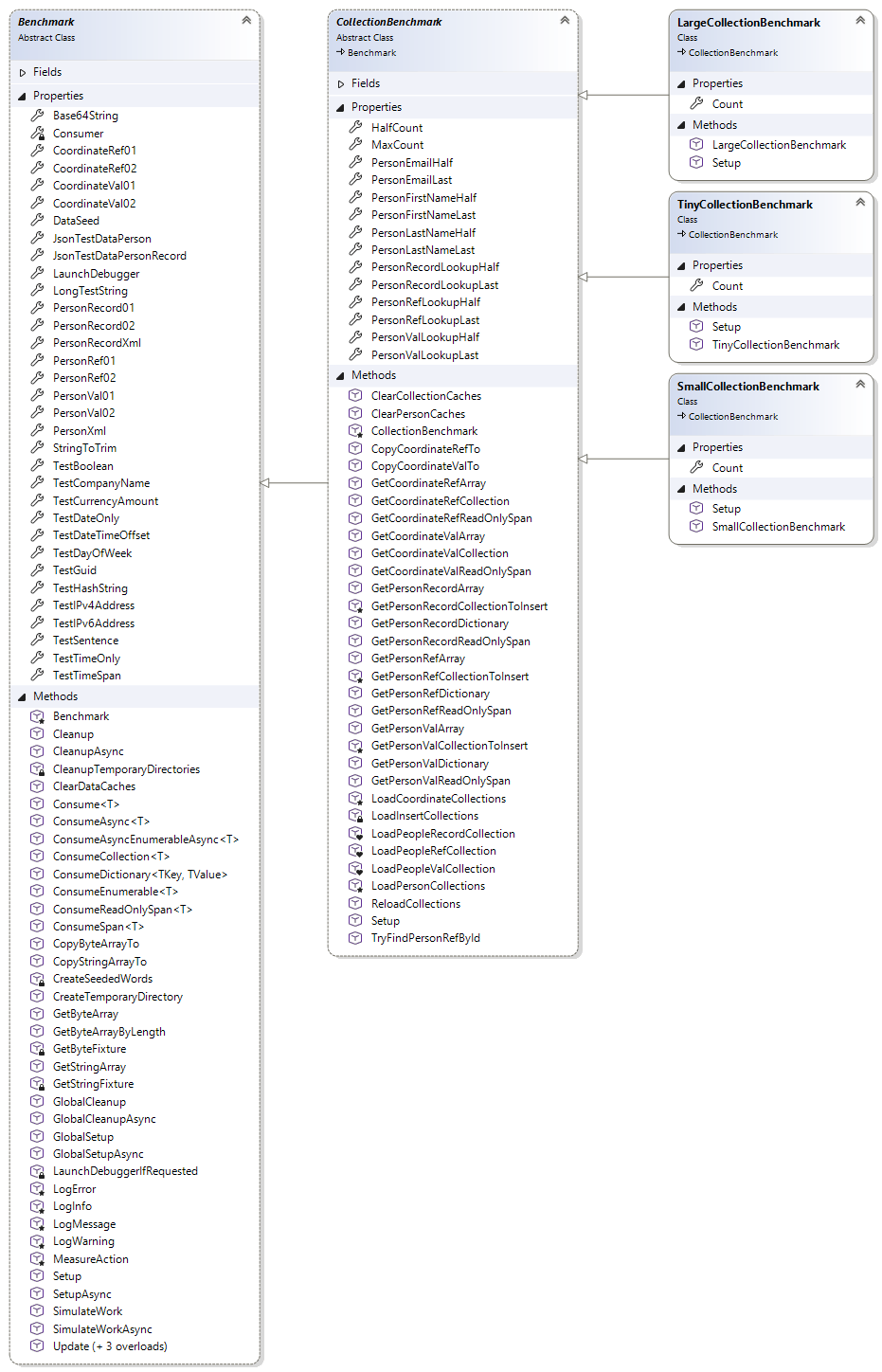
At the core of this system is the Benchmark base class, which standardizes how tests are configured and executed.
The Benchmark Base Class
The Benchmark abstract class is the foundation for executing benchmark tests. It centralizes configuration, reporting, and helper functionality so benchmarks remain clean, accurate, and repeatable.
All data used by this class is either defined as constants or loaded once during initialization. This guarantees that test results aren’t skewed by setup costs. Configuration is separated from execution, keeping measurements honest and noise-free.
Constants
The following constants are used throughout benchmarks to standardize test inputs and improve readability:
- FailedText
Value: “failed” - LowerCaseString
Value: “john doe” - PhoneNumberUpdate
Value: “555-867-5309” - ProperCaseString
Value: “John Doe” - String10Characters01
Value: “2ds9JiOtNF” - String10Characters02
Value: “ndA5nJSHnU” - String15Characters01
Value: “C8IIVjaUi0owZh6” - String15Characters02
Value: “Q7sXguwS9vZpOo6” - SuccessText
Value: “success” - TestEmailLowerCase
Value: “fake@fakelive.com” - TestEmailUpperCase
Value: “Fake@FakeLive.com” - UpperCaseString
Value: “JOHN DOE”
Benchmark Properties
These properties are preloaded during initialization, so benchmarks don’t pay setup costs during execution:
- Base64String
Base64-encoded test string - Consumer
Gets the consumer used for consuming objects in benchmark operations. - CoordinateRef01 / CoordinateRef02
Reference-type coordinate objects - CoordinateVal01 / CoordinateVal02
Value-type coordinate objects - JsonTestDataPerson
JSON test data for a Person object - JsonTestDataPersonRecord
JSON test data for a PersonRecord - LaunchDebugger
Indicates whether a debugger should launch at startup - LongTestString
969-character string for realistic text processing tests - PersonRecord01 / PersonRecord02
Randomly generated records - PersonRef01 / PersonRef02
Reference-type Person objects - PersonVal01 / PersonVal02
Value-type Person objects - PersonXml
XML test data for IPerson - StringToTrim
Whitespace-padded string - TestGuid
Startup-generated Guid
Benchmark Methods
These helper methods exist for one reason: to keep your benchmarks accurate, repeatable, and free from measurement noise. Instead of polluting your benchmark code with setup, logging, or defensive logic, these methods centralize that responsibility.
Execution & Lifecycle Methods
- CleanUp() / CleanUpAsync()
Performs cleanup after benchmark execution. - ClearDataCaches()
Releases all cached byte and string fixture references. Use during setup or cleanup, not concurrently with fixture generation. Does not force garbage collection, reset the seed, or modify arrays already returned. Seeded data can be regenerated. - GlobalCleanup()
Runs once after all benchmarks complete. Does not invoke asynchronous overrides. BenchmarkDotNet uses GlobalCleanupAsync(). Tracked directory deletion is attempted even when the cleanup hook fails. Deletion failures propagate, and unsuccessful paths remain tracked for a subsequent cleanup attempt. - GlobalCleanupAsync()
Awaits the cleanup hook and then removes this instance’s tracked temporary directories. BenchmarkDotNet invokes this entry point. Override CleanupAsync() or Cleanup() instead. Directory cleanup is attempted even if the hook fails. - GlobalSetup()
Performs synchronous setup for manual callers, optionally launching the debugger. Does not invoke asynchronous overrides. BenchmarkDotNet uses GlobalSetupAsync(). - GlobalSetupAsync()
Optionally launches the debugger and dispatches asynchronous benchmark initialization. - Setup() / SetupAsync()
Override to perform custom initialization before each benchmark run.
Consumption Methods (Prevent Optimization)
- Consume<T>(T obj)
Consumes a value to prevent compiler optimization. - ConsumeAsync<T>(T obj)
Async version of Consume. - ConsumeAsyncEnumerableAsync<T>(IAsyncEnumerable<T> source, CancellationToken cancellationToken)
Enumerates and consumes every element of an asynchronous sequence. Enumeration, consumption, and disposal are part of the measured workload when called from a benchmark. Source and disposal exceptions propagate. Cancellation during a pending move requires cooperation from the source; this method does not abandon enumeration in the background. - ConsumeCollection(IReadOnlyList<T> collection)
Consumes each item in the specified IReadOnlyList by index, avoiding enumerator allocation. - ConsumeDictionary<TKey, TValue>(IDictionary<TKey, TValue> collection)
Iterates through the dictionary and consumes each value. This method uses a foreach loop to traverse the dictionary and calls Consume() for each value. It is designed to introduce deterministic work when benchmarking dictionary-based data structures without allocations. - ConsumeEnumerable<T>(IEnumerable<T> collection)
Iterates through a sequence and consumes each item. This method uses a foreach loop to traverse the sequence and calls Consume() for each element. It is designed to introduce deterministic work when benchmarking enumerable data structures without allocations. - ConsumeReadOnlySpan<T>(ReadOnlySpan<T> span)
Consumes each item in the specified ReadOnlySpan using the Consume() method. - ConsumeSpan<T>(Span<T> span)
Iterates through a span and consumes each item. This method uses a foreach loop to traverse the span and calls Consume() for each element. It is designed to introduce deterministic work when benchmarking span-based data structures without allocations. - SimulateWork(object item)
Simulates work by computing the hash code of the provided item object. This method uses RuntimeHelpers.GetHashCode(), which provides a stable hash code for an object during the lifetime of the process, making it suitable for benchmarking operations that need to perform real work without being eliminated by compiler optimizations.
Data Generation & Test Support
These methods provide consistent, reusable test data to eliminate setup overhead and ensure repeatable results.
- CopyByteArrayTo(Span<byte> destination)
Restores the entire destination from a private byte fixture of the same length. Use outside measured code unless copying is the workload. The first call creates cached arrays; subsequent copies reuse them. Mutations to arrays returned by getters do not affect this source. - CopyStringArrayTo(Span<string> destination, int wordMinLength = 10, int wordMaxLength = 15)
Restores the entire destination from a private string fixture of the same count. Use outside measured code. Copies references to immutable strings, not the strings themselves. - CreateTemporaryDirectory()
Creates a unique temporary directory owned by this benchmark instance. Opt in by calling during setup, not concurrently with cleanup. Global cleanup recursively deletes the created paths and their contents; do not place data that must be preserved there or move these directories. Merely constructing a benchmark performs no filesystem operations. - int DataSeed
Gets or sets the optional seed used by byte and string fixture helpers. Changing the seed clears the fixture caches. Configure it during setup, not concurrently with fixture access. The same seed and arguments reproduce data on the same runtime independently of call order. Other fixtures, including people, are unaffected. Reproducibility across runtime versions is not guaranteed. Previously returned arrays are not changed. - GetByteArray(int count)
Returns cached random byte arrays. Retrieves a cached mutable byte array with an exact length, including zero. - GetByteArrayByLength(int byteCount)
Retrieves a cached mutable byte array with an exact length, including zero. Shares fixtures with GetByteArray(). Generate fixtures outside measured code. - GetStringArray(int count, int minLength, int maxLength)
Generates and caches random string arrays. Call during setup. A private array snapshot preserves the original string references for CopyStringArrayTo() the immutable strings themselves are shared, not duplicated. Changing returned elements does not change this private snapshot. - SimulateWork(object item) / SimulateWorkAsync(object item)
Simulates work by computing the hash code of the provided object. - Update(Person)
Updates phone number data for test scenarios. This helper is intended for benchmarking scenarios to apply a deterministic mutation to a Person instance. Person.CellPhone() to the constant test value stored in PhoneNumberUpdate(). - Update<T>(T coordinate)
Updates coordinate values. This helper applies a deterministic mutation for benchmarking scenarios and validates input.
Logging & Diagnostics
These methods provide structured logging that integrates directly with benchmark output.
- LogError(string message)
Logs an error-level message by forwarding it to the benchmark console logger. This helper standardizes error logging for benchmark setup, execution, and cleanup diagnostics. - LogInfo(string message)
Logs an informational message by forwarding it to the benchmark console logger. - LogMessage(LogKind logKind, string message)
This method centralizes logging within benchmarks by forwarding messages to ConsoleLogger.Default(). Messages are written using ConsoleLogger.WriteLine(LogKind, string) and will appear in BenchmarkDotNet console output and artifacts, which is useful for setup/teardown diagnostics and informative traces during benchmark execution. - LogWarning(string message)
Logs a warning-level message by forwarding it to the benchmark console logger. - MeasureAction(Action action, string description = “Action”)
Measures the elapsed time of the specified action and logs the result. This helper is intended for quick ad-hoc timing during setup or cleanup and is not a substitute for BenchmarkDotNet measurements. Exceptions thrown by action are not intercepted and are propagated to the caller.
Logs messages to BenchmarkDotNet output for visibility during execution.
Benchmark Report Configuration
All report formats and diagnostics are configured in the Benchmark base class, including HTML, GitHub Markdown, JSON, and CSV output. Columns include Min, Max, Rank, Memory, Disassembly, Threading, and more.
Configured attributes include:
[AllStatisticsColumn]
[BaselineColumn]
[CategoriesColumn]
[ConfidenceIntervalErrorColumn]
[CsvExporter]
[DisassemblyDiagnoser(printSource: true, exportGithubMarkdown: true, exportCombinedDisassemblyReport: true, exportDiff: true, exportHtml: true)]
[EvaluateOverhead]
[ExceptionDiagnoser]
[GcServer(true)]
[InliningDiagnoser(logFailuresOnly: true, filterByNamespace: true)]
[IterationsColumn]
[JsonExporter(indentJson: true)]
[Orderer(SummaryOrderPolicy.Method, methodOrderPolicy: MethodOrderPolicy.Alphabetical)]
[StopOnFirstError(true)]
CollectionBenchmark
CollectionBenchmark manages realistic collection data used during benchmarks. Collections are generated once, stored in memory, and cloned as needed. This eliminates setup overhead and keeps results clean.
Constructor
- CollectionBenchmark(int maxCount)
maxCount is the maximum count for the collections used in the benchmark.
Properties
- int HalfCount
Gets the half count. - int MaxCount
Gets the maximum count for the collections used in the benchmark. - string PersonEmailHalf
Gets the email address of a person in the middle of the collection. - string PersonEmailLast
Gets the email address of the last person in the collection. - string PersonFirstNameHalf
Gets the first name of a person in the middle of the collection. - string PersonFirstNameLast
Gets the first name of the last person in the collection. - string PersonLastNameHalf
Gets the last name of a person in the middle of the collection. - string PersonLastNameLast
Gets the last name of the last person in the collection. - string PersonRecordLookupHalf
Gets the person record for lookup from the middle of the collection. - string PersonRecordLookupHalf
Gets the person record for lookup from the middle of the collection. - string PersonRecordLookupLast
Gets the person record for lookup of the last item in the collection. - string PersonRefLookupHalf
Gets the reference type person for lookup from the middle of the collection. - string PersonRefLookupLast
Gets the reference type person for lookup of the last item in the collection. - Person PersonValLookupHalf
Gets the value type person for lookup from the middle of the collection. - Person PersonValLookupLast
Gets the value type person for lookup of the last item in the collection.
Methods
- ClearCollectionCaches()
Clears all in-memory collection caches held by this benchmark instance. After calling this method, the internal collections will be empty and lookup properties will be reset to defaults. - ClearPersonCaches()
Clears the in-memory person collection caches and replaces them with empty lists. Useful for tests that need to reset state between runs. - Collection<Coordinate> GetCoordinateValCollection()
Gets a clone of the Coordinate list as a Collection<T>. Similar to GetCoordinateValArray(), this method provides a fresh copy of the data for benchmark tests. - Coordinate GetCoordinateRefCollection()
Gets a clone of the Coordinate list as a Collection<T. Similar to GetCoordinateValArray(), this method provides a fresh copy of the data for benchmark tests. - Coordinate[] GetCoordinateRefArray()
Gets a clone of the Coordinate array. This method ensures that benchmarks operate on a fresh copy of the data, preventing modifications from affecting subsequent benchmark runs. - Coordinate[] GetCoordinateValArray()
Gets a clone of the Coordinate array. This method ensures that benchmarks operate on a fresh copy of the data, preventing modifications from affecting subsequent benchmark runs. - CopyCoordinateRefTo(Span<Tester.Models.RefTypes.Coordinate> destination)
Copies the internal reference-type coordinate buffer into the provided destination span. Throws if the destination is smaller than the source. - CopyCoordinateValTo(Span<Coordinate> destination)
Copies the internal value-type coordinate buffer into the provided destination span. Throws if the destination is smaller than the source. - Dictionary<string, Person> GetPersonValDictionary()
Gets clone of person value dictionary. - Dictionary<string, PersonRecord> GetPersonRecordDictionary()
Gets a cloned dictionary for PersonRecord. - GetPersonRecordCollectionToInsert()
Gets a collection of PersonRecord objects for insertion into collections. - GetPersonRefCollectionToInsert()
Gets a collection of Person reference objects for insertion into collections. - GetPersonValCollectionToInsert()
Gets a collection of Person value objects for insertion into collections. - LoadCoordinateCollections()
Loads the coordinate collections into memory. This includes both a list and an array of Coordinate objects, populated to the maximum count specified for the benchmark. This method is called to prepare data for benchmark tests. - LoadPersonCollections()
Loads the person collections into memory, including arrays, lists, and dictionaries for PersonRecord, Person reference types, and Person value types. - ReadOnlySpan<Coordinate> GetCoordinateRefReadOnlySpan()
Returns a ReadOnlySpan over the internal reference-type coordinate array. The caller MUST NOT mutate the underlying collection; this provides allocation-free read access for hot-path benchmarks. - ReadOnlySpan<Coordinate> GetCoordinateValReadOnlySpan()
Returns a ReadOnlySpan over the internal value-type coordinate array. The caller MUST NOT mutate the underlying collection; this provides allocation-free read access for hot-path benchmarks. - ReadOnlySpan<Person> GetPersonRefReadOnlySpan()
Returns a read-only span over the internal Person reference-type list. This is allocation-free and intended for high-performance read-only access. The caller MUST NOT mutate the underlying list. - ReadOnlySpan<PersonRecord> GetPersonRecordReadOnlySpan()
Returns a read-only span over the internal PersonRecord list. This is allocation-free and intended for high-performance read-only access. The caller MUST NOT mutate the underlying list. - ReadOnlySpan<Tester.Models.ValueTypes.Person> GetPersonValReadOnlySpan()
Returns a read-only span over the internal Person value-type list. This is allocation-free and intended for high-performance read-only access. The caller MUST NOT mutate the underlying list. - ReloadCollections()
Reloads the coordinate and person collections and refreshes the lookup values. This is useful for tests that need to repopulate the internal caches deterministically. - Setup()
Sets up the benchmark instance. This method is called before the benchmark runs and is responsible for initializing the collections and loading the data. - TryFindPersonRefById(string id, out Person person)
Attempts to find a Person reference with the specified id in the internal list. This is a convenience O(n) lookup. For large collections prefer building a dictionary via GetPersonRefDictionary().
All collection-producing methods return clones to prevent cross-test contamination.
Large, Small, and Tiny Collection Benchmarks
- LargeCollectionBenchmark
Benchmarks sizes from 64 to 8192 elements - SmallCounterBenchmark
Benchmarks sizes from 16 to 2048 elements - TinyCollectionBenchmark
Benchmarks sizes from 2 to 256 elements
Ideal for string and micro-operation testing
Creating Benchmark Classes
For non-collection benchmarks:
public class GeneralBenchmark : Benchmark
Override setup and cleanup as needed:
public override void Setup()
{
    base.Setup();
    this._personRefList = this.GetPersonRefArray().ToList();
}
If benchmarking collections, inherit from one of the collection benchmark base classes and let Spargine handle the heavy lifting.
Running Benchmarks with BenchmarkHelper
BenchmarkHelper provides streamlined utility methods for running BenchmarkDotNet benchmarks with minimal boilerplate. It simplifies setup, execution, and reporting so you can focus on performance results—not plumbing.
Available Methods
- PlayErrorBeep()
Plays an error beep sequence using system beep tones. Produces two beeps to indicate an error, failure, or problematic benchmark result. The second beep uses a high frequency for an extended duration to create an attention-grabbing alert tone. The high frequency and long duration make this beep sequence distinctly different from the success beep, making it immediately recognizable as an error notification. Note: This method blocks the calling thread during beep playback and may not work in all environments (e.g., containerized applications or headless systems without audio hardware). - PlaySuccessBeep()
Plays a success beep sequence using system beep tones. Produces four consecutive beeps with increasing frequency and duration to indicate successful completion of a benchmark or operation. The total duration of the sequence is approximately 6 seconds plus the default beep duration. Note: This method blocks the calling thread during beep playback and may not work in all environments (e.g., containerized applications or headless systems without audio hardware). - RunAllBenchmarks(IConfig config)
Executes all benchmark classes discovered in the calling assembly using the specified configuration. This method is intended to be called from a benchmark project’s Program.cs file to execute every benchmark that derives from Benchmark in the calling assembly. It uses Assembly.GetCallingAssembly() to discover all non-abstract classes assignable to Benchmark and then delegates execution to the private Run(IConfig,bool,Type[],Assembly,string) helper, which handles validation, timing, logging, and optional result persistence. - RunBenchmarks(IConfig config, bool saveResults, params Type[] benchmarks)
Executes only the specified benchmark classes using the provided configuration. Optionally saves a human-readable timing summary to the BenchmarkDotNet artifacts directory. This is intended for selectively running a subset of benchmarks from a given assembly. It should typically be called from a benchmark project’s Program.cs.
Insight into Benchmark Test Runs
Both RunAllBenchmarks() and RunBenchmarks() automatically filter and execute only classes that inherit from Benchmark. This ensures consistency and produces additional diagnostics for each run, including:
- Execution time per benchmark class
- Total number of benchmark tests executed
- High-level run diagnostics for traceability
By leveraging the PerformanceStopwatch in Spargine, you also get a consolidated timing report similar to the following:
Performance Report
===============================
Total Time: 14 minutes 55 seconds

Laps:
Lap 0: 11 minutes 41 seconds
Lap 1: 14 minutes 55 seconds

Diagnostics:
2026-03-29 13:15:26Z: Found 2 benchmark classes to run.
2026-03-29 13:15:27Z: Starting benchmark: CharacterExtensionsBenchmark - Test Count: 12
2026-03-29 13:27:07Z: Benchmark completed: CharacterExtensionsBenchmark - Runtime: 00:11:40
2026-03-29 13:27:07Z: Starting benchmark: ExceptionExtensionsBenchmark - Test Count: 3
2026-03-29 13:30:21Z: Benchmark completed: ExceptionExtensionsBenchmark - Runtime: 00:03:13
2026-03-29 13:30:21Z: Total benchmark tests across all classes: 15
Saving and Using Results
- The report is always saved when using
RunAllBenchmarks(). - When using
RunBenchmarks(), saving the report is optional via the saveResults parameter.
These reports are more than just logs—they’re actionable data. I use them to:
- Update benchmark summaries in class headers
- Maintain accurate performance metrics in the Spargine README
Track performance changes over time
SummaryBenchmarking separates guesswork from truth.
If you care about performance, scalability, and cost—especially in cloud environments—benchmarking isn’t optional. It’s a requirement.
By combining BenchmarkDotNet with the DotNetTips.Spargine.Benchmarking assembly, you eliminate setup friction and gain real insight into how your code behaves under pressure.
Stop assuming your code is fast.
Measure it.
Stop guessing which approach is better.
Prove it.
Invest the time. Measure the truth. Ship faster, leaner, more scalable code.
Benchmark like dotNetDave—and take control of your .NET performance.
If you’d like to contribute, submit a pull request or open an issue.
If your team needs help with benchmarking or performance tuning, I’m available for contract work.
Email: dotnetdave@live.com
Happy benchmarking. Rock on.


Pick up any books by David McCarter by going to Amazon.com: http://bit.ly/RockYourCodeBooks
Make a one-time donation
Make a monthly donation
Make a yearly donation
Choose an amount
Or enter a custom amount
Your contribution is appreciated.
Your contribution is appreciated.
Your contribution is appreciated.
If you liked this article, please buy David a cup of Coffee by going here: https://www.buymeacoffee.com/dotnetdave
© The information in this article is copywritten and cannot be reproduced in any way without express permission from David McCarter.
Discover more from dotNetTips.com
Subscribe to get the latest posts sent to your email.

You must be logged in to post a comment.