
Benchmarking isn’t optional—it’s how you prove your code can actually perform under pressure.
At its core, benchmarking establishes a performance baseline for your code. It helps you uncover bottlenecks, compare competing algorithms that solve the same problem, and choose the most efficient approach in terms of execution time and memory usage. In .NET, there are countless ways to implement the same functionality, which raises a critical question:
Which one is actually faster?
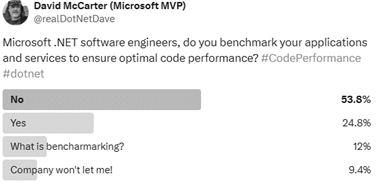
Performance differences don’t just affect speed—they impact memory allocation, scalability, and cost, especially in high-load or cloud-based environments. A poll I ran showed that most developers either don’t benchmark their code at all or don’t realize how important it is. That’s a problem.
This article is here to fix that.
Benchmarking requires an upfront investment of time, but the payoff is massive. I’ve uncovered issues during benchmark runs that never appeared in unit tests. Unit tests run once. Benchmarks run millions of times. That’s how real performance problems show themselves.
Benchmarking Code Before Release
Benchmarking should be a required step before releasing any code. In cloud environments, performance problems don’t just slow things down—they cost money. When you’re billed based on execution time and resource usage, inefficient code hits your budget directly.
For years, I’ve relied on BenchmarkDotNet in my professional work, my open-source projects, and my book Rock Your Code: Code & App Performance for Microsoft .NET. It’s rock-solid, battle-tested, and trusted—even Microsoft uses it to benchmark .NET itself.
Everything in this article is drawn from the DotNetTips.Spargine.Benchmarking assembly and NuGet package.
Source code and packages:
GitHub: Benchmarking Projects
NuGet: http://bit.ly/dotNetDaveNuGet
Overview of Benchmarking with Spargine
The DotNetTips.Spargine.Benchmarking assembly removes the friction from setting up BenchmarkDotNet. It provides preconfigured reporting, realistic test data, and reusable base classes so you can focus on measuring performance—not wiring things together.
Here’s a simple example benchmarking Spargine’s AppendBytes() extension method for StringBuilder:
[Benchmark (Description = "AppendBytes"))]
[BenchmarkCategory(Categories.Strings)]
public void AppendBytes()
{
    var sb = new StringBuilder();
    sb.AppendBytes(this._byteArray);
    this.Consume(sb.ToString());
}
The [Benchmark] attribute is the backbone of every test. I always include a description because it shows up directly in the reports. I also frequently use [BenchmarkCategory] so I can group and execute related tests together.
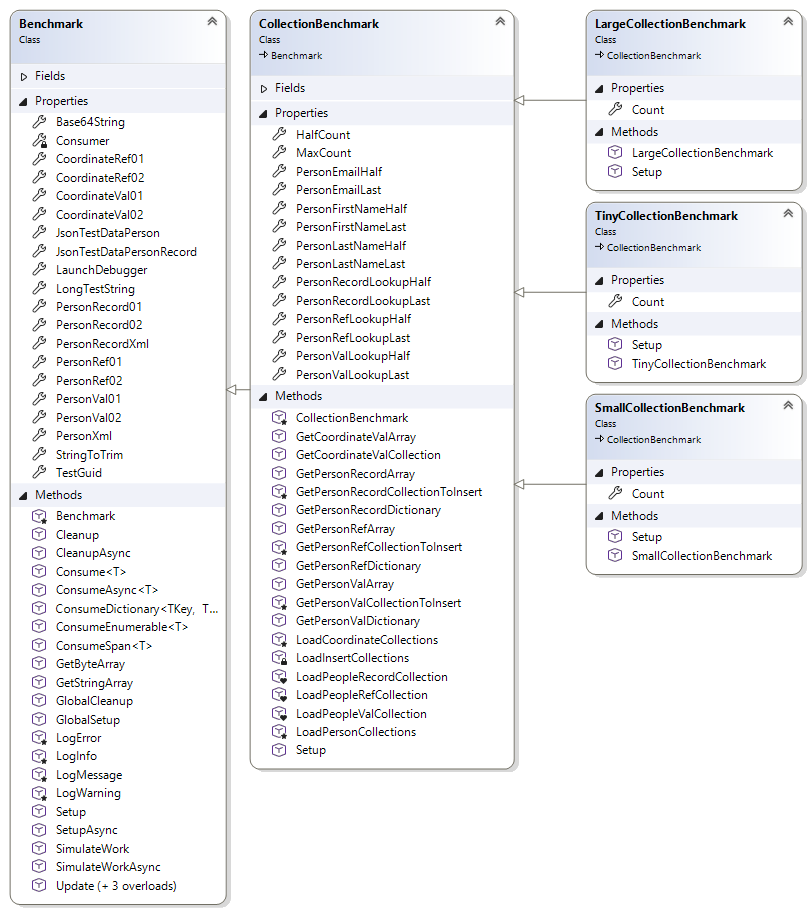
All report columns and diagnostics are configured centrally in the Spargine Benchmark base class.
The Benchmark Base Class
The Benchmark abstract class is the foundation for executing benchmark tests. It centralizes configuration, reporting, and helper functionality so benchmarks remain clean, accurate, and repeatable.
All data used by this class is either defined as constants or loaded once during initialization. This guarantees that test results aren’t skewed by setup costs. Configuration is separated from execution, keeping measurements honest and noise-free.
Constants
The following constants are used throughout benchmarks to standardize test inputs and improve readability:
- FailedText
Value: “failed” - LowerCaseString
Value: “john doe” - PhoneNumberUpdate
Value: “555-867-5309” - ProperCaseString
Value: “John Doe” - String10Characters01
Value: “2ds9JiOtNF” - String10Characters02
Value: “ndA5nJSHnU” - String15Characters01
Value: “C8IIVjaUi0owZh6” - String15Characters02
Value: “Q7sXguwS9vZpOo6” - SuccessText
Value: “success” - TestEmailLowerCase
Value: “fake@fakelive.com” - TestEmailUpperCase
Value: “Fake@FakeLive.com” - UpperCaseString
Value: “JOHN DOE”
Benchmark Properties
These properties are preloaded during initialization, so benchmarks don’t pay setup costs during execution:
- Base64String
Base64-encoded test string - CoordinateRef01 / CoordinateRef02
Reference-type coordinate objects - CoordinateVal01 / CoordinateVal02
Value-type coordinate objects - JsonTestDataPerson
JSON test data for a Person object - JsonTestDataPersonRecord
JSON test data for a PersonRecord - LaunchDebugger
Indicates whether a debugger should launch at startup - LongTestString
969-character string for realistic text processing tests - PersonRecord01 / PersonRecord02
Randomly generated records - PersonRef01 / PersonRef02
Reference-type Person objects - PersonVal01 / PersonVal02
Value-type Person objects - PersonXml
XML test data for IPerson - StringToTrim
Whitespace-padded string - TestGuid
Startup-generated Guid
Benchmark Methods
These methods support execution, validation, and accurate measurement:
- CleanUp
Performs cleanup after benchmark execution - CleanUpAsync
Asynchronous cleanup after all tests complete - Consume<T>(T obj)
Prevents JIT optimization by consuming values - ConsumeAsync<T>(T obj, CancellationToken token)
Async version of Consume - GetByteArray(int count)
Returns cached random byte arrays - GetStringArray(int count, int minLength, int maxLength)
Generates and caches random string arrays - GlobalSetup
Runs once before benchmarks begin - GlobalCleanup
Runs once after benchmarks complete - LogMessage / LogInfo / LogWarning / LogError
Logs messages to BenchmarkDotNet output - Setup / SetupAsync
Override for custom initialization logic - SimulateWork / SimulateWorkAsync
Hash-based workload simulation - Update(Person person)
Updates phone numbers for test data - Update<T>(T coordinate)
Updates coordinate values - ConsumeDictionary<TKey, TValue>
Iterates and consumes dictionary values - ConsumeEnumerable<T>
Consumes enumerable sequences - ConsumeSpan<T>
Consumes spans efficiently
When running benchmarks, performance improves when executed with Administrator privileges.
Benchmark Report Configuration
All report formats and diagnostics are configured in the Benchmark base class, including HTML, GitHub Markdown, JSON, and CSV output. Columns include Min, Max, Rank, Memory, Disassembly, Threading, and more.
Configured attributes include:
[AllStatisticsColumn]
[BaselineColumn]
[CategoriesColumn]
[ConfidenceIntervalErrorColumn]
[CsvExporter]
[DisassemblyDiagnoser(printSource: true, exportGithubMarkdown: true)]
[ExceptionDiagnoser]
[GcServer(true)]
[InliningDiagnoser]
[IterationsColumn]
[JsonExporter(indentJson: true)]
[MemoryDiagnoser(displayGenColumns: true)]
[Orderer(SummaryOrderPolicy.Method)]
[RankColumn] [ThreadingDiagnoser]
CollectionBenchmark
CollectionBenchmark manages realistic collection data used during benchmarks. Collections are generated once, stored in memory, and cloned as needed. This eliminates setup overhead and keeps results clean.
Constructor:
- CollectionBenchmark(int maxCount)
Key properties include MaxCount, HalfCount, and lookup values for reference, record, and value-type collections.
All collection-producing methods return clones to prevent cross-test contamination.
Large, Small, and Tiny Collection Benchmarks
- LargeCollectionBenchmark
Benchmarks sizes from 64 to 8192 elements - SmallCounterBenchmark
Benchmarks sizes from 16 to 2048 elements - TinyCollectionBenchmark
Benchmarks sizes from 2 to 256 elements
Ideal for string and micro-operation testing
Running Benchmarks with BenchmarkHelper
BenchmarkHelper centralizes execution and provides audible success or failure feedback.
Running all benchmarks:
BenchmarkHelper.RunAllBenchmarks(config);
Running specific benchmarks:
BenchmarkHelper.RunBenchmarks(config,
    typeof(TypeExtensionsBenchmark),
    typeof(ArrayExtensionsCollectionBenchmark));
Creating Benchmark Classes
For non-collection benchmarks:
public class GeneralBenchmark : Benchmark
Override setup and cleanup as needed:
public override void Setup()
{
    base.Setup();
    this._personRefList = this.GetPersonRefArray().ToList();
}
If benchmarking collections, inherit from one of the collection benchmark base classes and let Spargine handle the heavy lifting.
Summary
Benchmarking separates guesswork from truth.
If you care about performance, scalability, and cost—especially in the cloud—benchmarking isn’t optional. By combining BenchmarkDotNet with the DotNetTips.Spargine.Benchmarking assembly, you get faster setup, realistic data, and reports that actually tell you something useful.
Invest the time. Measure the truth. Ship faster code.
Benchmark like dotNetDave—and take control of your .NET performance.
If you’d like to contribute, submit a pull request or open an issue.
If your team needs help with benchmarking or performance tuning, I’m available for contract work.
Email: dotnetdave@live.com
Happy benchmarking. Rock on.


Pick up any books by David McCarter by going to Amazon.com: http://bit.ly/RockYourCodeBooks
Make a one-time donation
Make a monthly donation
Make a yearly donation
Choose an amount
Or enter a custom amount
Your contribution is appreciated.
Your contribution is appreciated.
Your contribution is appreciated.
DonateDonate monthlyDonate yearlyIf you liked this article, please buy David a cup of Coffee by going here: https://www.buymeacoffee.com/dotnetdave
© The information in this article is copywritten and cannot be preproduced in any way without express permission from David McCarter.
Discover more from dotNetTips.com
Subscribe to get the latest posts sent to your email.

 dotNetTips.com