
Updated January 2024

Collections are extensively employed in .NET, as data retrieved from a data source typically yields 1 to N results. In the upcoming articles covering collection performance, we will delve into various aspects, including iterating through collections, optimizing the retrieval of collections from methods, and more. Be sure to conduct your benchmarking when dealing with your custom types.
There are four primary methods to iterate through a collection: for(), foreach(), do(), and while(). I was curious about which method most developers consider the fastest when looping over a collection using for() and ForEach(), and here are the results.
I conducted a Twitter poll, inquiring from developers about which of these methods they believe is the fastest. Let’s see if their opinions align with the results.

Let’s evaluate the performance of each method. Below are examples of each.
for()
for (int count = 0; count < collection.Count; count++)
{
  var name = collection[count].FirstName;
}
foreach()
foreach (var person in collection)
{
    var name = person.FirstName;
}
do()
var count = 0;

do
{
  var name = collection[count].FirstName;
  count++;
} while (count < collection.Count);
while()
var count = 0;

while (count < collection.Count)
{
  var name = collection[count].FirstName;
  count++;
}
I would say that over 90% of the .NET code I review uses foreach() since it’s simpler and easier to read. However, the question remains: is it more performant?
Benchmark Results
These findings pertain to iterating over a List<> of reference types. As evident from the results, employing foreach() is less efficient compared to alternative methods for looping through a collection. Consequently, nearly 62% of the developers who took part in my Twitter poll may need to refactor their code to enhance performance. Additionally, I want to highlight that, based on my benchmark tests, varying types (such as structure or record) exhibit distinct outcomes regarding the optimal iteration approach.
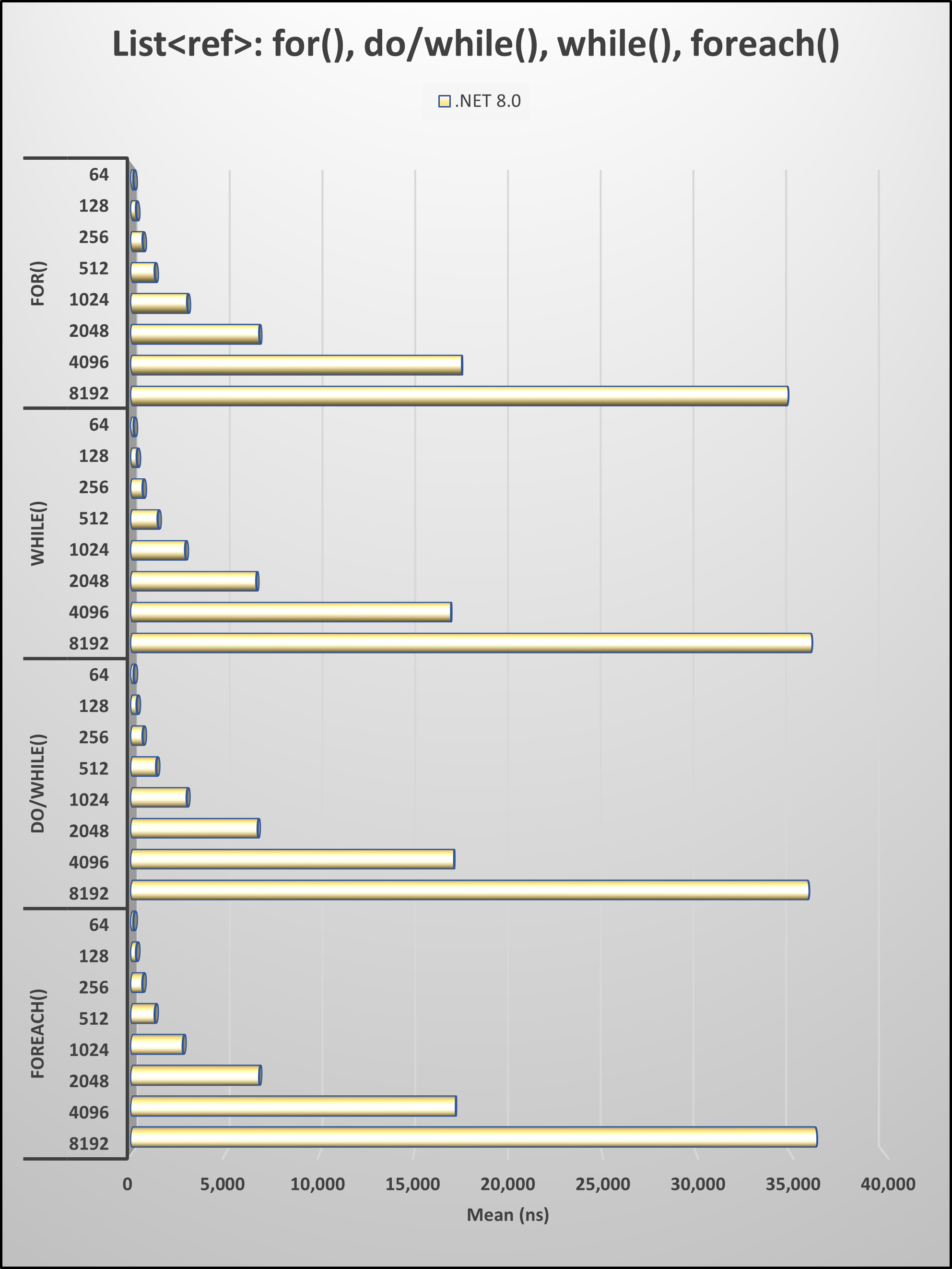
My recommendation is to opt for
for(),do(), orwhile()when iterating over aList<>collection, considering these four methods for looping.
List.ForEach()
In .NET 2.0, the method ForEach() was added to List<> and Array types. It is also available for the ImmutableList<> type. Below is an example of using it with List<Person>.
collection.ForEach(person =>
{
    var name = person.FirstName;
});
Benchmark Results
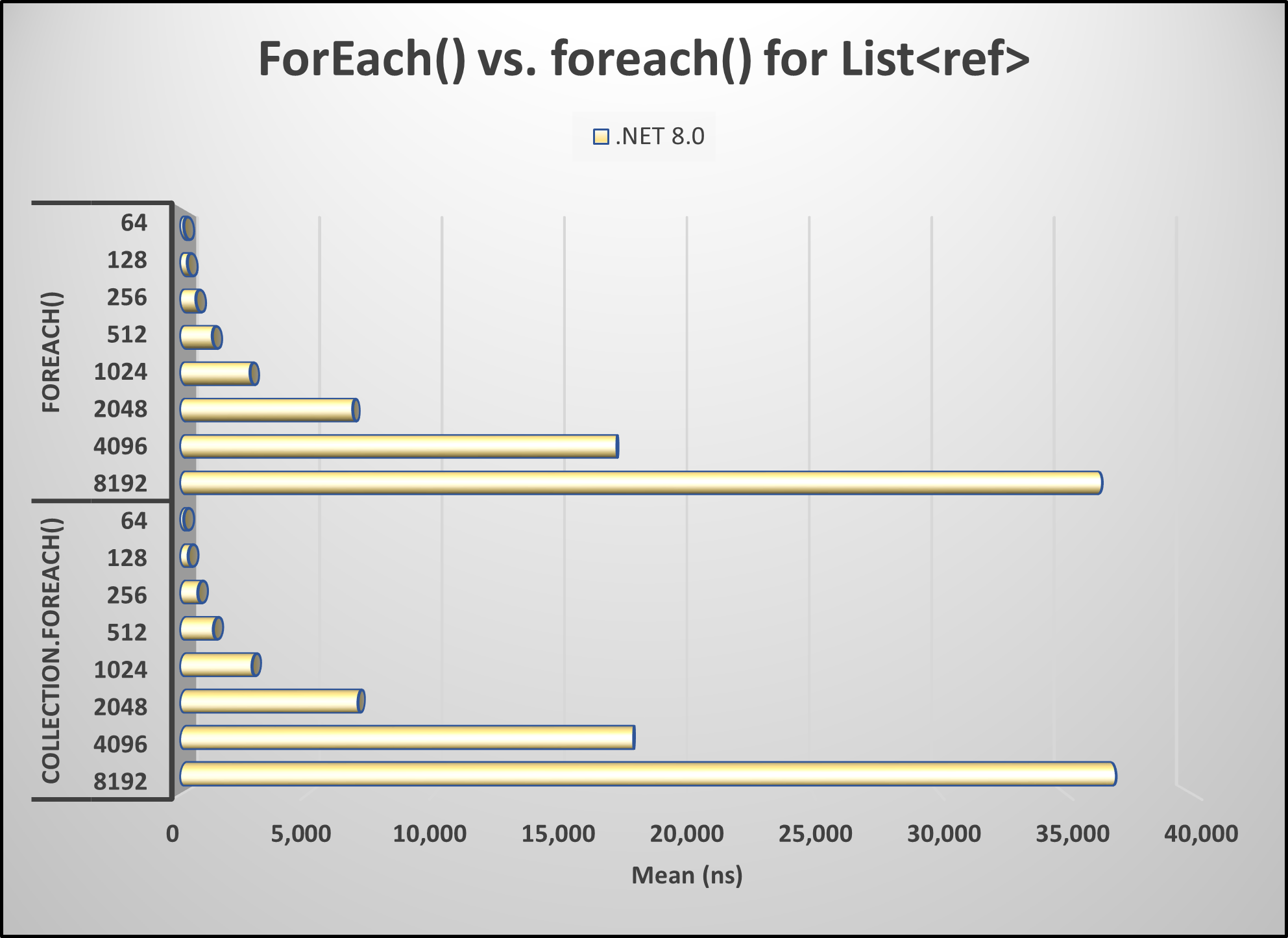
As you can see, foreach() is more performant than using ForEach() but is less performant than using for().
Pick up any books by David McCarter by going to Amazon.com: http://bit.ly/RockYourCodeBooks
Make a one-time donation
Make a monthly donation
Make a yearly donation
Choose an amount
Or enter a custom amount
Your contribution is appreciated.
Your contribution is appreciated.
Your contribution is appreciated.
DonateDonate monthlyDonate yearlyIf you liked this article, please buy David a cup of Coffee by going here: https://www.buymeacoffee.com/dotnetdave
© The information in this article is copywritten and cannot be preproduced in any way without express permission from David McCarter.
Discover more from dotNetTips.com
Subscribe to get the latest posts sent to your email.

 dotNetTips.com
Measured in nanoseconds? In practical terms that difference is negligible for the benefit of more readable code.