
This content discusses the performance of using a constant vs. a read-only property.

This content discusses the performance of using a constant vs. a read-only property.

The article compares two methods of checking for the presence of a specific character in a string in C#.

The post discusses the importance of using constants for static numerical or string values in code, highlighting benefits such as clarity of intent. It provides an example of a read-only property for π and notes that .NET 10 benchmarks show similar performance for both methods. EditorConfig settings for identifying issues are also mentioned.

The article explores the usage of LINQ's MinBy() and MaxBy() methods, which efficiently return the objects with the minimum and maximum values in a sequence based on a specified key selector function.

"Rock Your Code: Code & App Performance for Microsoft .NET" is a comprehensive guide that emphasizes the importance of optimizing code performance for enhanced user experience and backend efficiency. With practical insights and example code, developers learn essential practices for maximizing the performance of their business applications within the Microsoft .NET framework. From string manipulation to leveraging source generators, this edition covers a wide range of topics, including new chapters on code analysis and benchmark testing. Written for developers using Microsoft .NET 8 and Visual Studio 2022, this book offers timeless principles applicable across different versions of .NET, ensuring relevance and utility in any environment.
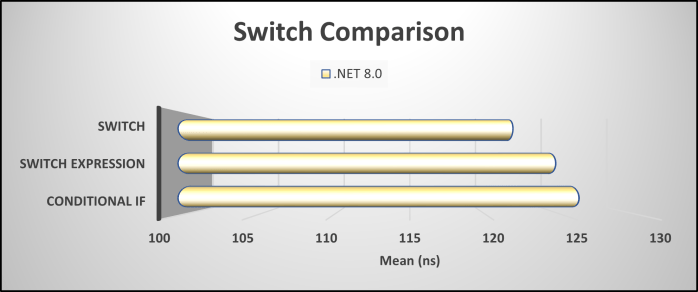
This article compares the performance of conditional if statements, switch statements, and switch expressions in C# code, with a focus on data retrieval.

To optimize .NET code effectively, developers must utilize appropriate tools like profilers and analyzers. These resources reveal hidden performance issues and inefficiencies that can affect software quality. By measuring and analyzing their code, developers can focus on impactful optimizations, ensuring their applications operate at peak performance rather than relying solely on coding skills.

Utilizing .NET code analysis tools is essential for identifying performance issues in code before execution. Modern .NET analyzers provide real-time warnings for inefficiencies, enabling developers to refine their code. This resource outlines practical examples and benchmarks, emphasizing that most performance problems stem from minor inefficiencies. Analyze, measure, and optimize for better performance.

The excerpt discusses the recommendation to seal classes in .NET for design clarity and adherence to OOP principles, while noting that benchmark tests reveal non-sealed classes perform slightly better. Despite this, the author maintains sealing classes not meant for inheritance is essential for robust class design. An EditorConfig setup for checking this is also mentioned.

.NET source generators enhance application performance by moving tasks from runtime to compile time, optimizing C# code generation. They eliminate boilerplate, reduce memory usage, and improve startup speed. By replacing reflection-heavy patterns, these generators enable faster, more efficient execution, ensuring cleaner and smarter code performance.
 dotNetTips.com
You must be logged in to post a comment.