The article critiques code analysis rule CA1828 in Microsoft .NET, which suggests using AnyAsync() over CountAsync() for checking item existence in IQueryable collections. Benchmark results indicate CountAsync() outperforms both AnyAsync() and LongCountAsync(), pointing to potential inefficiencies in following CA1828. The author recommends adjusting rule severity to optimize performance.

Category: Code Analysis
Microsoft .NET Code Analysis: Creating Empty Arrays
Arrays are popular in .NET for their efficiency. The .NET team recommends avoiding zero-length allocations, opting instead for Array.Empty() or using the [] expression for creating empty arrays. The latter is faster than both new string[0] and Array.Empty(), marking a shift in performance standards in recent .NET versions.
Microsoft .NET Code Analysis: Optimizing JSON Serialization with Cached Options
Caching your JSON serialization options in .NET leads to significant performance benefits.
Microsoft .NET Code Analysis: Optimizing Byte-to-Hex Conversions
Switching from BitConverter.ToString() to Convert.ToHexString() in .NET can significantly enhance performance and reduce memory usage for byte-to-hex conversions.
Microsoft .NET Code Analysis: Leveraging Span-Based String Concatenation for Improved Performance
String concatenation in .NET can be optimized by using the Span type to enhance performance and reduce memory usage. By replacing traditional methods with AsSpan() and string.Concat(), memory allocations decrease significantly, yielding substantial performance gains. Adhering to best practices helps identify and rectify inefficient concatenation patterns.
Stop the Leaks: Properly Disposing Objects in .NET
Improper disposal of objects in .NET projects can lead to severe memory leaks, causing performance issues and crashes. A case study revealed a company spent over $25,000 to resolve these issues. Recommended practices include using IDisposableAnalyzers and custom extension methods like TryDispose() and DisposeFields() to simplify memory management and prevent problems.
Collection Performance: Enhancing Dictionary Performance with FrozenDictionary
The FrozenDictionary is a thread-safe, immutable, read-only dictionary optimized for fast lookups. It outperforms the Dictionary, reducing iteration and lookup times significantly.
Microsoft .NET Code Analysis: Eliminating Dictionary Double Lookups
Using ContainsKey() followed by an indexer on dictionaries results in a double lookup, decreasing performance. This is common anti-pattern. This article will show you how to fix this and increase performance up to 2x.
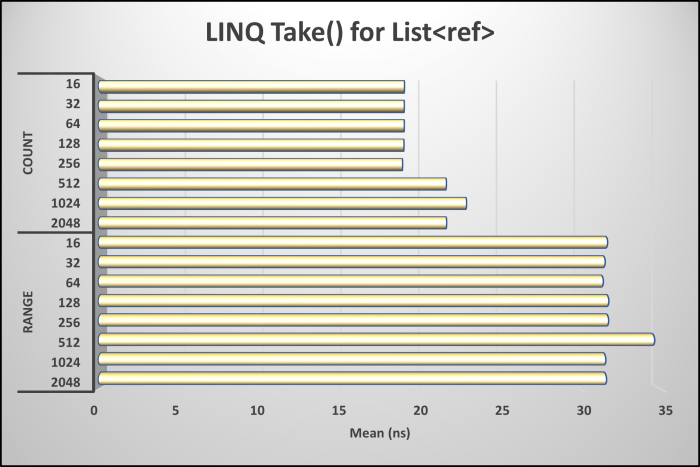
Collection Performance: Exercise Caution When Using Take() with a Basic Count
The article advises caution when using the LINQ method Take() with a basic count, suggesting that a range might be recommended by code analyzers. However, benchmark results indicate that using Take() with a simple count is 1.63 times faster than employing a range in such cases.
Rock Your Code: Code & App Performance for Microsoft .NET (4th Edition)
"Rock Your Code: Code & App Performance for Microsoft .NET" is a comprehensive guide that emphasizes the importance of optimizing code performance for enhanced user experience and backend efficiency. With practical insights and example code, developers learn essential practices for maximizing the performance of their business applications within the Microsoft .NET framework. From string manipulation to leveraging source generators, this edition covers a wide range of topics, including new chapters on code analysis and benchmark testing. Written for developers using Microsoft .NET 8 and Visual Studio 2022, this book offers timeless principles applicable across different versions of .NET, ensuring relevance and utility in any environment.

You must be logged in to post a comment.