
The author delves into the performance disparities of using reference types, value types, and record types in collections.

The author delves into the performance disparities of using reference types, value types, and record types in collections.

It is recommended to use constants for static numerical or string values in code. This helps maintain code clarity and adhere to best practices. Benchmark tests show variables are slightly more performant than constants, but it is still advisable to use constants where appropriate to reflect the intent of the variable.
Beginning with .NET 8, you have the option to employ the novel collection expression to generate frequently used collection values. A collection expression comprises a concise syntax, which, upon evaluation, can be assigned to a wide array of collection types. Key Features of Collection Expressions: Concise Syntax: Easily create collections using square brackets [] and comma-separated elements, such as … Continue reading Collection Expressions in .NET 8

In C# 8, a new method for null coalescing assignments was introduced, simplifying the code. Performance benchmark results show a slight advantage in using the traditional approach for null checking compared to the new method. Previously, the performance difference between the two methods was negligible.
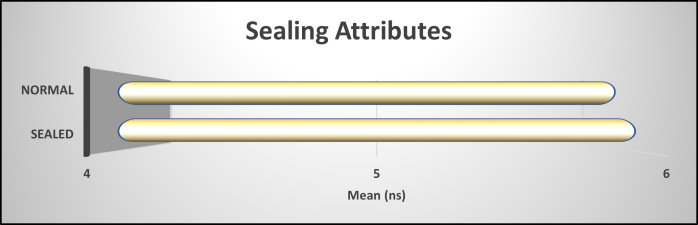
When customizing attributes, Microsoft and I both advise sealing them for clarity and performance. However, benchmark results show sealing attributes to be marginally less performant, with both outcomes indicating a memory allocation of 24 bytes. Despite this, I maintain that sealing non-inheritable classes is essential for robust class design.
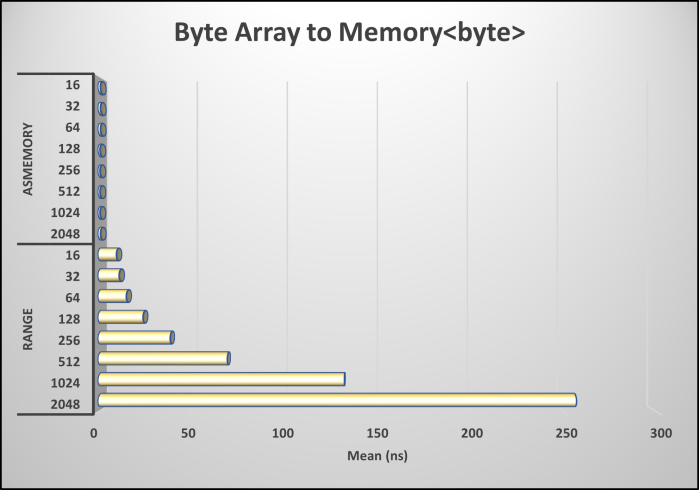
The article discusses the efficiency benefits of using AsMemory() for byte array conversion, emphasizing reduced memory usage, future-proofing code, and performance optimization. Benchmark results highlight a significant performance advantage, with a 54 times improvement compared to other methods, reinforcing the importance of AsMemory() for optimal performance in memory-sensitive applications.
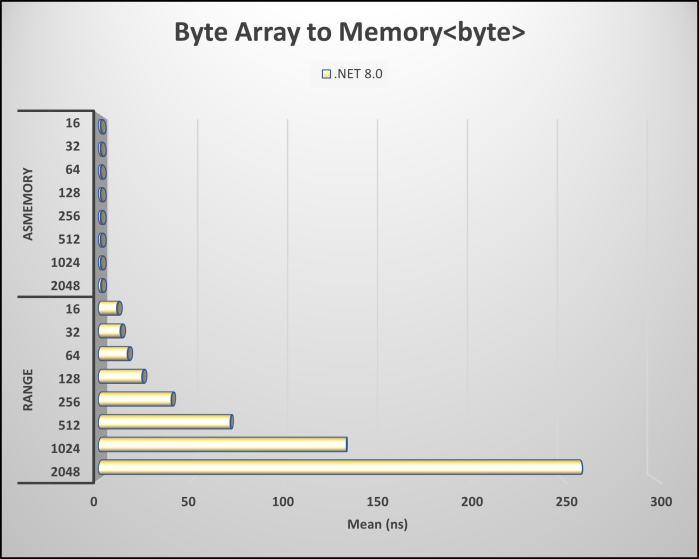
When working with byte arrays, there are two methods to convert to Memory. Using AsMemory() offers performance optimization, efficient memory management, improved code clarity, and future-proofing. Benchmark results show a 57x performance improvement, with no memory allocation. This method is crucial for memory-sensitive applications and large datasets. Utilize AsMemory() for optimal performance and efficient array handling.

The post critiques developers’ practices of using properties that return arrays, highlighting issues like lack of encapsulation, read-only enforcement challenges, and limited flexibility for future changes. It recommends using methods or collections as alternatives, despite performance benchmarks indicating that array properties are more efficient, ultimately suggesting adherence to Microsoft's guidelines.

Many developers use LINQ methods such as First(), Last(), and Count() to interact with collections. However, these methods can be about 2.33× slower in performance compared to direct indexing. Caution is advised when using indexing to avoid exceptions, and consideration should be given to code readability versus performance.
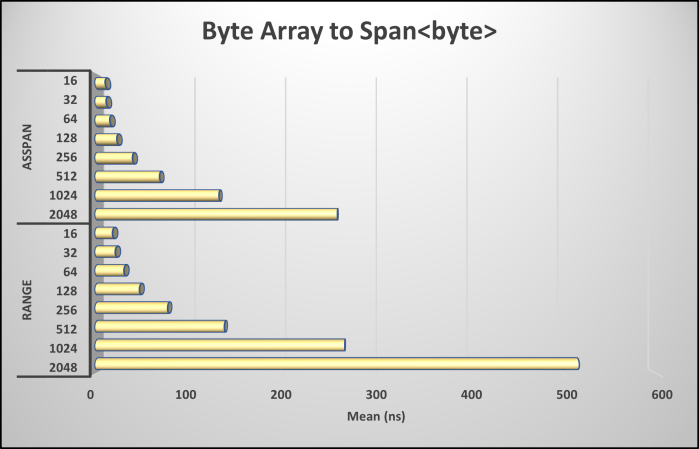
When working with byte arrays, converting to Span can be achieved through AsSpan(). This method offers performance optimization by providing direct access without creating new arrays, efficient memory management, improved code clarity, and future-proofing for .NET framework evolution. Benchmark results show AsSpan() to be twice as performant with minimal memory allocations.
 dotNetTips.com
You must be logged in to post a comment.