
There are several ways to sort a collection in .NET. Some of the sorting methods are part of LINQ. Let’s look at the methods that are part of the System.Collections.Generic namespace.

There are several ways to sort a collection in .NET. Some of the sorting methods are part of LINQ. Let’s look at the methods that are part of the System.Collections.Generic namespace.

This article shows benchmark results for adding items to a List collection by using AddRange() and for().
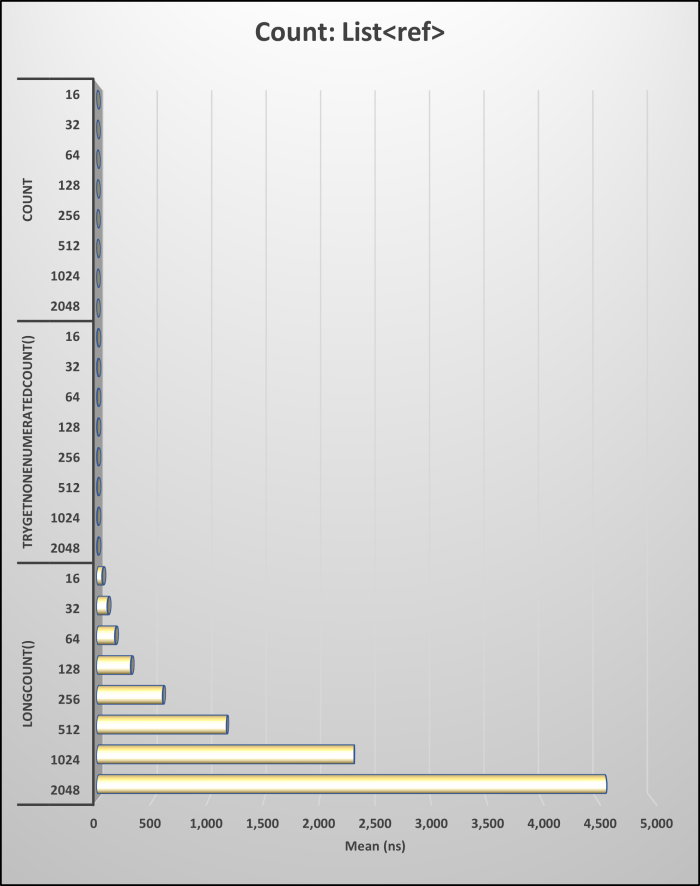
Before processing collections, always perform null and item checks. For counting items, prefer Count for speed, as it's more efficient than LongCount() and TryGetNonEnumeratedCount(). When working with arrays, use Length or LongLength instead of Count. Benchmarking is crucial for optimizing collection methods in .NET applications.

This article talks about sorting collections with LINQ and doing the same using one of the sorted collections.

Immutable collections, which are collections that cannot be changed, was introduced in .NET 4.5 and are supported in .NET Core and beyond. There are immutable collections that mirror many of the generic collections in .NET. This article shows performance results from creating these types of collections.

Its common in programming to create a collection from a collection. Usually there is some business logic applied to the items before they are put into the new collection. This article will focus on doing that by using AddRange() from LINQ.

In many of the collection types in .NET, you can fill a collection at the same time the object is created as that can improve performance. This article shows the performance results for List and LinkedList.

The article highlights the importance of using efficient methods for checking if a string is empty or null, emphasizing the performance benefits and exception prevention of using `string.IsNullOrEmpty()` and `string.IsNullOrWhiteSpace()` over the traditional `if (emailAddress == "")` approach. Benchmark results reveal that using null and `string.Empty()` is the most performant way to check for an empty string, with other methods showing similar performance levels. Updated January 2024.
Let’s discuss for() and foreach() under load to establish a baseline. As you can see below, I used the same code in the previous chapter and added Task.Delay() to simulate a CPU load.

The post emphasizes that debates over coding styles in .NET often overlook the negligible performance differences they create. It affirms that readability, maintainability, and team standards are more crucial than minor optimizations, as modern .NET frameworks efficiently handle performance. Developers should focus on clean code rather than getting bogged down by insignificant details.
 dotNetTips.com
You must be logged in to post a comment.