

Spargine is a collection of open-source assemblies and NuGet packages designed for .NET 10, which I have been developing and maintaining since the release of .NET Framework 2. These assemblies are not only a core part of my projects but are also actively deployed in production environments across several companies I collaborate with.
Get Spargine
You can access the source code and NuGet packages here:
- GitHub: Spargine 10
- NuGet: dotNetDaveNuGet
Simplify StringBuilder Usage with Spargine’s StringBuilderExtensions
When performance matters, StringBuilder is already a powerful tool — but writing clean, reusable string-building logic can still get messy fast. That’s where Spargine’s StringBuilderExtensions—part of the DotNetTips.Spargine.Extensions project and NuGet package—steps in.
These extensions streamline common string-building scenarios, reduce repetitive boilerplate, and help prevent subtle bugs, all while keeping performance at the forefront. Whether you’re appending key/value pairs, formatting byte arrays, or joining collections into text, StringBuilderExtensions makes your code clearer, safer, and faster to write.
Key Features of StringBuilderExtensions
The StringBuilderExtensions class is designed for performance and error prevention. Here is a breakdown of its key methods:
- AppendBytes(byte[] bytes)
Appends the bytes to the StringBuilder in hexadecimal format, prefixed with ‘0x’ and enclosed in single quotes. - AppendKeyValue(string key, string value, bool includeQuotes, bool includeComma)
Appends a key-value pair to the StringBuilder in a formatted string representation. - AppendValues(string separator, IEnumerable<string> values)
Appends a collection of string values to the StringBuilder, separated by the specified separator. - AppendValues(string separator, params ReadOnlyCollection<string> values)
Appends a collection of string values to the StringBuilder, separated by the specified separator. - AppendValues<T, TParam>(string separator, IEnumerable<T> values, TParam param, Action<T, TParam> joinAction)
Appends a collection of values to the StringBuilder, separated by the specified separator, using a custom join action that takes an additional parameter. - AppendValues<T, TParam1, TParam2>(string separator, IEnumerable<T> values, TParam1 param1, TParam2 param2, Action<StringBuilder, T, TParam1, TParam2> joinAction)
Appends a collection of values to the StringBuilder, separated by the specified separator, using a custom join action that takes two additional parameters. - AppendValues<T>(string separator, IEnumerable<T> values, Action<T> joinAction)
Appends a collection of values to the StringBuilder, separated by the specified separator, using a custom join action. - ClearSetCapacity(int capacity)
Clears the StringBuilder and sets its capacity to the specified value. - SetCapacity(int capacity)
Sets the capacity of the StringBuilder to the specified value.
Summary
StringBuilderExtensions brings clarity, consistency, and efficiency to everyday StringBuilder operations. By replacing repetitive append logic with clean extension methods, your code becomes easier to read, easier to maintain, and less prone to mistakes — without sacrificing performance.
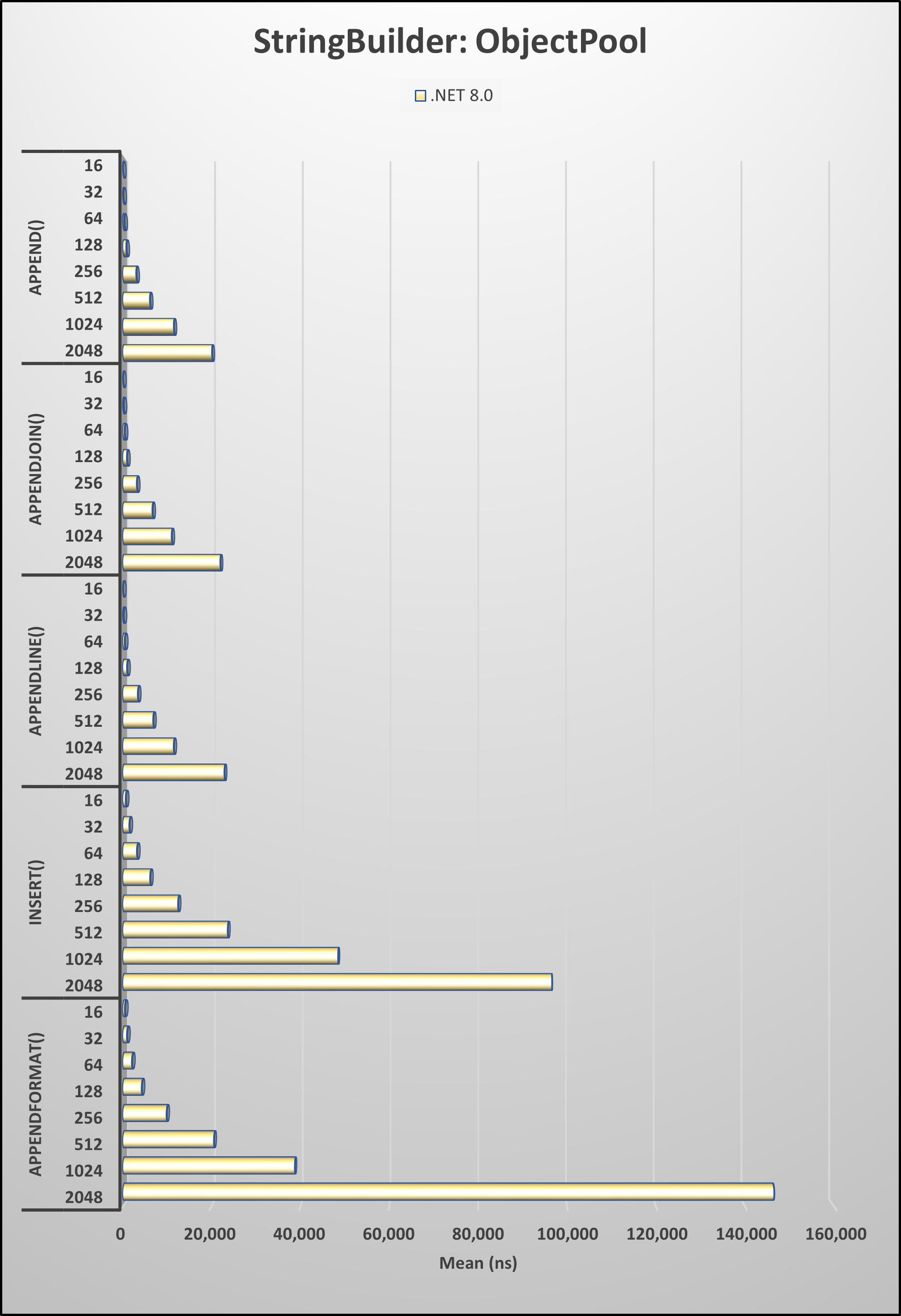
And if you want to take execution speed even further, combine these extensions with an ObjectPool<StringBuilder> to dramatically reduce memory allocations in high-throughput scenarios.
Bottom line: if you’re using StringBuilder, Spargine’s StringBuilderExtensions is an easy win for cleaner, faster .NET code.
Get Involved!
The success of open-source projects like Spargine relies on community contributions. If you find these updates useful or have ideas for further improvements, I encourage you to contribute by:
- Submitting pull requests
- Reporting issues
- Suggesting new features
Your input is invaluable in making Spargine an even more powerful tool for the .NET community.
If you are interested in contributing or have any questions, feel free to contact me via email at dotnetdave@live.com. Your support and collaboration are greatly appreciated!
Thank you, and happy coding!


Pick up any books by David McCarter by going to Amazon.com: http://bit.ly/RockYourCodeBooks
Make a one-time donation
Make a monthly donation
Make a yearly donation
Choose an amount
Or enter a custom amount
Your contribution is appreciated.
Your contribution is appreciated.
Your contribution is appreciated.
DonateDonate monthlyDonate yearlyIf you liked this article, please buy David a cup of Coffee by going here: https://www.buymeacoffee.com/dotnetdave
© The information in this article is copywritten and cannot be preproduced in any way without express permission from David McCarter.
Discover more from dotNetTips.com
Subscribe to get the latest posts sent to your email.

 dotNetTips.com