
Excerpt from the book Rock Your Code: Coding Standards for Microsoft .NET
Welcome to this series of articles on defensive programming, where we’ll explore tried and true techniques for preventing exceptions before they occur. By adopting the principles outlined in this series and collaborating with your team members, you can significantly improve the quality of your code. This will not only reduce the frequency of visits from the quality assurance team and emergency patches but also spare you from working late nights and weekends.
Defensive Programming is a software development practice focused on writing code that anticipates and handles potential errors, unexpected behaviors, and external threats. It emphasizes creating robust, error-resistant applications by ensuring the software behaves predictably and securely, even in the face of invalid inputs, environmental changes, or system failures. Key aspects of defensive programming include:
- Input Validation: Ensuring that all inputs, whether from users, external systems, or other sources, are thoroughly checked and sanitized before being processed.
- Error Handling: Implementing comprehensive mechanisms for detecting, reporting, and recovering from errors or exceptions to prevent the application from crashing or behaving unpredictably.
- Assumption Checking: Actively verifying that assumptions made about system state, data, or external conditions hold true, with fallback logic if they do not.
- Fail-Safe Defaults: Designing systems that default to a secure or stable state in the event of failure, minimizing the impact on users and data.
- Clear Assertions: Using assertions or checks within the code to ensure that critical assumptions and conditions are validated during runtime, preventing silent failures.
By proactively addressing potential issues, defensive programming helps build reliable, secure, and maintainable software that can gracefully handle unforeseen situations.
The reality is that software projects often face challenges, and a significant number of them end up failing (over 68% according to statistics). These failures can stem from various reasons, such as unclear requirements, poor design, spaghetti code, and inexperience. Furthermore, some teams struggle to properly implement Agile practices, leading to inadequate documentation of requirements and designs.
However, fear not! By implementing the strategies outlined in this series, you’ll be well-equipped to write more resilient and reliable code that not only meets requirements but exceeds expectations.
I asked a few of my fellow software engineers what defensive programming means to them, and here’s what they said.
Anticipating and minimizing effects of potential problems even if you don’t think they will normally arise. Dave Noderer – Microsoft MVP
Thinking as much as possible before even writing a single line of code. And yes, an enormous amount of unit tests. Oleksandr Valetsky
If something can go wrong, plan for it, implement appropriate measures, and test, review, and refactor out fringe cases in favor of logging. Karen Payne – Microsoft MVP
It means writing real exception handlers which deal with the stuff that might happen–the stuff you don’t expect could possibly go wrong–but invariably does, but only after the app is deployed and you’re on a beach in Australia. William Vaughn – Microsoft MVP
If you are not familiar with Finagle’s Law, it states:
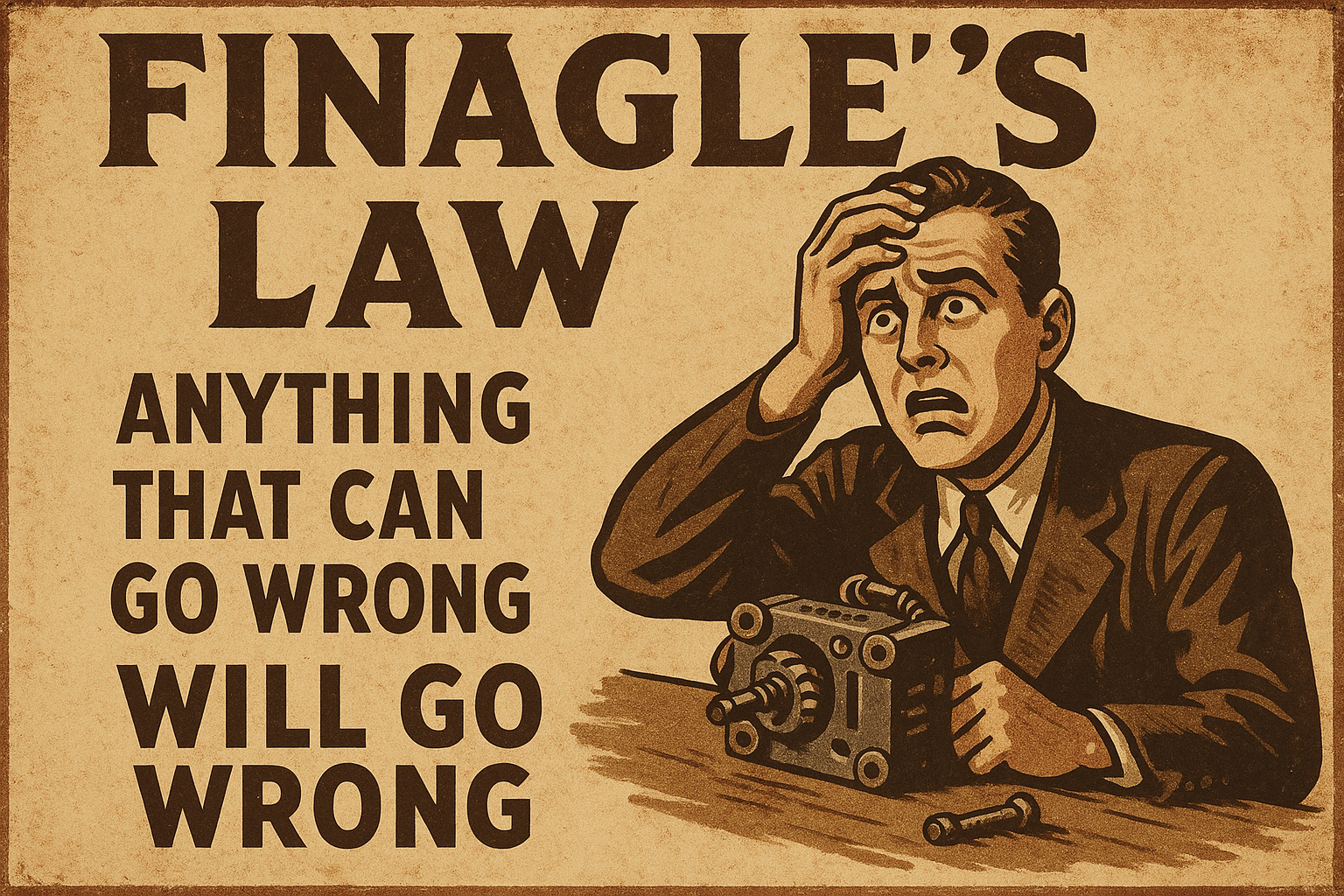
This is indeed true! I would like to emphasize that these moments often include Friday afternoons when you might be trying to start the weekend early or right before an important demo or trade show.
When it comes to practicing defensive programming, there are three crucial aspects to keep in mind:
- Ensuring overall code quality.
- Making the source code comprehensible and maintainable.
- Ensuring the software behaves in a predictable manner.
By prioritizing these aspects, software engineers can reduce the chances of encountering unexpected issues and improve the robustness of their software.
The Cost of Addressing Bugs in Software Development
Many years ago, I came across a compelling study that sheds light on the financial impact of addressing bugs in software development (see chart below). Over time, I have consistently incorporated this data into my conference presentations, affectionately referring to it as my “money slide.” I have noticed that it garners the attention of management more effectively than discussions about quality or user experience. Regrettably, there are instances where some managers fail to prioritize these crucial aspects, leading to substantial customer losses.
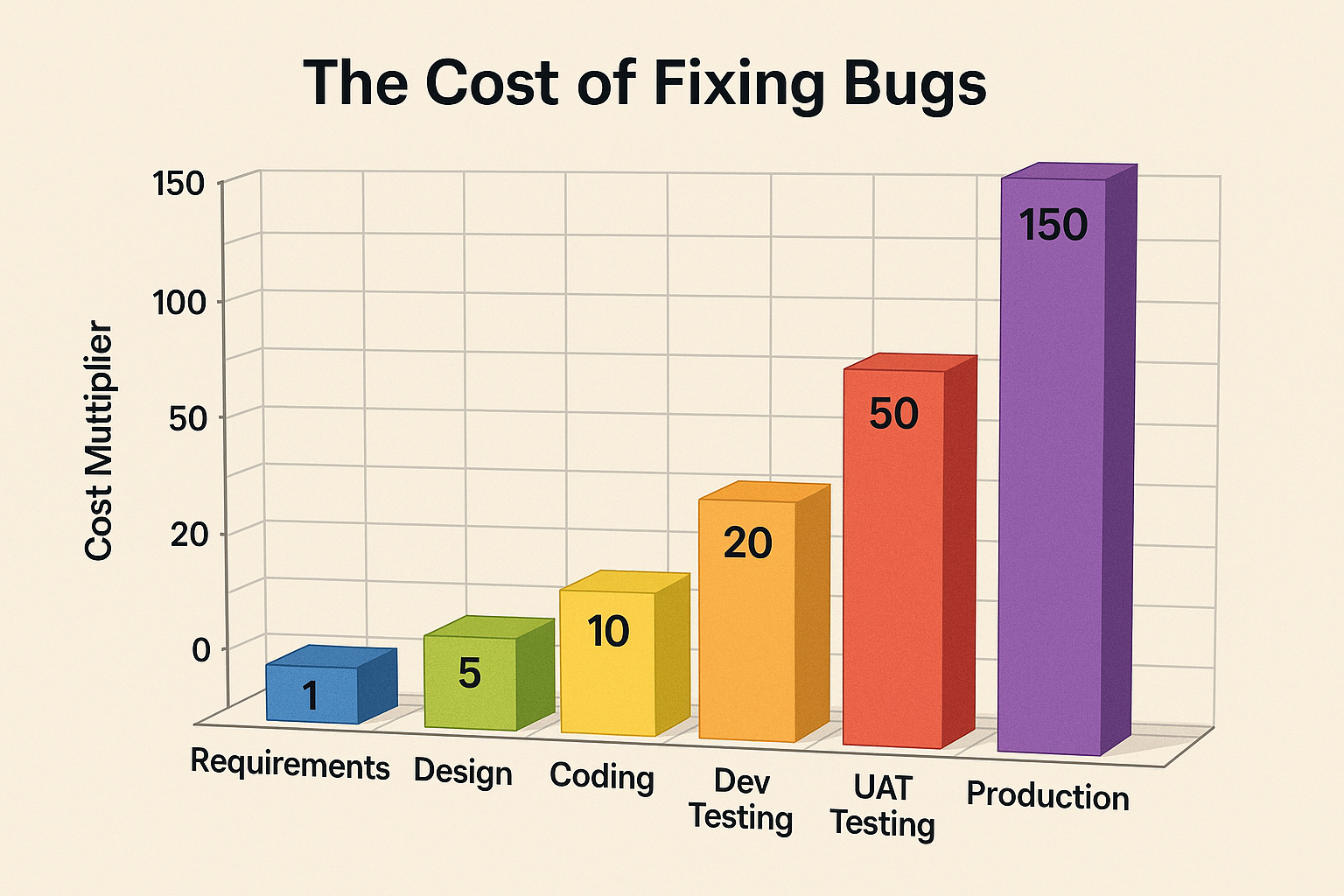
During my conference sessions, I encourage attendees to capture a photo of the chart and prominently display it on their managers’ or program managers’ doors. My intention is to share this information in a visible and impactful manner, thereby emphasizing the paramount importance of code quality and reducing the occurrence of costly bugs in software development. While there is no guarantee that this approach will achieve immediate success, I firmly believe it is a worthwhile endeavor that could significantly mitigate future customer losses.
Look at this chart, and you might wonder, “Can bugs be fixed before I even start coding?” The answer is a resounding “Yes!” This is a crucial point to highlight, especially considering the decline in well-documented requirements and designs over the past 10 years due to various reasons. Even when I come across such documents, they are often poorly written, which makes early bug detection even more critical. Before anyone sits down to start coding, thorough bug fixing should be a top priority.
I have posted this statement many times:
If you’re spending most of your day coding, you’re doing it wrong!
This reflects the importance of investing time in the early phases to prevent issues from arising later.
The cost of fixing issues when you are already coding is tenfold compared to catching them in the initial stages. If a user discovers a bug, it sets off a chain of tasks that must be completed before the fix can be delivered. Upsetting users is never a good situation since they are the ones who ultimately support our work. So, prioritizing bug prevention and early detection is paramount to ensure a smoother development process and satisfied customers.
Consider the staggering cost of fixing a bug reported by a user: it’s more than 150 times higher than catching it during the earlier phases of development. Even a simple bug fix can easily run into tens of thousands of dollars if it’s caught late in the process. This highlights the undeniable value of investing time and effort into prevention and early detection. By doing so, you not only save significant resources but also avoid disruptions for both the development team and end-users. Early intervention is far cheaper and far more effective than dealing with the fallout from post-release issues.
During my time at a company, we faced a challenging situation when our major partner discovered an issue with our product. I vividly recall being part of a call where my boss informed them that the problem would be resolved in approximately six months. Needless to say, our partner was extremely dissatisfied with such a lengthy timeline for resolution. This incident highlighted the critical importance of addressing issues promptly and efficiently to maintain strong partnerships and customer satisfaction.
I use Sora from OpenAI to create many of the images featured on this site. While OpenAI leads the way in artificial intelligence, its supporting tools and platforms don’t always live up to the same standard. Sora, for instance, can be frustratingly unreliable—sometimes going down for hours (over 12) and plagued by recurring bugs.
Recently, a platform change broke the ability to delete images we had generated, re-created, and no longer needed. Because Sora doesn’t provide a built-in way to report issues, I had to resort to posting about it on Twitter. It took more than a week before the issue was finally resolved—a delay that would be unacceptable in any production system, especially one where lingering bugs can cause unnecessary storage bloat.
Surprisingly, just about a week later, the same bug resurfaced.
I have many more stories like this, but here’s one you might have heard of. In 2017, Amazon experienced a major S3 outage, caused by a simple human error during a routine maintenance task. A command meant to remove a small set of servers accidentally took down a significant portion of the S3 infrastructure. As a result, popular services like Slack, Quora, and IFTTT were disrupted for several hours. While the issue wasn’t directly linked to a null pointer exception, it underscored a critical point: the disastrous consequences of failing to properly handle service dependencies and failure states in large, distributed systems. This outage serves as a stark reminder of the need for robust error handling, failover mechanisms, and thorough testing to prevent such incidents.
Defensive Programming Overview
Embracing defensive programming does not have to be a daunting task once you become accustomed to it and leverage tools to identify potential issues. The good news is that with each new release of .NET and Visual Studio, this practice becomes more accessible, as we will explore in this chapter. Always keep in mind:
Any code that could potentially result in an exception, such as accessing files or utilizing objects like a data context, should always validate the objects for null to prevent exceptions from being thrown.
It should be a no-brainer, right? Surprisingly, a significant amount of code I come across at the workplace and on websites does not follow this simple practice. I would say that over 90% of the code I review fails to adhere to these principles. In a recent project I worked on, I couldn’t find any validation for the objects or data! One crucial point to remember is that specifying a return type as List<Person> does not guarantee that such a list was returned or that it necessarily contains any items. Being mindful of this will set you on the right track.
To write clean and understandable code, follow these rules:
- Ensure your code is easy to test.
- Create methods and types with a singular purpose that yield consistent and predictable results. Employ method overloading when required.
- Aim to have around 90% of your code in reusable DLLs.
In one codebase I worked on, there were 1,700 unit tests, but none of them tested for encapsulation! Shockingly, none of the 3,300 types in this solution even implemented encapsulation properly.
To determine the number of unit tests needed to test encapsulation, analyze your code’s cyclomatic complexity. This will give you the minimum number of unit tests required. If you are using a .NET project with Visual Studio, you can utilize the built-in Analyze – Calculate Code Metrics feature for this purpose.
As an alternative, consider leveraging GitHub Copilot Chat in Visual Studio to help generate unit tests, particularly in repetitive or boilerplate-heavy scenarios. However, it’s essential to carefully validate the generated tests—not only to ensure they execute correctly, but also to confirm they provide meaningful code coverage. In my experience, Copilot often falls short in both accuracy and coverage, so manual review and refinement are still critical.
For tracking code coverage, consider using the Live Unit Testing feature in Visual Studio. This tool provides real-time feedback on which lines of code are covered by tests. However, because Live Unit Testing can be resource-intensive—consuming significant CPU power during development, it’s best to enable it selectively, focusing on specific methods or classes you’re actively working on.
Strategies to Mitigate Exceptions
Proactively preventing exceptions in your applications is critical to achieving optimal performance and avoiding costly failures. Unhandled exceptions can lead to data corruption, frustrated users, and a poor impression with leadership. In this series of articles, we’ll explore proven defensive programming techniques that I’ve relied on for years—practices you can easily adopt to strengthen your application’s stability, reliability, and overall resilience.
Articles

Pick up any books by David McCarter by going to Amazon.com: http://bit.ly/RockYourCodeBooks
Make a one-time donation
Make a monthly donation
Make a yearly donation
Choose an amount
Or enter a custom amount
Your contribution is appreciated.
Your contribution is appreciated.
Your contribution is appreciated.
DonateDonate monthlyDonate yearlyIf you liked this article, please buy David a cup of Coffee by going here: https://www.buymeacoffee.com/dotnetdave
© The information in this article is copywritten and cannot be preproduced in any way without express permission from David McCarter.
Discover more from dotNetTips.com
Subscribe to get the latest posts sent to your email.

 dotNetTips.com