

Spargine is a collection of open-source assemblies and NuGet packages designed for .NET 10, which I have been developing and maintaining since the release of .NET Framework 2. These assemblies are not only a core part of my projects but are also actively deployed in production environments across several companies I collaborate with.
Get Spargine
You can access the source code and NuGet packages here:
- GitHub: Spargine 10
- NuGet: dotNetDaveNuGet
Working with accurate global data is critical when building realistic unit and benchmark tests, especially when locations, postal codes, and phone numbers are involved. The DotNetTips.Spargine.Tester assembly includes comprehensive datasets for all countries worldwide, along with their regions, states, and cities, so you can easily generate realistic, production-like test data.
To make this information easy to consume and reuse, all country-related access is consolidated into a single, focused type: CountryRepository.
In this article, I’ll show you how to use CountryRepository to retrieve country data for your tests and utilities.
Retrieving and Validating Country Data with CountryRepository
Managing country-specific data can be painful and error-prone when every project rolls its own solution. To simplify this, I consolidated all the methods for accessing country data into the CountryRepository type, so you have one reliable source of truth for:
- Listing all countries
- Retrieving a single country by name or ISO code
- Accessing related geographic details such as regions, states, and cities
Below, I’ll walk through the available API and how to use it.
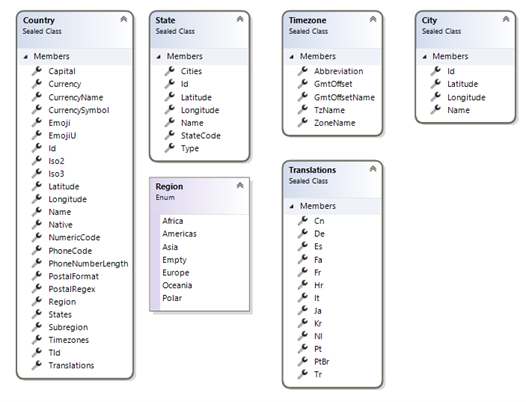
Accessing Country Data
Loading All Countries
If you need to load a complete list of countries, including their states and cities, simply call:
var countries = CountryRepository.GetCountries();
This method returns all countries and their related data in one call, making it ideal for:
- Seeding test datasets
- Generating randomized test cases
- Validating country selections in UIs or APIs
Use it whenever you need a full, in-memory representation of global country data.
Retrieving Data for a Single Country
When you only need information for a specific country, you can use one of the following methods:
- GetCountry(CountryName countryName)
Retrieves country information based on a value from the CountryName enum. This is the best option when you want strong typing and compile-time safety. - GetCountry(string countryNameOrIso)
- Retrieves a country by its name, ISO2, or ISO3 code. This is useful when your inputs come from user entry, configuration, or external services.
Both methods return the same rich country model, including related geographic details, so you can plug the data directly into your tests and validation logic.
Summary
The CountryRepository in DotNetTips.Spargine.Tester is designed to take the pain out of working with country and region data in your applications and tests. Instead of maintaining your own country lists, ISO codes, and nested region structures, you can rely on a single, well-structured API that:
- Provides a complete global country dataset
- Supports both strongly-typed and string-based lookups
- Includes regions, states, and cities for realistic test scenarios
I hope the CountryRepository proves useful whenever you need to retrieve or validate country-specific data. If you discover incorrect or missing information for any country, region, state, or city, please let me know so I can keep improving the dataset.
Get Involved!
The success of open-source projects like Spargine relies on community contributions. If you find these updates useful or have ideas for further improvements, I encourage you to contribute by:
- Submitting pull requests
- Reporting issues
- Suggesting new features
Your input is invaluable in making Spargine an even more powerful tool for the .NET community.
If you are interested in contributing or have any questions, feel free to contact me via email at dotnetdave@live.com. Your support and collaboration are greatly appreciated!
Thank you, and happy coding!
Pick up any books by David McCarter by going to Amazon.com: http://bit.ly/RockYourCodeBooks
Make a one-time donation
Make a monthly donation
Make a yearly donation
Choose an amount
Or enter a custom amount
Your contribution is appreciated.
Your contribution is appreciated.
Your contribution is appreciated.
DonateDonate monthlyDonate yearlyIf you liked this article, please buy David a cup of Coffee by going here: https://www.buymeacoffee.com/dotnetdave
© The information in this article is copywritten and cannot be preproduced in any way without express permission from David McCarter.
Discover more from dotNetTips.com
Subscribe to get the latest posts sent to your email.

 dotNetTips.com