
Spargine is a set of open-source assemblies and NuGet packages for .NET 8, developed and maintained by me since the release of .NET 2. These assemblies are integral to my projects and are currently in production at my company. You can access the source code and NuGet packages through the following links:
- GitHub: Spargine Releases
- NuGet: dotNetDaveNuGet
Managing configuration settings effectively is key to ensuring applications run smoothly, avoiding the dreaded misconfigurations and runtime errors. The Config class in the DotNetTips.Spargine.8.Core assembly is designed to make storing and managing configuration data easier and more dependable for .NET applications. Let us dive into how it works and why it stands out.
Meet Config.cs
Not every application requires cloud-based settings; many need reliable local storage. Recognizing this need early on, I developed the Config.cs class in my open-source project, Spargine. This class was designed to mimic the Settings feature, without the need for a designer, and it lets developers define settings in a custom class with the following benefits:
- Customizable Settings Classes: You can define any custom class for your application’s settings.
- Load and Save Methods: The configuration file is stored in the local application data folder, e.g., C:\Users\dotNetDave\AppData\Local\McCarter Consulting – dotNetTips.com\dotNetTips.Spargine.Dev.Tool.config.
- XML Serialization: Settings are serialized as XML for easy readability and portability.
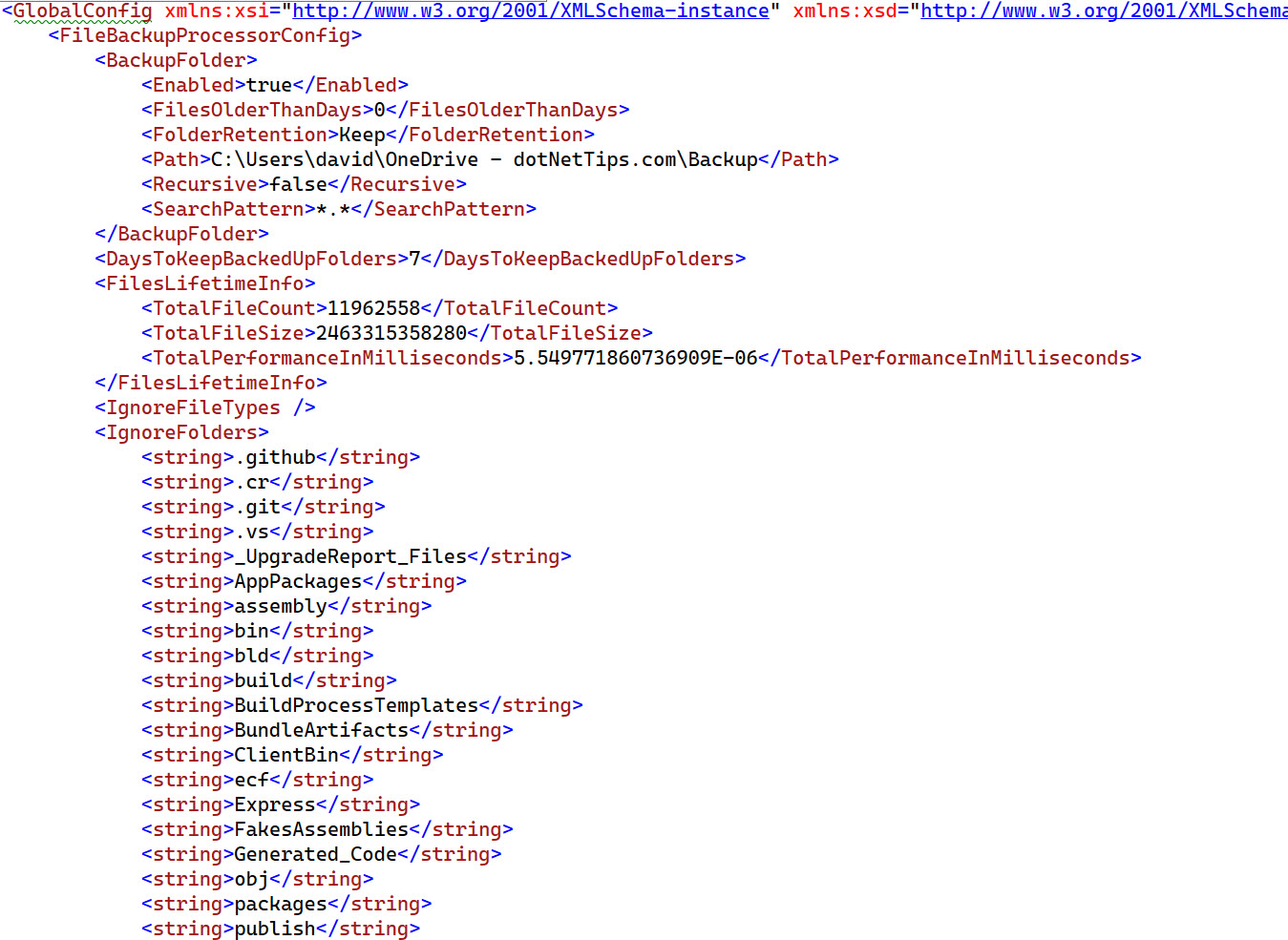
Using Config in the Spargine Dev Tool
To illustrate, let us look at the Spargine Dev Tool, which leverages Config to manage settings across its features:
public class AppConfig : Config<GlobalConfig>
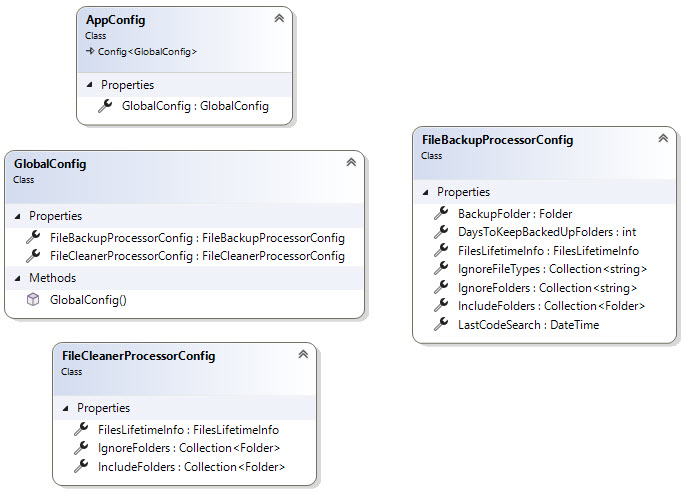
Here, AppConfig is our main configuration class, using GlobalConfig as its settings structure. Since this tool includes multiple features—each requiring configuration data—GlobalConfig implements properties for each feature’s settings:
public class GlobalConfig
{
    public GlobalConfig()
    {
        this.FileCleanerProcessorConfig = new();
        this.FileBackupProcessorConfig = new();
    }

    public FileBackupProcessorConfig FileBackupProcessorConfig
    {
        get; set;
    }

    public FileCleanerProcessorConfig FileCleanerProcessorConfig
    {
        get; set;
    }
}
Below is a diagram showing the structure of the configuration classes for the Spargine Dev Tool.
Accessing Configuration Data
For accessing settings, let us consider an example from the file backup feature. The tool initializes configuration data as follows:
private readonly FileBackupProcessorConfig _config = Program.Config.Instance.FileBackupProcessorConfig;
And here are two practical examples:
Example 1: Adding a File Type to the Ignore List
private void AddIgnoreFileTypeToConfig([NotNull] string fileType)
{
    if (Directory.Exists(fileType))
    {
        _ = this._config.IgnoreFileTypes.AddIfNotExists(fileType);
    }
}
Example 2: Retrieving File Lifetime Information
var stats = this._config.FilesLifetimeInfo;
Saving and Loading Configuration Data
Any application using Config will need methods to save and load configuration data, as shown below:
internal static void SaveConfigFile()
{
    if (Config.Save() is false)
    {
        Logger?.Warning("Unable to save configuration file.");
    }
}
private static void LoadConfigFile()
{
    if (Config.Load() is false)
    {
        _ = Config.Save();
    }
}
Why Use the Config Class?
The Config class in Spargine is versatile, easy to use, and offers complete control over application-specific configuration. This class allows developers to create strongly-typed, local configuration files tailored to the unique needs of their applications.
If you are looking for a custom configuration solution, consider giving the Config class in Spargine a try. It is designed to simplify configuration management and prevent common pitfalls associated with loosely-typed configurations, making your applications more dependable and maintainable.
Summary
I am confident that these enhanced methods in Spargine will greatly benefit your projects by improving performance and reliability. Detailed benchmark results are available on GitHub. The success of open-source projects like Spargine depends significantly on community involvement. If you find these updates useful or have ideas for further improvements, I encourage you to contribute. Whether by submitting a pull request, reporting issues, or suggesting new features, your input is invaluable.
Together, we can continue to make Spargine a powerful and essential tool for the .NET community. Your feedback and suggestions are highly appreciated, so please share them in the comments section.
If you are interested in contributing to this project or have any questions, feel free to contact me via email at dotnetdave@live.com. Your support and collaboration are greatly appreciated!
Thank you for your support, and happy coding!

Pick up any books by David McCarter by going to Amazon.com: http://bit.ly/RockYourCodeBooks
Make a one-time donation
Make a monthly donation
Make a yearly donation
Choose an amount
Or enter a custom amount
Your contribution is appreciated.
Your contribution is appreciated.
Your contribution is appreciated.
DonateDonate monthlyDonate yearlyIf you liked this article, please buy David a cup of Coffee by going here: https://www.buymeacoffee.com/dotnetdave
© The information in this article is copywritten and cannot be preproduced in any way without express permission from David McCarter.
Discover more from dotNetTips.com
Subscribe to get the latest posts sent to your email.

 dotNetTips.com