
As I am nearing the completion of a contract, I wanted to discuss real-world coding issues I encountered during the development of this solution and other projects. My intention is to provide valuable insights to improve your current project’s codebase. Throughout this process, I reflect on the codebase’s initial state when I joined the team and its evolution during my tenure. My objective is to leave the code, project, and team in a better state than when I became involved. In this contract, I was hired to enhance performance and code quality.

An enhanced edition of this article can be found in my book, “Rock Your Code: Coding Standards for Microsoft .NET,” now available on Amazon. This updated version comprises 230 new pages, providing valuable insights to help you and your team produce top-quality code that is easily modifiable.
Secure your copy by visiting the following link: https://bit.ly/CodingStandards8
One recurring observation I have made, not exclusive to this project, is the presence of common coding issues. This article provides statistics and sheds light on prevalent issues that consistently arise across the projects I have worked on.
The information I want to share in this article is extensive, so I will break it down into smaller segments. I encourage you to read all the articles in this series to enhance performance, address memory issues, and tackle common code problems in your projects. Most code examples in this series are from this project, while others are from my open-source project, Spargine, and ChatGPT.
The Statistics
I was curious to determine whether the work I invested in this project had a tangible impact on the following metrics. To evaluate this, I employed my comprehensive EditorConfig file, which I consistently utilize across all my projects (you can find the link to this file at the end of the article). On the day I commenced my involvement, I applied this EditorConfig file to the codebase and leveraged the “Analyze” feature in Visual Studio to assess the code’s quality. I then compared this assessment to the state of the codebase on the day I completed my contract.
At the end of my time on this contract, I initiated a pull-request process that aimed to migrate the solution to .NET 7. This transition allowed us to leverage various performance enhancements, including the utilization of code generators. All the statistics provided below were obtained from Visual Studio.
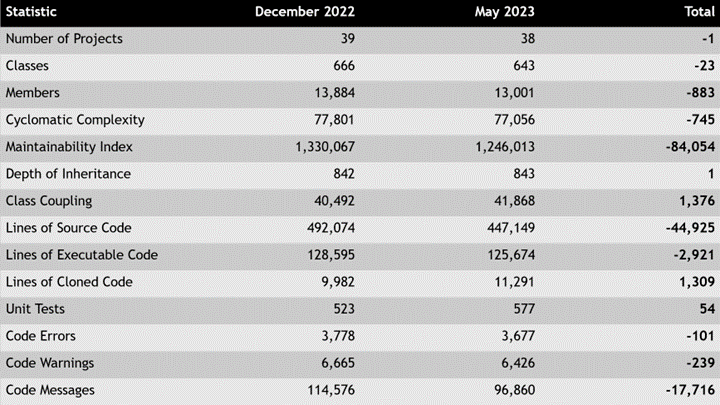
Most of the statistics mentioned above demonstrate positive progress. While I would have preferred even better numbers, I am generally satisfied with the improvements achieved for the time I spent on the contract. However, I do acknowledge that the code errors and warning numbers could have been better. It is important to note that the efforts of other developers on the team may have influenced these figures as well.
Considering that this codebase has been in existence since the mid-2000s, it is not surprising to encounter a significant amount of “dead code” commonly found in older solutions. I invested substantial time in cleaning up this unnecessary code, and although there is more work to be done, I successfully eliminated 883 members and 45K lines of source code.
I have also taken the initiative to update the NuGet packages for this solution. As part of the code cleanup process, I carefully removed the NuGet packages that were no longer necessary. This optimization reduces the deployment size of the website and services, potentially improving the warmup time of the code.
However, there is one statistic that consistently arises in every codebase I work on, which I frequently address in my discussions and writings.
Cyclomatic Complexity

For nearly two decades, I have been posing a question to attendees at my coding standard conference sessions: “What is cyclomatic complexity, and what does the number truly signify?” Over the years, I have observed that many engineers struggle to provide an immediate explanation of cyclomatic complexity. In essence, it represents the number of paths a method can take before reaching completion. A higher cyclomatic complexity indicates a greater number of potential paths. It is crucial to strive for a low cyclomatic complexity value, and personally, I aim to keep it under 20. While some online resources suggest a maximum value of 25, higher numbers lead to more intricate code that is less reusable.
However, what this number truly signifies to me is the minimum number of unit tests required to adequately test the encapsulation of a method. In this codebase, numerous methods exhibited cyclomatic complexities exceeding 100. This implies that over 100-unit tests would be needed solely to validate encapsulation. To put it into perspective, I have never encountered such a high number of unit tests for a single method. As evident from the statistics provided above, the codebase necessitates a minimum of 76,479 additional unit tests.
Realistically, no company would halt development solely to write these unit tests. Therefore, it becomes imperative to ensure that unit tests are written, at the very least, for every public and protected method in the codebase. Considering the lack of unit tests in this codebase, I advised the team to not only include them in the new code but also to add them to methods that currently lack them whenever they undergo modifications.
In the subsequent sections, I will delve deeper into the recurring issues I have observed and highlight some of the performance enhancements I was able to implement.
Memory Issues

Regrettably, I have come to find that every project I have consulted on experienced memory issues, ranging from mild to severe, and this solution was no exception. The recurring problems included the necessity to reboot backend services frequently to address these issues, as well as frequent crashes. Consequently, tackling these memory issues became one of my top priorities.
Moreover, these memory issues had a detrimental effect on the solution’s ability to handle concurrent users and the number of requests per second. Given the company’s objective to accommodate approximately 40K concurrent users, it was disheartening to discover that the solution could only manage around 100 when I initially joined the project. However, through the collective efforts of various developers, including the work I contributed to the main branch and improvements made in other areas, we were able to increase the capacity to approximately 7K concurrent users, with a maximum of 250 requests per second. Although this progress is noteworthy, it is evident that there is still substantial work ahead to meet the business requirements.
These memory issues stemmed from improper disposal of disposable objects and inadequate implementation of the IDisposable pattern. I extensively cover these issues in my coding standards book, as well as in my multipart series of articles titled “Everything That Every .NET Developer Needs to Know About Disposable Types” that I strongly encourage you and your team to read this series, which can be accessed through the following link: https://bit.ly/DisposeArticles.
Improvements in Performance

As mentioned earlier, the performance of this solution fell short of meeting the business requirements, and I dedicated significant effort to address these issues. Many of these improvements will be detailed in the articles within this series. To begin, I would like to highlight two specific areas where notable enhancements were made in relation to .NET.
Logging
One common issue I consistently encounter in every project is the lack of sufficient logging. Logging serves as a crucial tool for identifying and resolving issues. Without comprehensive logging, the process of identifying and rectifying problems becomes time-consuming and costly. Therefore, it is vital to incorporate logging practices throughout the codebase while striving to minimize its impact on performance.
Enter .NET 6 and source generators! By utilizing partial classes and the LoggerMessage attribute, the execution time for logging can be reduced from 20-30 nanoseconds to 3-4. The improvement is truly remarkable and well worth the effort. I have already published an article titled “Speed Up Logging in .NET 6” that delves into this topic. I encourage you to read it by following this link: https://bit.ly/LoggingNet6.
StringBuilder
If you have been using .NET for a while, you are aware that utilizing the StringBuilder improves the performance of string concatenation. However, did you know that there is a way to make the StringBuilder even faster? This can be achieved by utilizing the StringBuilder from an ObjectPool stored in a private field within a class. For now, and for future considerations, I recommend utilizing the StringBuilder ObjectPool approach until a more performant alternative emerges. I have authored an article titled “Speeding Up the StringBuilder Using an ObjectPool” that explores this optimization technique. I encourage you to read it by visiting this link: https://bit.ly/ObjectPoolStringBuilder.
Summary
In this article, I have highlighted some prevalent issues that I consistently encounter in various teams and solutions. However, my exploration of these topics is far from exhaustive. The upcoming articles will delve deeper into more common issues, accompanied by detailed code examples and thorough explanations.
For further guidance and insights, I highly recommend obtaining a copy of my book, “Rock Your Code: Coding Standards for Microsoft .NET” available on Amazon.com. Additionally, to explore more performance tips for .NET, I encourage you to acquire the 3rd edition of “Rock Your Code: Code & App Performance for Microsoft .NET” also available on Amazon.com.
To analyze your code using the same settings I used in these articles, I encourage you to incorporate my EditorConfig file. It can be found at the following link: https://bit.ly/dotNetDaveEditorConfig. I update this file quarterly, so remember to keep yours up to date as well. I hope you will check out my OSS project Spargine by using this link: https://bit.ly/Spargine.
Please feel free to leave a comment below. I would appreciate hearing your thoughts and feedback.
Pick up any books by David McCarter by going to Amazon.com: http://bit.ly/RockYourCodeBooks
Make a one-time donation
Make a monthly donation
Make a yearly donation
Choose an amount
Or enter a custom amount
Your contribution is appreciated.
Your contribution is appreciated.
Your contribution is appreciated.
DonateDonate monthlyDonate yearlyIf you liked this article, please buy David a cup of Coffee by going here: https://www.buymeacoffee.com/dotnetdave
© The information in this article is copywritten and cannot be preproduced in any way without express permission from David McCarter.
Discover more from dotNetTips.com
Subscribe to get the latest posts sent to your email.

 dotNetTips.com
One thought on “Real World Coding Issues: Part 1 – An Introduction”