
Updated March 2024
When coding, it is crucial to pay attention to the value returned by a method and avoid ignoring or discarding it. Neglecting the return value is not just a matter of style; it has implications that go beyond code readability and cleanliness. In the code I reviewed for this chapter, I came across more than 1,000 instances where unnecessary expression values were being used.
- Code readability: Removing unnecessary expression values improves the overall readability of the code. It makes the code more concise and easier to understand for other developers who may work on the codebase later. By removing redundant expressions, the code becomes cleaner and less cluttered, enhancing its maintainability.
- Performance optimization: Redundant expressions can sometimes hurt code performance. Unnecessary calculations or assignments consume processing power and memory, which can slow down the execution of the program. By removing these redundant expressions, you can optimize your code for better performance.
- Bug prevention: Redundant expressions may introduce potential bugs or logic errors. Unintended side effects can occur if a redundant expression modifies a variable or has an unexpected impact on the program’s behavior. By removing these unnecessary expressions, you reduce the chances of introducing such bugs and make your code more reliable.
- Code maintainability: Removing unnecessary expression values simplifies the codebase and makes it easier to maintain in the long run. When developers review or modify the code, they can quickly identify and understand the intent of the code without being distracted by unnecessary expressions. This improves the maintainability of the codebase and reduces the likelihood of introducing errors during future modifications.
My concerns are performance, introducing confusion during the debugging process, and making maintenance more challenging. This is an example of the issue:
_memoryCache.Set(key, obj, new TimeSpan(0, minutes, 30));
Other developers might invoke the method, capture the result, and subsequently take no further action with it, as demonstrated in this example:
var result = _memoryCache.Set(key, obj, new TimeSpan(0, minutes, 30));
The _memoryCache is an instance of IMemoryCache. To fix, use a discard (_ =) as shown below:
_ = _memoryCache.Set(key, obj, new TimeSpan(0, minutes, 30));
Discards, similar to unassigned variables, lack a value. However, using discards serves as a communication tool for both the compiler and other developers reading your code. It explicitly indicates your intention to disregard the result of an expression. Discards can be a beneficial practice.
Benchmark Results
In these benchmark tests, I aimed to investigate whether there is a distinction when employing a discard with both value and reference types as the return value. As evident in the results below, using a discard is more performant when using the integer value type, but less performant with a string reference type.
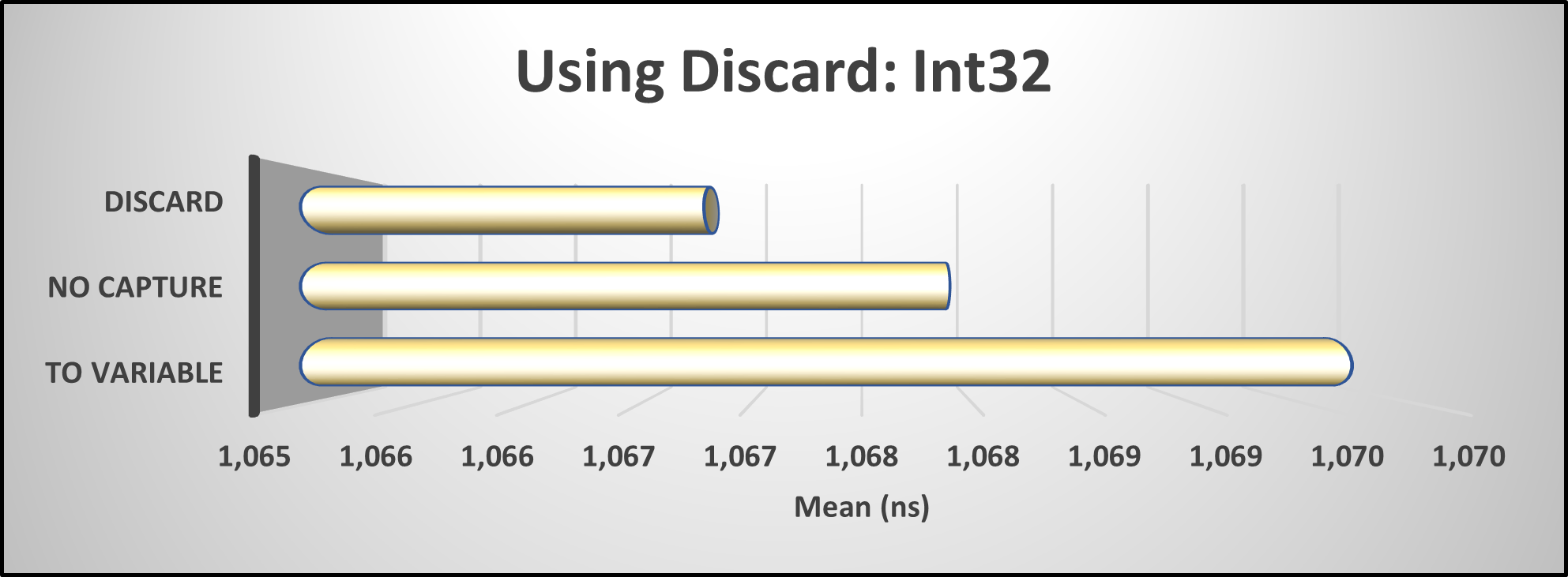
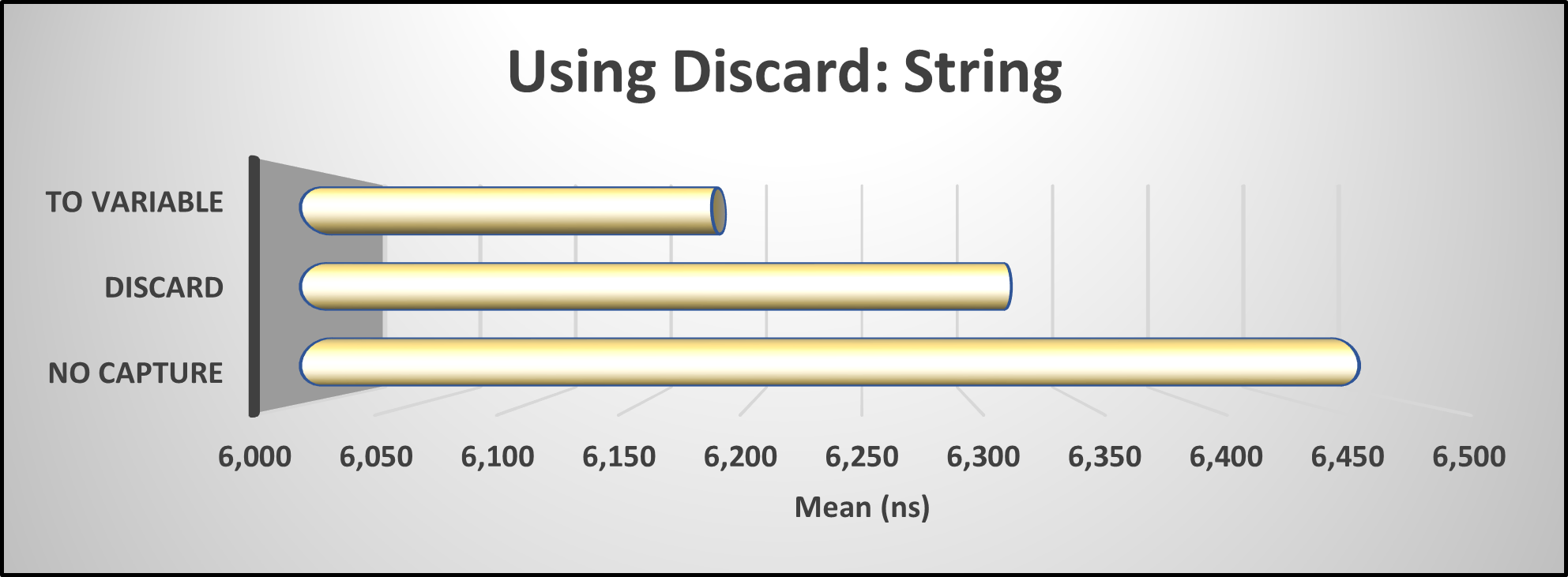


These variations may be subtle, but they have the potential to accumulate and impact overall performance.
When I setup the IDE0058 & IDE0110 code analysis in my .editorConfig it looks like this:
dotnet_diagnostic.IDE0058.severity = warningdotnet_diagnostic.IDE0110.severity = warning
Summary
In the codebase I analyzed for this article, I discovered more than 1,000 instances where they failed to utilize the discard as described above. I addressed and rectified these issues as I came across them.
For further guidance and insights, I highly recommend obtaining a copy of my book, “Rock Your Code: Coding Standards for Microsoft .NET” available on Amazon.com. Additionally, to explore more performance tips for .NET, I encourage you to acquire the 3rd edition of “Rock Your Code: Code & App Performance for Microsoft .NET” also available on Amazon.com.
To analyze your code using the same settings I used in these articles, I encourage you to incorporate my EditorConfig file. It can be found at the following link: https://bit.ly/dotNetDaveEditorConfig. I update this file quarterly, so remember to keep yours up to date as well. I hope you will check out my OSS project Spargine by using this link: https://bit.ly/Spargine.
Please feel free to leave a comment below. I would appreciate hearing your thoughts and feedback.
Pick up any books by David McCarter by going to Amazon.com: http://bit.ly/RockYourCodeBooks
Make a one-time donation
Make a monthly donation
Make a yearly donation
Choose an amount
Or enter a custom amount
Your contribution is appreciated.
Your contribution is appreciated.
Your contribution is appreciated.
DonateDonate monthlyDonate yearlyIf you liked this article, please buy David a cup of Coffee by going here: https://www.buymeacoffee.com/dotnetdave
© The information in this article is copywritten and cannot be preproduced in any way without express permission from David McCarter.
Discover more from dotNetTips.com
Subscribe to get the latest posts sent to your email.

 dotNetTips.com