
Updated March 2024
Compound assignments have been available since the release of .NET and are the preferred method for modifying numbers and strings. Let’s look at an example to illustrate the benefits:
var peopleCount = 0;
var loopedCount = 0;

foreach (var peoplePage in people.Page(10))
{
	loopedCount = loopedCount + 1;
	peopleCount = peopleCount + peoplePage.Count();
}
To improve the code and make it more efficient, let’s use compound assignments. Here’s the corrected version:
var peopleCount = 0;
var loopedCount = 0;

foreach (var peoplePage in people.Page(10))
{
	loopedCount = loopedCount + 1;
	peopleCount = peopleCount + peoplePage.Count();
}
Here is a list of all the compound assignment operators.
Arithmetic Compound Assignment Operators
+=: Add and assign.
-=: Subtract and assign.
*=: Multiply and assign.
/=: Divide and assign.
%=: Modulo and assign.
Bitwise Compound Assignment Operators
&=: Bitwise AND and assign.
|=: Bitwise OR and assign.
^=: Bitwise XOR and assign.
<<=: Left shift and assign.
>>=: Right shift and assign.
Here are the benefits of using compound assignments:
- Conciseness: Compound assignment operators combine the operation and assignment into a single statement, making the code more concise and easier to read. This reduces the amount of code you need to write and understand.
- Performance: Compound assignment operators can potentially improve performance by avoiding unnecessary variable lookups. They can directly modify the value of a variable without requiring an additional lookup and assignment.
- Readability: Compound assignment operators convey the intent of the code more clearly by expressing the operation being performed. This makes the code more readable and helps other developers understand your intentions.
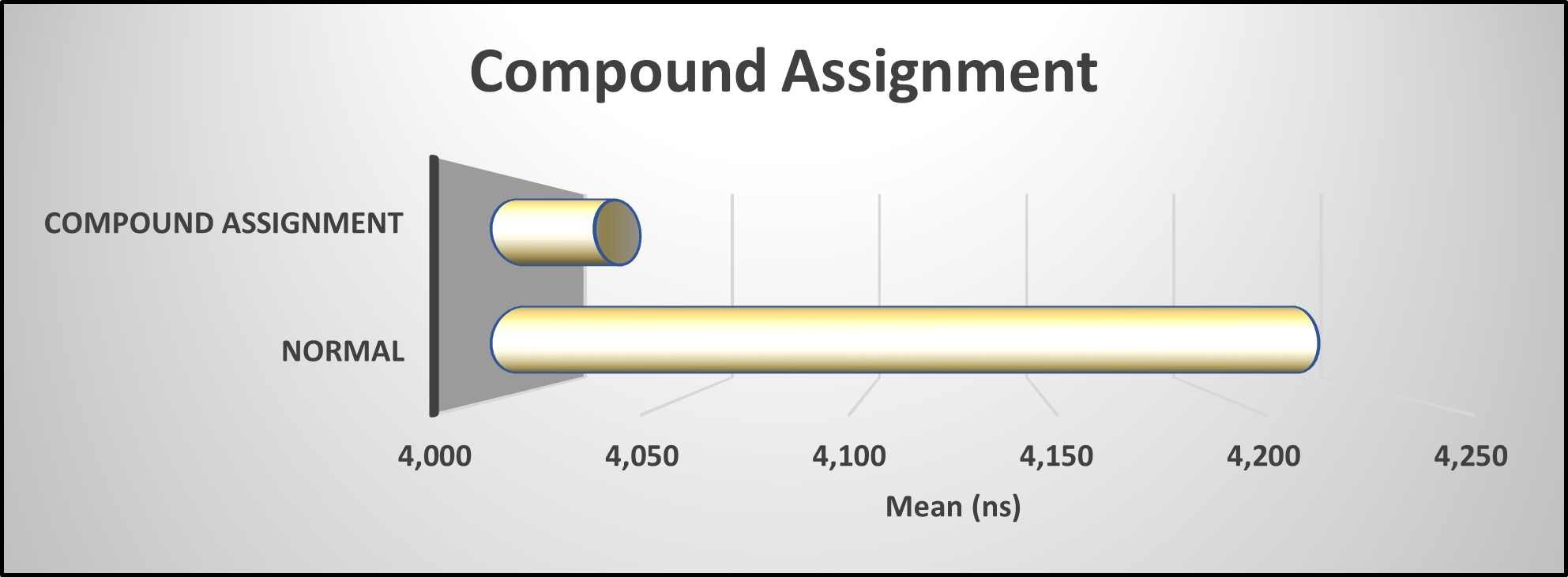
Benchmark Results
As demonstrated by the benchmark test results, utilizing a compound assignment in .NET yields a slight performance advantage.


This is how I have it setup in my EditorConfig:
dotnet_diagnostic.IDE0055.severity = suggestion
dotnet_diagnostic.IDE0074.severity = suggestion
Summary
During my review of the codebase, I identified over 70 instances where this issue occurs. Considering the magnitude of the refactoring required, it is essential to streamline the process. Tools like CodeRush from DevExpress offer valuable extensions that simplify the refactoring task with a single mouse click, making the process efficient and convenient.
For further guidance and insights, I highly recommend obtaining a copy of my book, “Rock Your Code: Coding Standards for Microsoft .NET” available on Amazon.com. Additionally, to explore more performance tips for .NET, I encourage you to acquire the 3rd edition of “Rock Your Code: Code & App Performance for Microsoft .NET” also available on Amazon.com.
To analyze your code using the same settings I used in these articles, I encourage you to incorporate my EditorConfig file. It can be found at the following link: https://bit.ly/dotNetDaveEditorConfig. I update this file quarterly, so remember to keep yours up to date as well. I hope you will check out my OSS project Spargine by using this link: https://bit.ly/Spargine.
Please feel free to leave a comment below. I would appreciate hearing your thoughts and feedback.
Pick up any books by David McCarter by going to Amazon.com: http://bit.ly/RockYourCodeBooks
Make a one-time donation
Make a monthly donation
Make a yearly donation
Choose an amount
Or enter a custom amount
Your contribution is appreciated.
Your contribution is appreciated.
Your contribution is appreciated.
DonateDonate monthlyDonate yearlyIf you liked this article, please buy David a cup of Coffee by going here: https://www.buymeacoffee.com/dotnetdave
© The information in this article is copywritten and cannot be preproduced in any way without express permission from David McCarter.
Discover more from dotNetTips.com
Subscribe to get the latest posts sent to your email.

 dotNetTips.com