

Spargine is a collection of open-source assemblies and NuGet packages designed for .NET 10, which I have been developing and maintaining since the release of .NET Framework 2. These assemblies are not only a core part of my projects but are also actively deployed in production environments across several companies I collaborate with.
Get Spargine
You can access the source code and NuGet packages here:
- GitHub: Spargine 10
- NuGet: dotNetDaveNuGet
Once, while inspecting the source code for Microsoft .NET, I came across the use of a common class to simplify the process of throwing exceptions. Inspired by this concept, I decided to implement a similar approach in Spargine’s DotNetTips.Spargine.6.Core assembly, to make it easier for both myself and others to throw exceptions. In this article, I will outline the methods available in Spargine for throwing exceptions, accompanied by relevant examples.
In coding, there are many reasons why the code should throw exceptions. Here are a few of those reasons.
- Error Handling: Developers throw exceptions to handle errors that occur during the execution of a program. For example, if a method is expecting a certain input parameter but receives an invalid parameter value, the method can throw an exception to indicate that an error has occurred. By throwing an exception, the method can provide an error message or code that can be used to identify the problem and take appropriate action.
- Debugging: Developers throw exceptions to help them debug their code. By throwing an exception at a specific point in the code, developers can stop the execution of the program and examine the state of the application. This can help developers identify the cause of a problem and fix it.
- Communication: Exceptions provide a way for developers to communicate with other developers or users of their applications. By throwing an exception with a descriptive error message, developers can provide information about what went wrong and how to fix it.
- Robustness: Throwing exceptions can help make code more robust by handling unexpected situations. By catching exceptions and handling them appropriately, developers can prevent the program from crashing or producing incorrect.
The Exception Thrower
The class that contains all the methods for throwing exceptions is called ExceptionThrower.cs, and it includes both the common Exception types in .NET and the custom exceptions available in Spargine. Here is a description of all the currently available methods.
Each method allows for a custom message to be included. If no message is provided, a default message will be used.
Argument Exceptions
As I write often in articles, all data coming into a method or property should be validated before setting it to internal variables or using them in the method. Here are those methods.
- ThrowArgumentException
Message defaults to “Invalid argument.” - ThrowArgumentInvalidException
Message defaults to “Invalid argument.” ArgumentInvalidException is a custom Exception type in Spargine. - ThrowArgumentNullException
Message defaults to “Argument cannot be null.” - ThrowArgumentOutOfRangeException
Message defaults to “Argument is out of the given range.” - ThrowArgumentReadOnlyException
Message defaults to “Argument is out of the given range.” ArgumentReadOnlyException is a custom Exception type in Spargine.
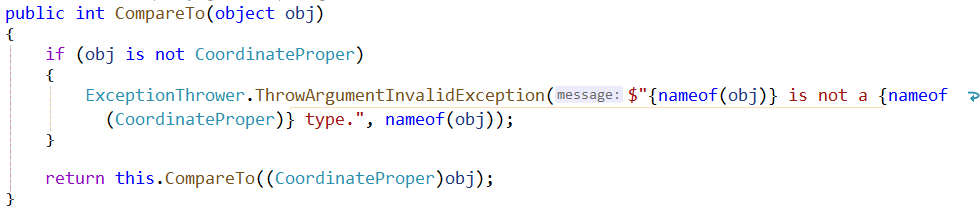
Here is an example of how to use these methods.
IO Exceptions
These are methods for common IO exceptions.
- ThrowDirectoryNotFoundException
Message defaults to “The specified directory was not found.” DirectoryNotFoundException is a custom Exception type in Spargine. - ThrowFileNotFoundException
Message defaults to “File not found.” - ThrowIOException
Message defaults to “Unknown IO Exception.”
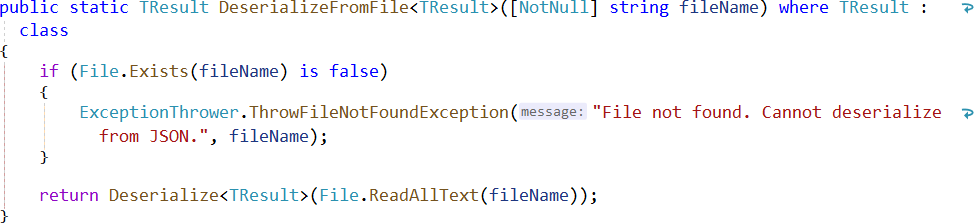
Here is an example of how to use these methods.
Other Exceptions
- ThrowInvalidCastException
Message defaults to “The object could not be cast to a new type.” - ThrowInvalidEnumTypeException
Message defaults to “Invalid enum type.” - ThrowInvalidOperationException
Message defaults to “Invalid operation.” - ThrowInvalidValueException
Message defaults to “Invalid Value.” - ThrowJsonException
Message defaults to “There was an error with Json serialization.” - ThrowMessageNotQueuedException
Message defaults to “The message could not be queued.” MessageNotQueuedException is a custom Exception type in Spargine.
Here is an example of how to use these methods.

Networking Exceptions
These three methods throw the Spargine exception type called NetworkConnectionException in case there is an issue connecting to Bluetooth, cellular, Ethernet, or WiFi. The third method below uses the NetworkConnection type in Spargine, where “connection” refers to the NetworkConnection type.
- ThrowNetworkConnectionException
Message defaults to “Unknown network connection issue.”
Summary
I recommend using ExceptionThrower in your projects to simplify the process of throwing exceptions. If you need an additional exception type added to this class, please leave a comment below. I welcome any questions or feedback you may have, so feel free to leave a comment as well. Your input is greatly appreciated!
Get Involved!
The success of open-source projects like Spargine relies on community contributions. If you find these updates useful or have ideas for further improvements, I encourage you to contribute by:
- Submitting pull requests
- Reporting issues
- Suggesting new features
Your input is invaluable in making Spargine an even more powerful tool for the .NET community.
If you are interested in contributing or have any questions, feel free to contact me via email at dotnetdave@live.com. Your support and collaboration are greatly appreciated!
Thank you, and happy coding!
Pick up any books by David McCarter by going to Amazon.com: http://bit.ly/RockYourCodeBooks
Make a one-time donation
Make a monthly donation
Make a yearly donation
Choose an amount
Or enter a custom amount
Your contribution is appreciated.
Your contribution is appreciated.
Your contribution is appreciated.
DonateDonate monthlyDonate yearlyIf you liked this article, please buy David a cup of Coffee by going here: https://www.buymeacoffee.com/dotnetdave
© The information in this article is copywritten and cannot be preproduced in any way without express permission from David McCarter.
Discover more from dotNetTips.com
Subscribe to get the latest posts sent to your email.

 dotNetTips.com
You should checkout the CommunityToolkit.Diagnostics package, which has been doing this for a while as well. It also supports CallerArgumentExpression, which reduces redundant variable references.
https://www.nuget.org/packages/CommunityToolkit.Diagnostics
https://github.com/CommunityToolkit/dotnet