
Regular expressions (regex) are a powerful tool in programming, enabling developers to efficiently search, parse, and manipulate text. However, they can also be notoriously challenging due to their intricate syntax and complex patterns, which are often difficult to remember.
In this article, we will break down the fundamentals of regular expressions, explore their diverse applications, and provide practical examples to help you master them with confidence. Additionally, we will share expert tips for optimizing regex performance using the latest best practices.
Whether you are new to regex or looking to refine your skills, this guide will set you on the right path. For a deeper dive into performance-focused coding techniques, check out my book, Rock Your Code: Code & App Performance for Microsoft .NET, available on Amazon.
What is a Regular Expression?
A regular expression is a sequence of characters that defines a search pattern. It matches, finds, and manipulates specific text within strings, making it an essential tool for data validation, text parsing, and search operations.
For example, the regex pattern \d{3}-\d{2}-\d{4} matches a Social Security number format like 123-45-6789, while \b[A-Z][a-z]+ finds words that start with an uppercase letter.
By learning how to construct and optimize regex patterns, you can simplify complex text-processing tasks and improve code efficiency.
Introduction to Regular Expressions
Regular expressions have been a core feature of .NET since its first release. They provide a powerful way to match, search, and manipulate strings using predefined patterns.
The fundamental step in using regular expressions is defining a pattern to match or replace specific text. For example, the following pattern is commonly used to validate email addresses:
\w+([-+.]\w+)*@\w+([-.]\w+)*\.\w+([-.]\w+)*
Using Regular Expressions
To utilize this pattern in code, we can create a method that checks whether a given string contains a valid email format:
public static bool ContainsEmail(string input)

{
    var expression = new Regex(
        pattern: @"\w+([-+.]\w+)*@\w+([-.]\w+)*\.\w+([-.]\w+)*",
        options: RegexOptions.CultureInvariant);

    return expression.IsMatch(input);
}
This method initializes a Regex object with the specified pattern and the CultureInvariant option, ensuring that matching behavior remains consistent across different cultures. It then checks if the input string matches the pattern, returning true if it does and false otherwise.
By leveraging regular expressions in .NET, developers can efficiently perform complex string operations with minimal code.
Optimizing Regular Expressions
Regular expressions are known for their speed and efficiency, but recent improvements in .NET have introduced an even better way to use them—boosting performance significantly.
The key improvement is caching the regular expression in a static readonly field, which eliminates the overhead of creating a new Regex object every time the method is called. Instead, we define the Regex instance once and reuse it:
private static readonly Regex _containsEmailRegex =
    new(pattern: @"\w+([-+.]\w+)*@\w+([-.]\w+)*",
        options: RegexOptions.CultureInvariant);
Now, instead of instantiating a new Regex object on each method call, we simply reference the precompiled instance:
public static bool ContainsEmail(string input) =>
    _containsEmailRegex.IsMatch(input);
Why This Improves Performance
As detailed in my code performance book, this optimization significantly reduces execution time by avoiding repeated object creation and compilation of the regular expression.
Benchmark results (see below) demonstrate a noticeable speed increase, making this approach ideal for scenarios where the same pattern is used frequently.
Boosting Performance with the Regex Source Generator in .NET 7
Source generators were first introduced in .NET 5, allowing developers to generate code at compile time. With the release of .NET 7, the .NET team introduced a Regex Source Generator, further improving regular expression performance by generating highly optimized code behind the scenes.
To use this feature, you must define the regular expression inside a partial class and apply the [GeneratedRegex] attribute:
public static partial class RegexExamples
{
    [GeneratedRegex(@"\w+([-+.]\w+)*@\w+([-.]\w+)*",
        RegexOptions.CultureInvariant)]
    private static partial Regex ContainsEmailRegex();
}
What Makes This So Powerful?
The Regex Source Generator compiles this pattern into 332 lines of highly optimized C# code—code that you could theoretically write manually, but no developer (or manager!) would like to spend the time writing, debugging, and testing.
Additionally, this approach enhances IntelliSense support by providing better documentation and type safety.
Using the Generated Regex
Once the source generator is in place, you can call it just like any other method:
public static bool ContainsEmail(string input) =>
    ContainsEmailRegex().IsMatch(input);
Why Use the Regex Source Generator?
- Faster Execution: Eliminates the need for runtime interpretation of the regex pattern.
- Improved Maintainability: Removes the need for manual regex optimizations.
- Better IntelliSense: Provides enhanced documentation and tooltips.
For applications that rely heavily on regular expressions, this approach can dramatically improve performance and maintainability.
Benchmarking the Performance of Regular Expressions in .NET
Is using a Regex Source Generator faster? Let us examine the performance of all three approaches:
- Traditional Instantiation: Creating a new
Regexobject for each method call. - Static Field Caching: Storing the
Regexinstance in astatic readonlyfield. - Regex Source Generator: Using the
[GeneratedRegex]attribute in .NET 7.
Benchmark Results
The results speak for themselves:
- Using the source generator is 3.3 times faster than the static field approach.
- It is also over 142 times faster than the traditional way of creating regex instances!
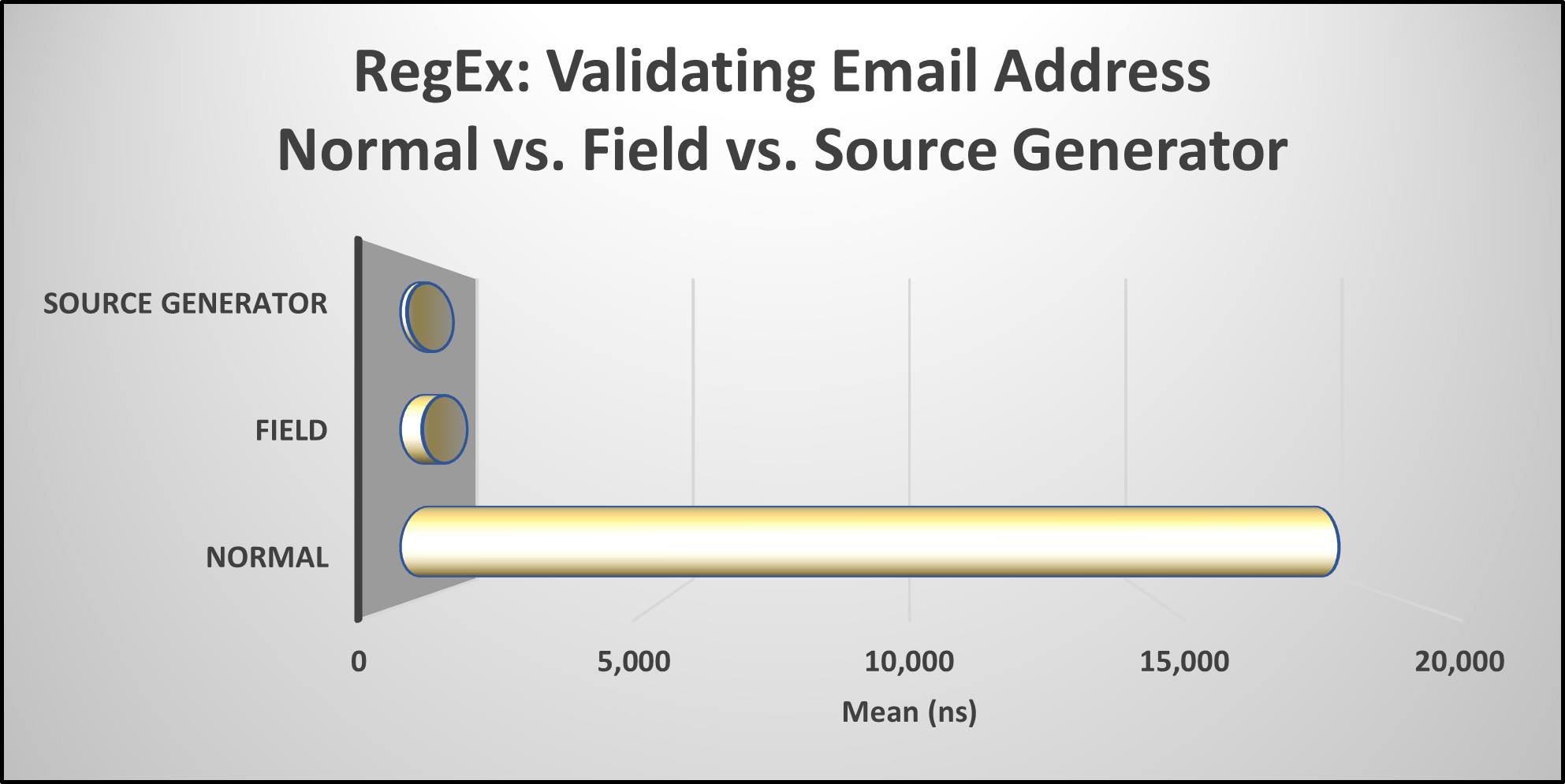
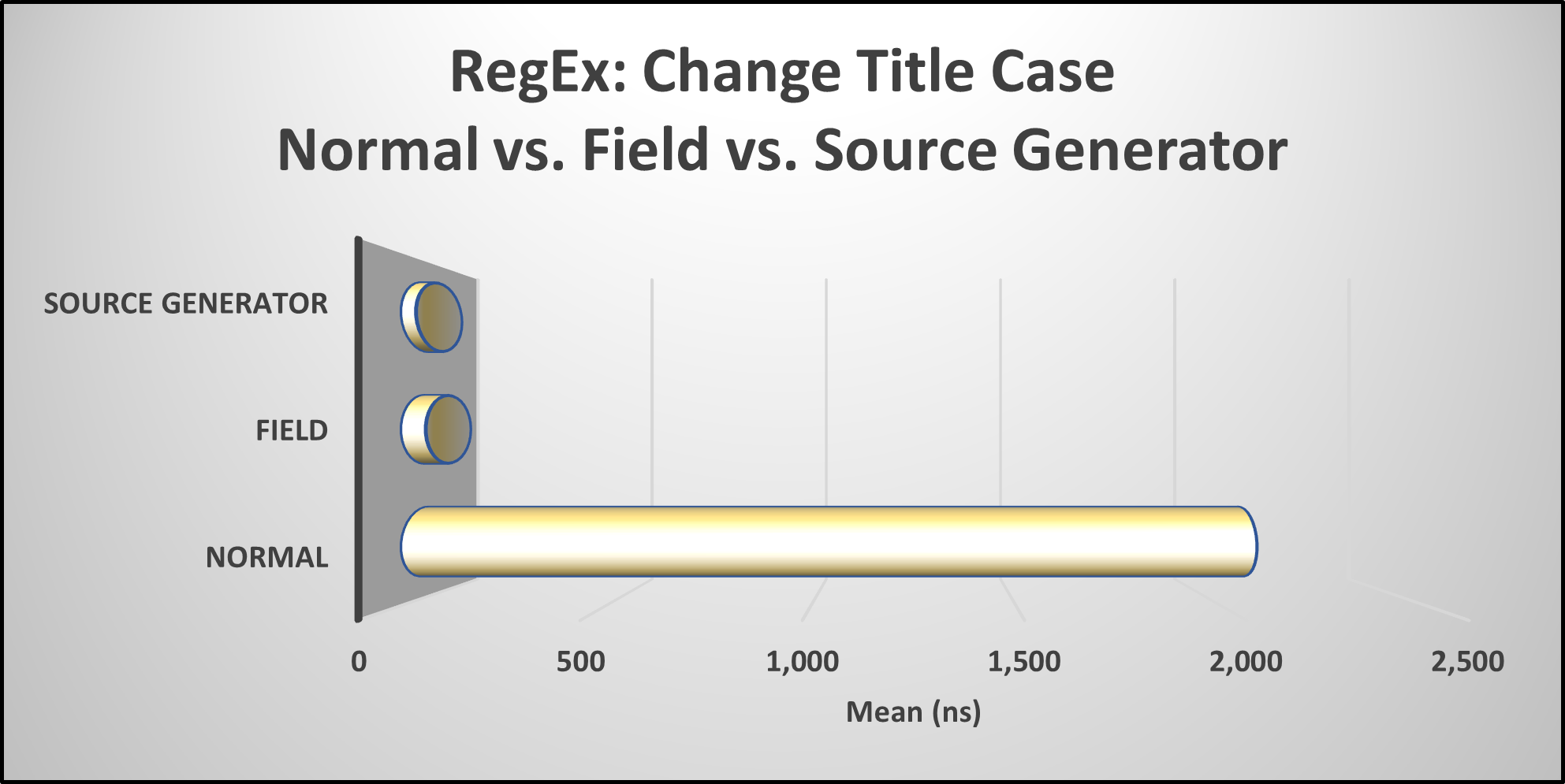
Now, let us look at another example—using a regular expression to change the title case of a string:
- Source Generator: 1.64× faster than the static field approach.
- Source Generator: 56× faster than the traditional method.
Should You Refactor Your Code?
With such dramatic performance improvements, is it time to refactor all your regular expression usage?
- If performance is critical (e.g., high-volume processing), the source generator is a no-brainer.
- If maintainability and readability are concerns, static field caching remains a solid choice.
- If you are still instantiating new
Regexobjects in methods—it is time to stop!
Now that you have seen the numbers, what will you do with your regex-heavy code?
Caution: Quirks When Using the Regex Source Generator
While the Regex Source Generator offers significant performance benefits, there are a few quirks to be aware of:
1. Avoid RegexOptions.Compiled
I discovered that using the RegexOptions.Compiled flag eliminates all the performance gains from the source generator.
Why? After inspecting the generated code, the source generator already applies compilation optimizations internally, making RegexOptions.Compiled unnecessary. Adding it manually can slow things down instead of speeding them up.
2. Mysterious Partial Method Errors
While working with the source generator, I repeatedly encountered errors like this:
"Partial method must have an implementation part because it has accessibility modifiers."
At first, I thought something was wrong with my code. However, the real issue was that the generated code needed to be rebuilt.
How to Fix It:
If you run into this error, simply:
- Go to Build → Clean Solution
- Then go to Build → Rebuild Solution
This forces the generated code to refresh, resolving the issue.
Keep these quirks in mind when integrating the Regex Source Generator into your projects.
Finding Regular Expression Patterns
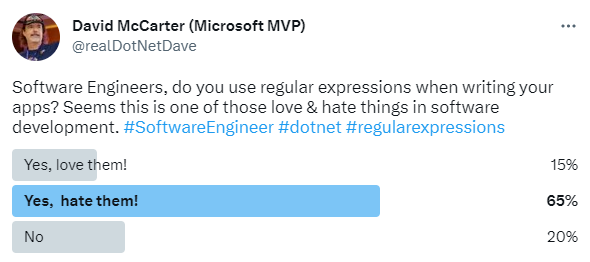
Regular expressions are a powerful tool for text manipulation, but many software engineers find them challenging due to their intricate syntax. Fortunately, several resources can make working with regex easier:
- regex101.com: A great interactive tool for testing and debugging regular expressions.
- AI-powered tools like ChatGPT: Quickly generate regex patterns based on your requirements.
With these resources, you can streamline text processing and avoid the trial-and-error approach often associated with regex.
AI-Generated Regular Expressions in Action
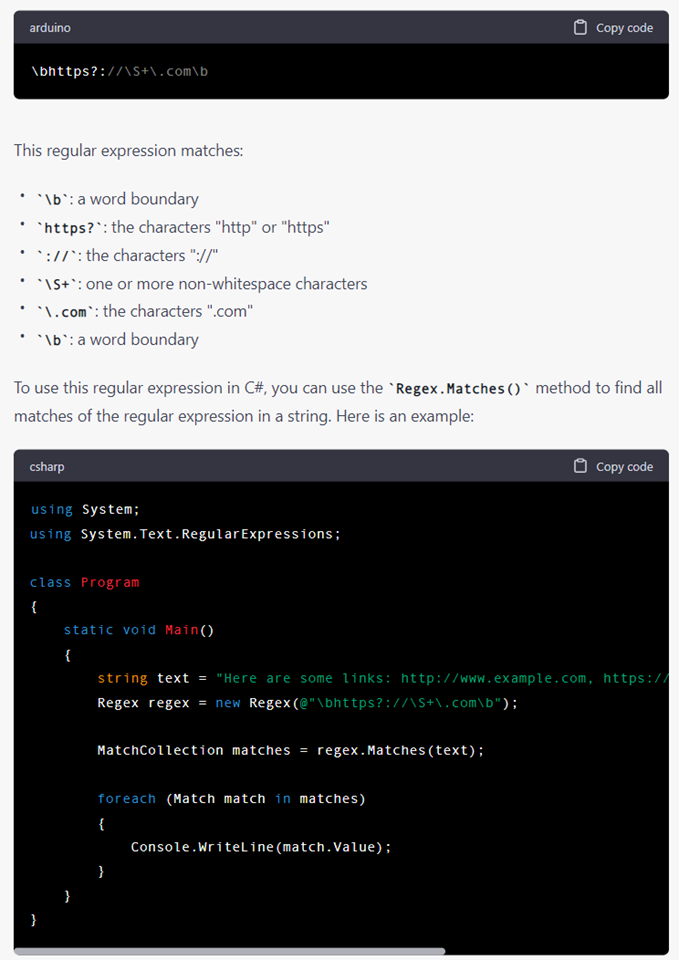
To test the capabilities of AI, I asked:
"Can you write a regular expression that finds all HTTP and HTTPS links in a document that end in .com? Provide a C# code example demonstrating its use."
Here is the AI-generated response:
Impressed? I Sure Am!
I have to say, the response was spot on! AI-powered tools like ChatGPT have proven to be a faster and easier way to generate and evaluate regular expressions. Going forward, I will definitely be using AI to simplify regex creation and improve my workflow.
But Do Not Forget Unit Tests!
While AI can generate accurate and efficient regex patterns, it is not always correct. Subtle mistakes can creep in, especially with complex patterns. That is why it is critical to:
- Write unit tests to verify your regex works as expected.
- Test with edge cases to ensure it manages all possible inputs.
- Manually review AI-generated regex before using it in production.
By combining AI efficiency with thorough testing, you can confidently integrate regex into your projects while avoiding unexpected issues!
Summary
Optimizing regular expressions in .NET 7 and beyond can significantly boost performance and reduce overhead in your applications. By leveraging best practices such as:
- Using static fields for regex instances instead of creating new ones.
- Utilizing the Regex Source Generator for maximum speed and efficiency.
- Avoiding RegexOptions.Compiled when using the source generator, as it is already optimized.
- Benchmarking your code to measure improvements and detect bottlenecks.
By following these techniques, you can ensure that your regular expressions are processed efficiently and that your applications run faster.
Since I frequently use regular expressions in my projects, I have added a set of common regex methods to my open-source library, Spargine. In the DotNetTips.Spargine.8.Core assembly and NuGet package, I introduced a new type called RegexProcessor, which provides efficient and reusable regular expression utilities. You can find more details at the link below.
What’s Your Experience?
Do you have any tips, experiences, or questions about optimizing performance in .NET? Share your thoughts in the comments—I would love to hear from you!
Pick up any books by David McCarter by going to Amazon.com: http://bit.ly/RockYourCodeBooks
Make a one-time donation
Make a monthly donation
Make a yearly donation
Choose an amount
Or enter a custom amount
Your contribution is appreciated.
Your contribution is appreciated.
Your contribution is appreciated.
DonateDonate monthlyDonate yearlyIf you liked this article, please buy David a cup of Coffee by going here: https://www.buymeacoffee.com/dotnetdave
© The information in this article is copywritten and cannot be preproduced in any way without express permission from David McCarter.
Discover more from dotNetTips.com
Subscribe to get the latest posts sent to your email.

 dotNetTips.com
One thought on “Rock Your Regex: High-Performance Patterns for .NET Developers”