
Have your parents ever recounted a classic tale like this: “Back in my day, I had to trek three miles to school, in the snow!” Well, consider this article a modern version of that, as I reflect on the notion that software engineering seemed simpler when I began. I’ll delve into an anecdote illustrating how what I now refer to as software engineering has evolved into a different landscape. The challenges stem from the myriad tools we’re required to navigate and the pitfalls of inadequate management.
In the Realm of Software Engineering
Repeatedly, I have emphasized at conferences and in my written works that…
“Coding should be the least part of your job. If you spend all day coding, you are doing it wrong!”

The essence of this statement lies in the fact that a substantial amount of groundwork should precede the actual coding phase for software engineers. This involves engaging with customers, formulating feature requirements, establishing robust architecture, drafting design documents, creating prototypes, and handling other relevant tasks.
I can affirm that the success of my projects, notably one where I earned a patent, can be attributed to the foundational work highlighted in the preceding paragraph. This holds true even during my tenure as a contractor at Verizon, where the solution I provided was acknowledged as the most efficiently executed project in the company’s history. Through firsthand experience, I can confidently state that these principles are effective.
Unfortunately, many managers wrongly anticipate software engineers to attend a meeting and promptly commence coding upon return to their desks. Such an approach, as I will illustrate in this article, is a recipe for failed projects or projects prone to brittleness, incurring high costs for subsequent feature additions and bug fixes.
In my early days, coding only commenced after thorough documentation, including feature requirements and design documents, had been meticulously crafted and approved. These comprehensive documents encompassed architectural details, the projects that needed to be implemented, and occasionally delved into the class-level specifics. I adhered to a template for these documents across various companies I worked for. Admittedly, writing these documents was not my favorite task, given my inclination towards coding. However, their significance for project success was undeniable. Regrettably, I can scarcely recall the last time I authored such documents, and today, I attribute much of this shift to the prevalent tendency among teams to bypass these essential steps, often influenced by Agile methodologies. The repercussions of skipping these crucial steps are vividly evident in the accompanying chart.
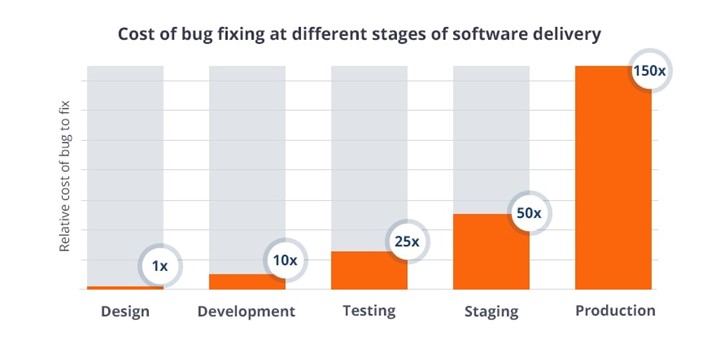
As depicted, identifying issues during the feature and design stages incurs minimal costs. By the time coding commences, the cost is already magnified by 10X, and if issues emerge in production, the cost skyrockets to a staggering 150X or more. Given that managers prioritize costs significantly more than developers do, I often advise attendees of my conference sessions, where I present this chart, to print it out and affix it to their managers’ office doors!
During my tenure at Mitchell International in San Diego, California, I developed their inaugural open API, enabling partners to access backend data for creating apps and services tailored for Mitchell customers. More details about this venture can be found in my article, “A Look at 20 Years of Microsoft .NET: My First Enterprise Application and More!” Mitchell acquired the application from a business manager in New Mexico, who, while knowledgeable about the business, fell short in coding expertise. The database design was among the worst I had encountered. Given this, it was imperative to ensure that our partners were spared from grappling with the suboptimal design.
To achieve this, I invested considerable time collaborating with the original developer, devising an intricate design that incorporated UML diagrams for the data structure. This meticulous design phase spanned six months, interspersed with periods of focused effort. I successfully implemented the API utilizing the newly released Entity Framework and WCF Data Services. This choice proved to be user-friendly for our partners interacting with the REST-based API. When I departed from the company, the API was in the testing phase with partners, paving the way for Mitchell’s participation in profit-sharing for any product or service sold utilizing the API. Notably, after my departure, I secured a contract from one of the partners and found myself coding against my own API!
A Remarkable Illustration of Contemporary Software Engineering
Over the past decade, my professional journey has predominantly been as a contractor. Teams often enlist my services to address issues within their codebase, ranging from memory and performance concerns to overall code quality. More often than not, my role involves rectifying existing problems rather than introducing new features. In a recent project, I undertook the endeavor of meticulously documenting the time allocated to various major tasks over a two-week period. Astonishingly, the breakdown reveals that I dedicated less than an hour to the act of crafting entirely new code!
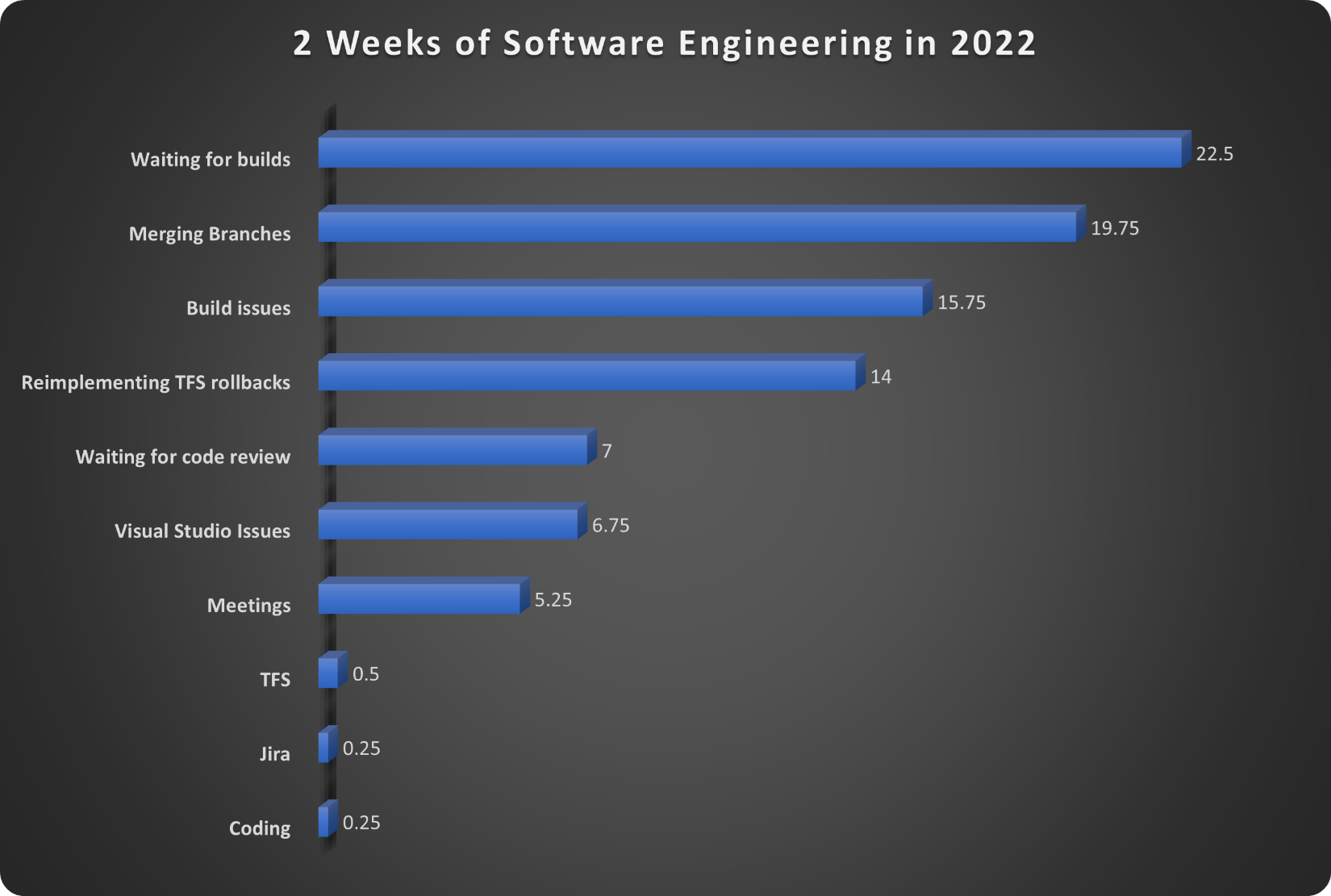
This stark reality underscores a notable shift in the nature of software engineering today. The bulk of my efforts revolve around diagnosing and rectifying issues embedded within the existing codebase, reflecting the pervasive challenges faced by contemporary development teams. The time allocated to novel coding pales in comparison to the substantial investments made in activities such as debugging, optimizing performance, and ensuring overall code robustness.
This snapshot of my recent project serves as an extreme example, shedding light on the evolving landscape of software engineering. The demand for code maintenance and enhancement has surged, relegating the creation of new features to a fraction of the overall effort. This paradigm shift underscores the critical need for a holistic approach to software development that encompasses not just coding but also comprehensive debugging, performance tuning, and quality assurance practices. As the industry grapples with evolving complexities, the role of a software engineer extends beyond mere coding, emphasizing the importance of addressing existing codebase challenges for sustainable and resilient software solutions.
Waiting for Builds
I endured a staggering 22.5 hours in anticipation, waiting for builds and the execution of unit tests. The team relies on Team Foundation Services (TFS) as their code repository. Each build on the server demands almost an hour, forcing me into a standstill until its successful completion. Any failure necessitates immediate attention and resolution before progressing further. Regrettably, this workflow impedes my ability to concurrently address different Jira tickets. The codebase’s fragility is evident, as my commits often disrupt the build, leading to extensive troubleshooting efforts.
One major challenge lies in the fact that the majority of the 9,000+ unit tests refuse to run on my development virtual machine. The thought of committing code changes induces a sense of apprehension due to this limitation. How can I ensure the code’s functionality without running the complete suite of unit tests locally? This predicament has translated into over half a week of productivity lost in grappling with these challenges. Building on my VM requires approximately 20 minutes, excluding unit tests, given that most of them don’t run locally. Even the developer build script provided did not encompass all the necessary projects, compelling me to develop my own.
Merging Branches
This solution presented a myriad of issues primarily stemming from improper disposal of objects and incorrect or missing implementation of IDisposable. It became a critical task, as DevOps faced repeated server and service restarts throughout the day. My involvement spanned over three months on the initial phase of this project. They directed me to create a new repository folder, and as I lacked expertise in TFS, I consistently sought assistance to keep my folder synchronized. Unfortunately, the help I requested was never provided.
When the time came to integrate my changes into the main repository, my folder had fallen so far behind that updating it proved impossible. Even attempts to restore from a shelf-set lacked reliability. Ultimately, a substantial portion of the code transitioned to the main branch required manual effort or recreation from scratch. This not only extended the time spent on the task but often doubled or tripled it. The decision to repeat the process multiple times added unnecessary complexity, contributing to additional challenges, as I will elaborate on in the subsequent sections.
Build Issues
Maintaining the integrity of this 82-project solution proved to be a delicate task, with the build susceptible to easy disruptions. A significant contributing factor was the inability to execute most unit tests on our development virtual machine (VM). The only way to identify potential issues was to submit a build and assess its performance, a process that frequently revealed problems, particularly regarding the memory issues I addressed.
Throughout a two-week period, nearly two days were dedicated to resolving these challenges. Additional build issues compounded the complexity, including:
- Inconsistencies with NuGet packages and other DLLs compared to our development VMs.
- Instances of other developers inadvertently overwriting our changes.
- Lack of regular updates for Visual Studio and .NET on the build server.
Many of these challenges arose from the adoption of Fakes for unit testing, a decision made to expedite server builds by shifting away from hitting the database. However, this approach introduced its own set of issues. When making changes to a class, it often resulted in breaking the Fakes, yet despite repeated requests for assistance in understanding and navigating these challenges, the needed support was never provided. This lack of guidance led to the necessity of rolling back several memory fixes that I attempted to implement, further complicating the resolution of build issues.
Reimplementing TFS Rollbacks
Dealing with build breaks became a routine ordeal, often necessitating the rollback of my changes to allow others to proceed with their builds. Subsequently, I had to diagnose the issues and then reintegrate the changes from a shelved set in TFS, following a code review. This process proved to be exceptionally challenging, as the builds on my VM worked seamlessly. However, the inability to run unit tests, particularly where most issues surfaced, forced me to rely on educated guesses to identify and resolve problems. Each iteration involved committing the changes and enduring an hour-long build process, repeating the cycle numerous times.
The inefficiencies in the TFS workflow, as illustrated, resulted in a substantial time investment of 14 hours. The repetitive nature of this task within the TFS environment proved to be a significant source of frustration and inefficiency.
Waiting for Code Reviews
Every modification I made required a code review, a standard practice. However, the team’s use of TFS imposed a restriction that prevented me from working on anything until the code review was completed. Typically, this process consumed approximately 3 hours or more, significantly impacting my coding time. Compounding this challenge was the team’s dispersed geographical locations across different time zones. If it was past 2 pm PST, code reviews were deferred until the next day. Despite my efforts to expedite the process by reaching out to reviewers via Teams, I was unable to reduce the code review duration to less than three hours. This time constraint further hindered my ability to efficiently progress with coding tasks.
Visual Studio Issues
The company mandated the use of virtual machines for development, a practice I typically avoid due to the inherent performance lag compared to physical boxes—approximately 20% slower, in my estimation. Setting up my VM to a functional state, a process spanning a month, was a significant hurdle. Moreover, running Visual Studio 2019 on the VM proved painfully slow, exacerbated by the company’s allocation of only 8GB of memory—barely sufficient for Windows to operate.
On a good day, Visual Studio would hang and crash multiple times, a recurring frustration. The situation was further worsened by the company’s use of mapped drives, exacerbating the challenges with Visual Studio. Though an upgrade to 16GB of memory alleviated some issues, it failed to prevent daily occurrences of hang-ups and crashes. Devoting nearly a day to troubleshooting these problems over a two-week period highlighted the ongoing struggles with Visual Studio 2019, exacerbated by the constraints of the VM environment.
Changing Just 1 Line of Code
Making even a minor alteration to a single line of code entailed a time-consuming process, as outlined below:
- Code Change: 0.5 hours.
- Local Build: 0.5 hours.
- Review Code Changes: 0.5 hours.
- Code Review: 3 hours.
- Build on Server including Unit Tests: 1 hour.
Total: 5.5 hours
This estimate assumed ideal conditions, a rarity in reality. In cases where issues surfaced, additional time was required to execute rollbacks, await server builds, and restart the entire process. This created a sense of being trapped in a recurring cycle of frustration and anguish. Furthermore, if deployment to a development server was necessary, the waiting time extended to many hours or, in some instances, until the next day. The cumulative effect of these inefficiencies added substantial delays to what should have been a straightforward and quick task.
Odds & Ends: Challenges in Company Development
Here are a few additional factors that impeded the development process within this company.
Jira Frustrations
Jira, a widely used tool for software teams, proved to be a double-edged sword in this project. Personally, I found fault not with Jira itself, but rather with how our team implemented and utilized it. Unlike past experiences where the responsibility for tracking and updating tickets shifted to QA after coding completion, on this team, developers were burdened with managing the entire lifecycle. This resulted in an excessive workload and undue blame on engineers.
The QA team member assigned to us exacerbated the situation. Not only did her negative and bitter communication style add to the frustration, but her insistence on perfection before approval seemed to overstep the boundaries of an engineer’s responsibilities. In the earlier days of programming, project management tasks, now handled by applications like Jira, were primarily the domain of project managers using tools such as Microsoft Project.
Microsoft Teams Misuse
The team heavily relied on Microsoft Teams for task assignments and updates, particularly from our QA representative. However, I believe Teams, aside from hosting online meetings, is more suited for casual communication than formal task documentation. I advocate for the use of Jira or email for clear documentation, as Teams, with its multiple chats and rooms, made it challenging to keep track of critical information. If the communication wasn’t documented in Jira or email, I often found myself disregarding it due to the overwhelming volume of information in Teams.
Contractor Hiring Practices
The company’s reliance on contractors, often exceeding the number of permanent employees, raised concerns. The frequent cycle of hiring and letting go of contractors not only disrupted the workflow but also resulted in a significant loss of institutional knowledge each time. The delayed setup for new contractors, combined with their steep learning curve, further strained the team’s resources. This approach seemed counterproductive, and the absence of experienced developers during scrum meetings added to the challenges.
Contractors, ideally brought in on a temporary basis, should not become a permanent fixture due to the issues outlined above. Proper management is crucial in contractor hiring, and the current practices, as observed in this company, may not align with legal and practical considerations.
Scrum Meetings’ Ineffectiveness
Despite the supposed purpose of scrum meetings, this team, like many others, failed to utilize them effectively. Rather than being a platform for problem-solving or assistance with obstacles, these meetings mainly revolved around updating ticket statuses. Requests for help were often met with silence, even from management. With 17 people on the call, the meetings, though short, proved to be an unproductive use of time. To maximize productivity, I often excused myself from the meeting after providing my status.
Addressing these challenges could significantly improve the efficiency and effectiveness of the development process within the company.
Key TakeAways
I have emphasized on numerous occasions that coding should be just a fraction of the overall job responsibilities. However, the issues highlighted in this article diverge from this perspective. In just two weeks, the challenges I’ve outlined illustrate how numerous tools and practices hinder our ability to produce high-quality software within reasonable timelines. The company’s hiring practices, coupled with subpar architecture, standards, and more, have resulted in a codebase that is challenging to maintain and enhance.
A comprehensive code analysis of the solution reveals alarming statistics: over 48,000 code violations, 217,000 lines of cloned and unused code, 32,000 spelling issues, and 80 outdated NuGet packages. The usage of unsupported versions of .NET and nearly 2,000 areas in the code requiring attention for memory issues paint a grim picture. None of the classes implementing IDisposable were done correctly, and the memory issues alone demand an estimated additional six months of work. With my departure, the fate of resolving these issues appears uncertain.
Working amidst these challenges on this team induced a considerable amount of stress and anxiety, negatively impacting the overall progress of software projects. This might shed light on the prolonged timelines for adding features and fixing bugs in the software you use.
The intention behind this article is to initiate a dialogue on simplifying the software development life cycle for engineering teams. Have you encountered similar issues in your workplace, and if so, have you discovered any solutions? I welcome your thoughts and experiences in the comments below, aiming to foster a conversation around improving the software development process.
Pick up any books by David McCarter by going to Amazon.com: http://bit.ly/RockYourCodeBooks
Make a one-time donation
Make a monthly donation
Make a yearly donation
Choose an amount
Or enter a custom amount
Your contribution is appreciated.
Your contribution is appreciated.
Your contribution is appreciated.
DonateDonate monthlyDonate yearlyIf you liked this article, please buy David a cup of Coffee by going here: https://www.buymeacoffee.com/dotnetdave
© The information in this article is copywritten and cannot be preproduced in any way without express permission from David McCarter.
Discover more from dotNetTips.com
Subscribe to get the latest posts sent to your email.

 dotNetTips.com
Things are more complicated than presented (and I realize the limitations of a single article). It is not really apple/apples to compare “Software Engineer” to “Modern Developer” as the scopes/focus/disciplines are loosely related but quite distinct. One analogy I commonly use is comparing a “Chemical Engineer” to a “Master Chef”. Both are involved in the transformation of molecules, but one would (hopefully) never confuse one for the other; nor would one hire/train for either role intending it to be applied to the other [except in very rare cases]