
Updated January 2024
Since the inception of .NET, we’ve had the string.Format() method to facilitate the formatting of strings that dynamically change based on the processed data. Here is an example:
var message = string.Format("The time is: {0}.", DateTime.Now)
The contemporary approach to format strings involves using string interpolation. The example above would now appear like this:
var message = $"The time is: {DateTime.Now}."
If the project is utilizing resource strings, as it should, here is an example of how to use them with string.Format():
var message = string.Format(Resources.TimeIsNow, DateTime.Now);
String interpolation is more concise, but the drawback is that it doesn’t seamlessly integrate with resource strings, rendering it unsuitable for globalization. For a deeper understanding of resource strings, refer to the Internationalization and Localization chapter in my code performance book.
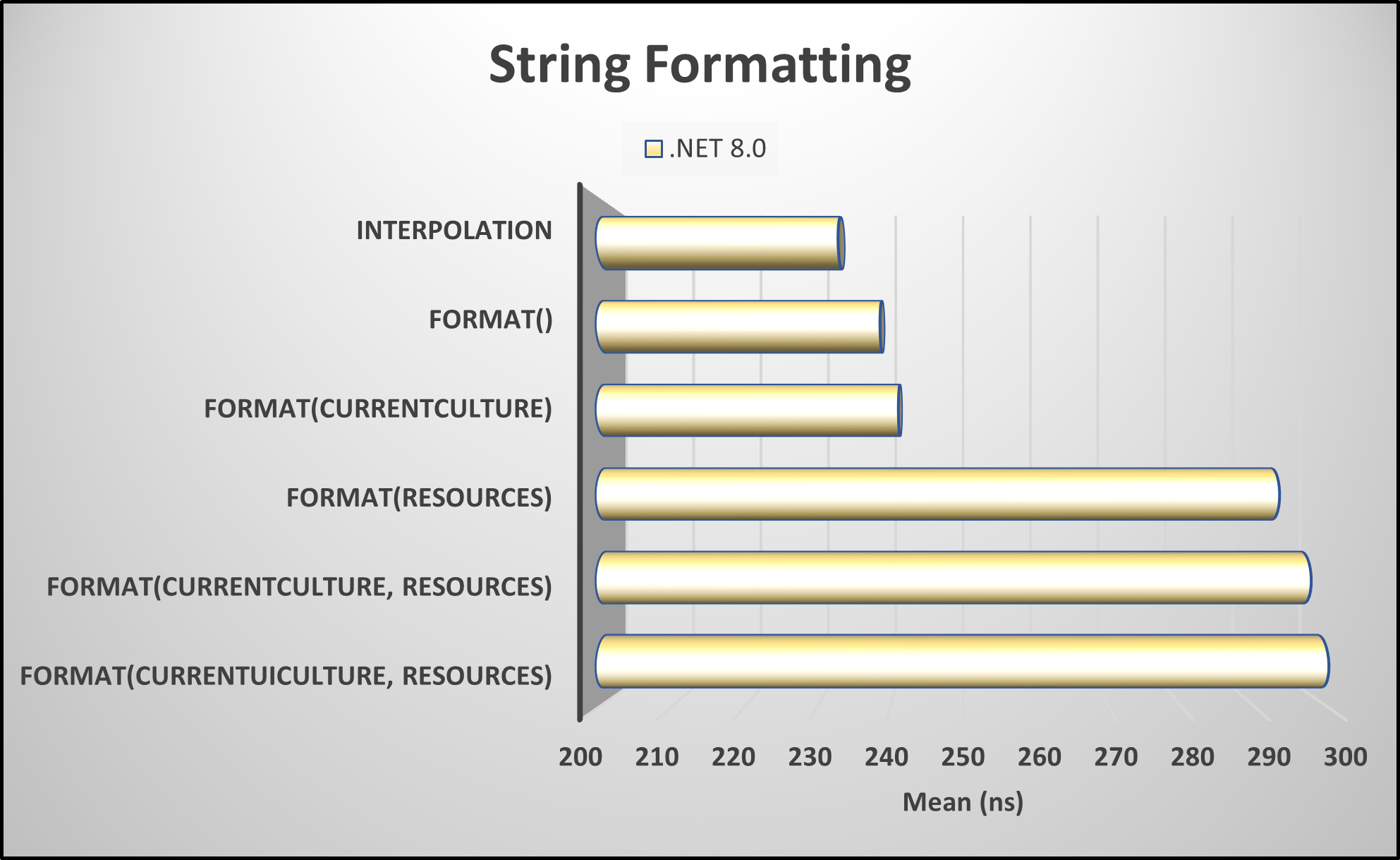
Benchmark Results
As evident from these benchmark tests, employing string interpolation proves to be the most efficient, although it may not seamlessly integrate with globalization. I suggest opting for string interpolation when handling strings not directly visible to the user, such as error messages or logging. For any string intended for user interaction, it is advisable to employ one of the formatting options outlined below, leveraging strings sourced from a resource file.
Pick up any books by David McCarter by going to Amazon.com: http://bit.ly/RockYourCodeBooks
Make a one-time donation
Make a monthly donation
Make a yearly donation
Choose an amount
Or enter a custom amount
Your contribution is appreciated.
Your contribution is appreciated.
Your contribution is appreciated.
DonateDonate monthlyDonate yearlyIf you liked this article, please buy David a cup of Coffee by going here: https://www.buymeacoffee.com/dotnetdave
© The information in this article is copywritten and cannot be preproduced in any way without express permission from David McCarter.
Discover more from dotNetTips.com
Subscribe to get the latest posts sent to your email.

 dotNetTips.com