
There isn’t a perfect application ever released, and the same is true for Visual Studio 2022. There are a lot of great features in VS2022, but there are many issues or features needed too. So I decided to create a running list of the issues that I find or find frustrating. If any of these issues are fixed or improved, I will update this post.
Most of these issues/ suggestions I have posted in the Visual Studio Developer Community. Some of them have been moved to GitHub by the Visual Studio team. I hope you will go to the links to vote to ensure the team works on them sooner than later!
Code Analysis
- Any of the windows in VS that has the button “Keep Results” should be available even after restarting VS and the last location that was clicked in the results. https://developercommunity.visualstudio.com/t/Keep-Results-in-Find-Windows-Should-Keep/1545354
- When analyzing source code for issues, it would be really helpful if we could automatically add a TODO for issues that need to be fixed at a later date. For example, in the violation below, it could add a TODO like this:
//TODO: Fix CS0618. ConfigurationSettings.AppSettings is obsolete: This method is obsolete, it has been replaced by System.Configuration.
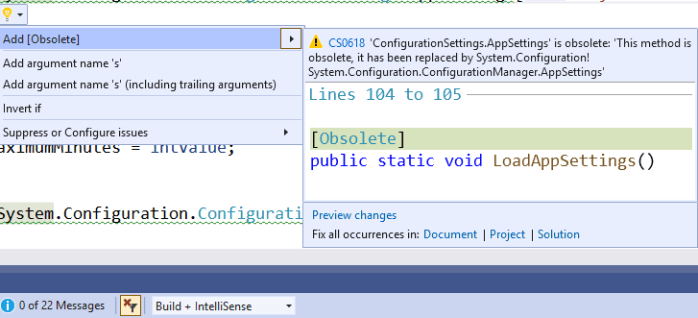
https://developercommunity.visualstudio.com/t/Add-TODOs-for-Code-Violations/1547762. Moved to https://github.com/dotnet/roslyn/issues/57055 - It would be really helpful when we are working on code and the analyzers find a violation, display those numbers and icons at the top of the Visual Studio toolbar. Would help us to know immediately that we have coded something incorrectly.
 https://developercommunity.visualstudio.com/t/Add-Error-List-Icons-To-Visual-Studio-To/1550490
Coding
- It would be really helpful if an icon could be added to the top Visual Studio toolbar to alert us if there are NuGet updates pending or any that need to be consolidated. The reason is that the current solution I’m working on has 80 updates and 29 to consolidate! It seems no one knows there are updates in the team. https://developercommunity.visualstudio.com/t/Add-Icon-To-VS-To-Indicate-There-Are-NuG/1547830
Miscellaneous
- TBA
Using Visual Studio
- Every time I create a new Windows Forms project for .NET 6 in Visual Studio 2022, the forms designer will not load. It won’t even compile. If I create a new Windows Forms project using the CLI, that works fine after I compile it. https://developercommunity.visualstudio.com/t/Windows-Form-Project-for-NET-6-Issue/1553295. Fixed In: Visual Studio 2022 version 17.0 Preview 6
- If I open a resx file from the project properties or by double-clicking on it in the Solution Exposure, it does not display correctly. Just shows a blank screen. See attached video. It only displays after I click off of the tab and go back. These are the same designer load issues that were also in VS2019.
 https://developercommunity.visualstudio.com/t/Resources-Designer-Dot-Not-Load-Correctl/1553328
 - What happened to the Editor for pre and post build events that was in VS2019? Creating these commands should be easier, not harder! Please put it back along with every command that is available for pre and post build events.


https://developercommunity.visualstudio.com/t/Editing-of-Pre-and-Post-Build-Events-Mis/1553335
- I stumbled across an issue with updating NuGet packages that are local. I was trying to update one of my apps that use a new version of my NuGet packages that were available on a local drive and I was not connected to the internet. It caused an error and would not update. Being connected to the Internet should not be a requirement to update local packages. https://developercommunity.visualstudio.com/t/Nuget-Package-Manager-Issue-with-Local-P/1556923. I could not reproduce this issue. I will resubmit if it happens again.
- After the update to VS 2019 v16.11.6 there are issues with the TFS source control. The solution explorer works, the Team Explorer works, but the status icons for the files do not work. There isn’t a right-click menu option to interact with TFS and at the bottom of VS, it says I need to add the solution to source control when it is in source control. I also discovered that not all the changes files are being picked up in the Pending Changes window. https://developercommunity.visualstudio.com/t/TFS-Not-Working-After-Update/1580635
- For most of the solutions I work on, Visual Studio is not usable until everything loads. Usually, the last thing that loads is source control, so I look for that. For the solution I work on for my job (82 projects), this takes up to 5 minutes.
I’d like the splash screen to be added back until everything loads. I realize that people might not like this, so adding a checkbook to ignore it in the future would be helpful for them.
It would also be nice to add a notification (sound) that can be played once it’s done so I can stop watching the news and get back to work! https://developercommunity.visualstudio.com/t/Add-Back-the-Visual-Studio-Splash/1590578
Solution
- TBA
Team
- TBA
Testing
- In Visual Studio 2019 and even in 2022, after starting Live Unit Testing, it just stops working. I have to stop it and then start it again. In VS2019, I had to start it twice EVERY SINGLE TIME, to get it to start. https://developercommunity2.visualstudio.com/t/Live-Unit-Testing-stops-working-with-mst/1582854
Summary
Well, that is what I have so far. Here are some general suggestions of mine for the Visual Studio team:
- Slow down the releases! It seems since you have gone too frequent updates (sometimes multiple per week) has, to me, lead to more issues.
- A feature isn’t done until the tooling is done! Oh and the documentation!
- Please get more Microsoft MVP’s (like me) involved in decision making for features BEFORE you start working on them, not at the end! Currently, the Visual Studio team holds zero MVP NDA meetings to discuss future features. I have never been contact by the Visual Studio team. I’m waiting! There are features in Visual Studio that are my idea and I’m ready to help even more! My passion is code quality features.
Have you found issues with Visual Studio 2022? If so, PLEASE make a comment below. I have reported many of these issues here: https://developercommunity.visualstudio.com/users/167861/f3856d7c-6549-4e28-9d85-ef1e3977c3c2.html?itemsifollow.
I’m not getting a lot of help from Visual Studio support, but I keep trying!
Discover more from dotNetTips.com
Subscribe to get the latest posts sent to your email.

 dotNetTips.com
Thank you for taking the time to report these issues and publish this article.
Please keep it up.