
Updated January 2024
This series of articles explores essential tips that should consistently be integrated into your coding practices. While these tips may appear incremental, their cumulative impact becomes pronounced, especially when dealing with high message volumes. Embracing these fundamental practices can yield substantial benefits for overall performance.
Removing Unused Using Statements
Incorporating unnecessary using statements that import redundant namespaces in your code can hinder the creation of a type. To address this, go to each class in the project, right-click, and select Remove and Sort Usings, or utilize the keyboard shortcuts Ctrl+R, Ctrl+G. Alternatively, you can employ the CodeRush refactoring tool (freely available from DevExpress) to automatically clean up using statements when saving the file.
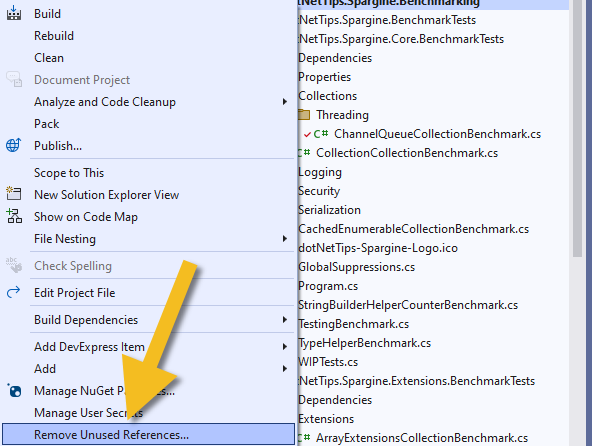
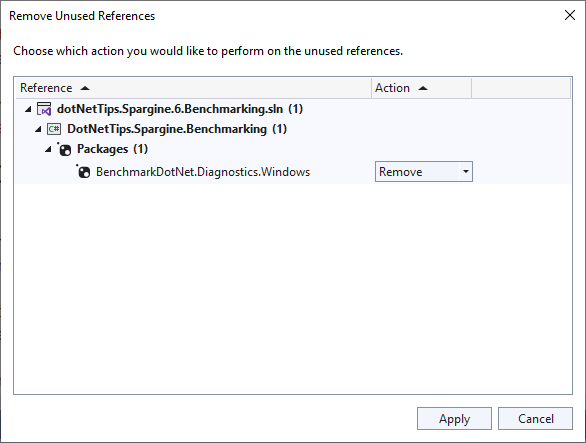
A window will appear as depicted below. Click Apply to initiate the removal of the references.
For further information, please consult the Analyzing Code for Issues chapter in my code performance book.
Pick up any books by David McCarter by going to Amazon.com: http://bit.ly/RockYourCodeBooks
Make a one-time donation
Make a monthly donation
Make a yearly donation
Choose an amount
Or enter a custom amount
Your contribution is appreciated.
Your contribution is appreciated.
Your contribution is appreciated.
DonateDonate monthlyDonate yearlyIf you liked this article, please buy David a cup of Coffee by going here: https://www.buymeacoffee.com/dotnetdave
© The information in this article is copywritten and cannot be preproduced in any way without express permission from David McCarter.
Discover more from dotNetTips.com
Subscribe to get the latest posts sent to your email.

 dotNetTips.com