
 In 2019, while I was working on benchmark tests for my new book on code & app performance, I wanted to use “real-world” data types like a person or a coordinate along with methods for creating random words, email addresses, URLs, etc. After I worked on the code, I thought that most of it could be re-used by myself in other projects, so I moved it into an assembly. Then I thought others might like to use it so then I turned it into a NuGet package!
The new .NET Standard 2.0 assembly and NuGet package is called dotNetTips.Utility.Standard.Tester. The main goal is to make it simple to create these real-world objects along with lots of other methods to create random data. Some of the methods include the use of fixed-length strings that I needed for the benchmark tests. I’m even starting to use this assembly on projects where I work.
I will next describe some of the methods and objects I use the most.
Person Types
For the benchmark tests for my performance book, I created three Person types that reflect different ways that I see developers create data model classes. All of them implement from the IPerson interface that defines these properties:
| Address1 | Address2 | BornOn |
| CellPhone | City | Country |
| FirstName | HomePhone | |
| Id | LastName | PostalCode |
The three different types that implement IPerson are:
Person: This type represents how I see most model classes created for use in web API service calls or Entity Framework by implementing the properties in IPerson as auto-implemented properties.
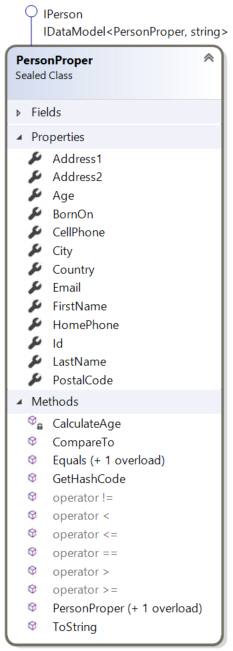
PersonFixed: This type is implemented the same as Person, adds a property for Age, and implements methods for the IComparable<T> and IEquatable<T> interfaces. It also overrides GetHashCode(), ToString() and Equals() and implements operators. It also uses the DebuggerDisplay attribute.
PersonProper: This type is implemented the same as PersonFixed and adds validation to all appropriate properties. It also uses the Serializable, XmlRoot, and DataContract attributes. The type represents how most data objects should be implemented and should usually be the one that you should use in your tests.
Along with those types, there is a PersonCollection<> that is used to return a collection of any types that implement IPerson.
Coordinate Types
Also, for my benchmark tests, I created two structure types that implement the ICoordinate interface. The interface has only two properties, X and Y. The two different types that implement ICoordinate are:
Coordinate: This structure implements X and Y as auto-implemented properties. It implements the IEquatable<> interface. It also overrides ToString(), Equals() and GetHashCode(). It implements operators (since structures do not by default have them) and uses the Serializable attribute.
CoordinateProper: This structure is implemented the same as Coordinate and implements the IComparable and IComparable<> interfaces. This structure should be used most often in your tests.
Random Data Methods
Using random data is very important if you are testing processing in your assemblies. I don’t know how many times in the past I forgot to test the last name value that includes an apostrophe which can cause SQL Server inserts or updates to fail. Humans aren’t very good at coming up with random data, code can solve that.
So, I created the RandomData static type that helps with generating random data. There are many methods in this class, and I add new ones often, especially when working on a new edition of my books. The methods are listed below along with sample output (most from using ? in the Immediate Window in Visual Studio).
| Method
|
Output |
| GenerateCharacter() | 82 ‘R’ |
| GenerateCharacter(char minValue, char maxValue) | 65 ‘A’ |
| GenerateCoordinate<T>() | X: 178765551
Y: -2145952440 |
| GenerateCoordinateCollection<T>(int count) | [0]: {2089369587–284215139}
[1]: {244137335-1577361939} |
| GenerateDecimal(decimal minValue, decimal maxValue, int decimalPlaces) | 95.15 |
| GenerateDomainExtension() | .co.uk |
| GenerateEmailAddress() | fbxpfvtanqysqmuqfh@kiuvf.fr |
| GenerateFile(string fileName, int fileLength) | c:\\temp\\UnitTest.test |
| GenerateFiles(int count, int fileLength) | Path: “C:\\Users\\dotNetDave\\AppData\\Local\\Temp\\”
Files: Count = 100 Raw View: (“C:\\Users\\david\\AppData\\Local\\Temp\\”, {System.Collections.Generic.List<string>}) |
| GenerateFiles(int count = 100, int fileLength, string fileExtension) | Path: “C:\\Users\\dotNetDave\\AppData\\Local\\Temp\\”
Files: Count = 100 Raw View: (“C:\\Users\\david\\AppData\\Local\\Temp\\”, {System.Collections.Generic.List<string>}) |
| GenerateFiles(string path, int count, int fileLength) | [0]: “c:\\temp\\dobybcyx.lj”
[1]: “c:\\temp\\zo2ggwub.3ro” |
| GenerateInteger(int min, int max) | 100 |
| GenerateKey() | f7f0af78003d4ab194b5a4024d02112a |
| GenerateNumber(int length) | 446085072052112 |
| GeneratePerson<T>(int addressLength, int cityLength, int countryLength, int firstNameLength, int lastNameLength, int postalCodeLength | N/A |
| GeneratePersonCollection<T> | [0]:”eemdqrbmgtypqxgjijsjmp@fpdgwbswvg.fr”
[1]:”roxmoiksscmrixp@wdfgjorfxydcw.de” |
| GeneratePhoneNumberUSA() | 284-424-2216 |
| GenerateRandomFileName() | C:\\Users\\dotNetDave\\AppData\\Local\\Temp\\3nvoblq5.lz1 |
| GenerateRandomFileName(string path) | c:\\temp\\0yiv4iiu.uuv |
| GenerateRandomFileName(int fileNameLength, string extension) | C:\\Users\\dotNetDave\\AppData\\Local\\Temp\\FOGWYNDRBM.dotnettips |
| GenerateRandomFileName(string path, int fileNameLength, string extension) | C:\\temp\\FFDHRBMDXP.dotnettips |
| GenerateRelativeUrl() | /ljsylu/rsglcurkiylqld/wejdbuainlgjofnv/uwbrjftyt/ |
| GenerateTempFile(int fileLength) | C:\\Users\\dotNetDave\\AppData\\Local\\Temp\\klxpckpo.24h |
| GenerateUrl() | https://www.agngbgluhawxhnmoxvdogla.hdtmdjmiagwlx.com |
| GenerateUrlHostName() | https://www.ehvjnbhcpcivgiccugim.lfa.net |
| GenerateUrlHostnameNoProtocol() | http://www.wucqcapnybi.kejdwudpbstekhxic.co.uk |
| GenerateUrlHostnameNoSubdomain() | elqqcw.org.uk |
| GenerateUrlPart() | /rregyyjxpjiats |
| GenerateWord(int length) | mL_g[E_E_CsoJvjshI]CFjFKa |
| GenerateWord(int minLength, int maxLength) | oMOYxlFvqclVQK |
| GenerateWord(int length, char minCharacter, char maxCharacter) | LBEEUMHHHK |
| GenerateWord(int minLength, int maxLength, char minCharacter, char maxCharacter) | ACRNFTPAE |
All methods in RandomData have corresponding unit tests.
Usage Examples
To install the NuGet package, run the following from the Package Manager Console in Visual Studio:
Install-Package dotNetTips.Utility.Standard.Tester
This is an example of how I use this package in one of my benchmark projects.
[Benchmark]
public void SortDelegateTest()
{
  var collection =
      RandomData.GeneratePersonCollection<PersonProper>(100);

  collection.Sort(delegate (PersonProper p1, PersonProper p2)
  {
    return p1.LastName.CompareTo(p2.LastName);
  });
  base.Consumer.Consume(collection);
}
Here is how I use it in a unit test project.
[TestMethod]
public void AddItemsToCachTest()
{
  var cache = InMemoryCache.Instance;

  for (int count = 0; count < 100; count++)
  {
    cache.AddCacheItem<int>(key: RandomData.GenerateKey(),
            item: RandomData.GenerateInteger(count, 1000000);
  }
  Assert.IsTrue(cache.Count == 100);
}
Summary
I hope that you will check out the dotNetTips.Utility.Standard.Tester NuGet package for use in your testing projects. Need something added? I hope you will contribute to the project on GitHub.
Discover more from dotNetTips.com
Subscribe to get the latest posts sent to your email.

 dotNetTips.com