

Once, an intern on my team asked me to review the code for a new solution he had been assigned to develop. Approximately a week later, I received the following message from him in our chat conversation:
On the project I sent you, I don’t understand what you mean by use a separate, reusable DLL. I’ve been trying to read about it, but I’m still not super sure.
My short reply to him via chat was:
Generally, model classes are used in multiple projects. For reusability of those models, they should be in their own separate DLL (C# Project). Not only is this good re-use, but also makes it much easier to unit test.
During all my code conference sessions, I emphasize the critical aspect of designing code for reusability from the project’s inception. These days, I assert that at least 90% of any application’s code should reside in reusable assemblies (DLLs), for several compelling reasons that I will elaborate upon. The sole purpose of the code within the actual application should be to handle user interactions or data flow to the back-end API. While not every developer may subscribe to this coding philosophy, it has consistently saved me significant time, resulting in more robust and dependable code, ultimately leading to cost savings for the company in the long term!
Consider the Future of Your App Beyond Your Boss’s Words!
For quite some time, I’ve been advocating a simple principle: ‘Don’t always heed your boss’s directives!’ Why, you might ask? Well, as is often the case, I’ve learned this lesson the hard way. Back in the 1990s, during the ASP era, my boss assigned me a web project. Naturally, I asked, ‘Will this project forever remain a web application?’ His response was an affirmative ‘yes,’ and so I proceeded to code the website.
However, at a later point, he approached me with an urgent request to support a different type of application, one distinct from a website. My response was less than ideal; I explained that it would take a considerable amount of time because I needed to extract most of the website code into a DLL (using VB) to make it compatible with two distinct applications. Needless to say, this was not the answer he had hoped for. Had I not simply adhered to his initial directive and instead designed the architecture with future flexibility in mind, accommodating a different application type would have been a breeze.
Since that memorable day, I’ve adopted a different approach: I stopped unquestioningly following my bosses’ instructions regarding the future of an application. Instead, I always architect applications with code reusability as a paramount consideration… every time!
Practice What You Preach Dave!
Since that experience, I’ve consistently placed the majority of my code in reusable DLLs, including my personal projects and even in testing and benchmarking applications. Don’t just take my word for it—let me demonstrate it to you.
Example of a Windows App Solution
I’ve maintained an application for developers for quite some time, known as the dotNetTips.Utility Dev App (which has since evolved into a global tool named Spargine Dev Tool). At present, the application comprises two primary features. While it might have been tempting to consolidate all the code within the EXE file, I made a deliberate choice not to do so, as illustrated below.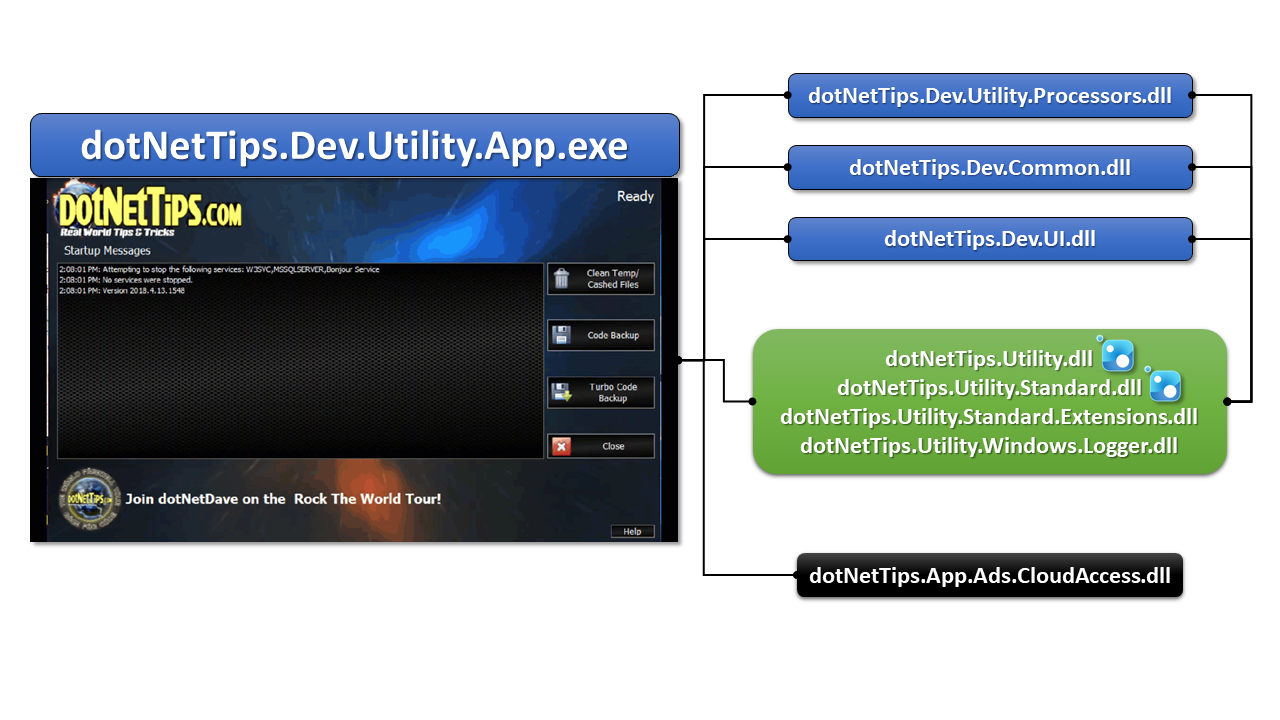
This illustrates how I’ve organized the code into different assemblies, including the ones highlighted in the green box, which are part of my open-source assemblies (the first two of which are available on NuGet). I’ll provide a brief description of what each contains:
- dotNetTips.Dev.Utility.App.exe (Clr C#): This is the Windows Forms application distributed via ClickOnce. The application contains minimal code, just enough for loading/saving data and displaying messages within the app, all of which is managed in a multi-threaded environment.
- dotNetTips.Dev.Utility.Processors.dll (Clr C#): This assembly handles the core functionality of the application. Currently, the app has two primary features. The first feature is designed to seek and delete temporary and cached files created by Visual Studio and SQL Server. The second feature scans the user’s computer for source code and quickly backs it up to OneDrive by default. Much of the processing code for each feature is located here, including the logic for sending status update messages to the app.
- dotNetTips.Dev.Utility.Common.dll (Clr C#): This assembly contains common code that is shared among the other assemblies within the solution. Some of this common code includes configuration settings, message types used to convey information to the user in the app, a type used for queuing, and more.
- dotNetTips.Dev.UI.dll (Clr VB.NET): This assembly houses custom controls and forms used throughout the app. These include controls for displaying user messages, a header control, performance metrics, an Errors Form, and various others.
- dotNetTips.App.Ads.CloudAccess.dll (.NET Core): In the event a user clicks on an advertisement within the app (typically located at the bottom of the app), this assembly immediately transmits that information to a queue in Azure. It’s important to note that this assembly is part of an entirely different solution, which I will describe in more detail next.
Cloud App Solution Example
I’ve been utilizing N-Tier architecture (also known as multitiered architecture) for a significant period, and I incorporate it into the design of any app or solution I work on. It’s evident in the example above, which highlights my approach, even for cloud-based applications. In this specific case, I’m showcasing a cloud app entirely hosted in Azure. I’m presenting this example to illustrate the flow of data originating from user clicks on ads within the app described earlier.
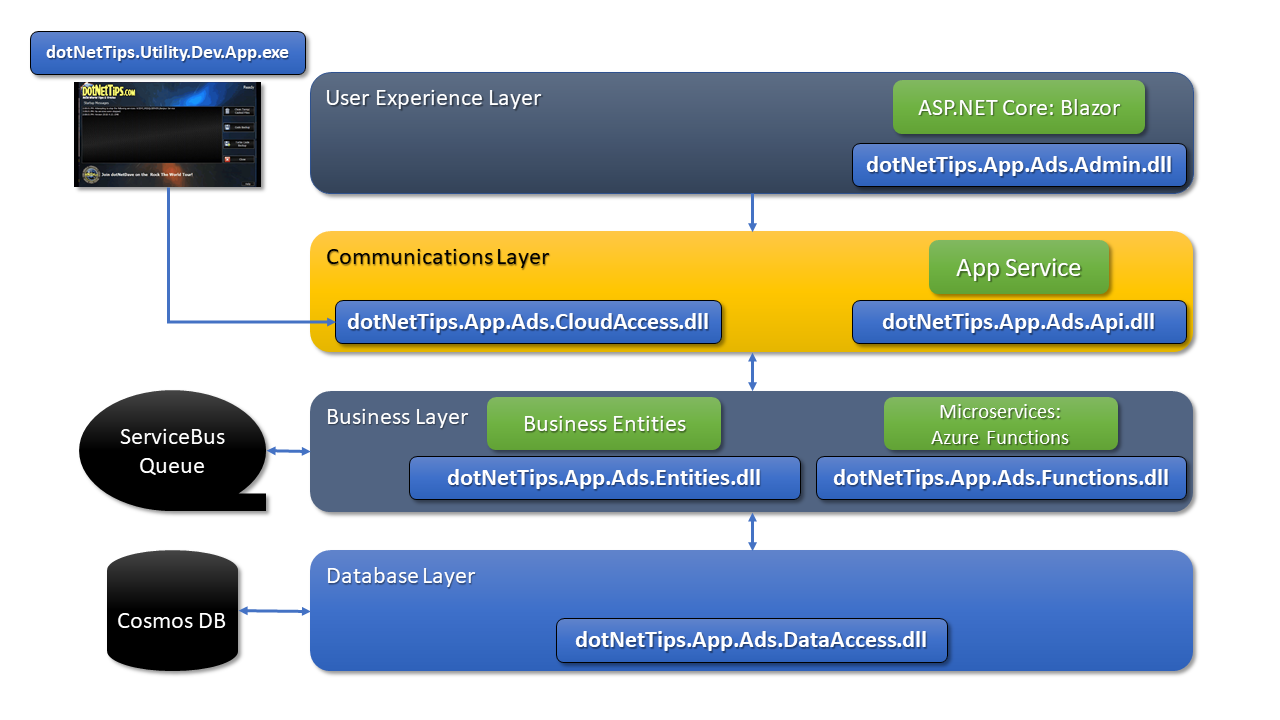
As you can observe, the ad click data follows a precise path within our application. It is first sent to a ServiceBus Queue via the communications layer, then proceeds to the business layer, and finally gets stored in Cosmos DB. All of these assemblies are coded in C# using .NET Core. Below, I outline the primary responsibilities of each assembly:
- dotNetTips.App.Ads.DataAccess.dll: This assembly, situated in the database layer, is responsible solely for handling data retrieval and storage within the database. It includes any custom methods I develop for accessing data. To clarify, this layer should exclusively call the actual database-specific assemblies, such as those for SQL Server, Oracle, Cosmos DB, and others.
- dotNetTips.App.Ads.Entities.dll: Here, we house all custom data entities used within the database layer. While you may consider placing them in the data access assembly, it’s important to avoid doing so. Placing them there would necessitate distributing that assembly across every layer requiring these models, including clients (users’ machines). This practice would violate N-Tier architecture principles and lead to larger deployments, potentially posing security risks.
- dotNetTips.App.Ads.Functions.dll: This assembly hosts my Azure Function, which is invoked when user ad click data arrives at the ServiceBus Queue. The function’s purpose is to store this data in Cosmos DB.
- dotNetTips.App.Ads.CloudAccess.dll: This assembly handles the code responsible for transmitting user ad click data to the Azure ServiceBus Queue. I anticipate expanding its functionality in the future, with potential plans to release it as an open-source project.
- dotNetTips.App.Ads.Api.dll: This ASP.NET website serves as the API layer (utilizing WebApi) responsible for facilitating communications.
- dotNetTips.App.Ads.Admin.dll: This ASP.NET website serves as the administrative interface for managing the ad data used by the dotNetTips.Utility Dev App. It’s constructed using the new Blazor framework.
Both solutions’ assemblies make use of .NET Framework and Core assemblies, along with third-party assemblies (from DevExpress). For further information regarding this solution, you can access all the articles I’ve authored by visiting this link: http://bit.ly/RealWorldAppSource.
The Advantages of Code Reuse
There are numerous benefits associated with code reuse. In this discussion, I will delve into the key advantages that I find most significant and explain why they hold paramount importance.
There are numerous benefits associated with code reuse. In this discussion, I will delve into the key advantages that I find most significant and explain why they hold paramount importance.
1. Unit Testable: Unit testing is a critical practice for validating code, yet it’s often overlooked. In many of the projects I’ve encountered as a contractor, unit tests are either absent or in short supply. During my time at Microsoft, a member of the IntelliTests team (although it doesn’t work in .NET Core) once suggested that teams should aim for at least 75% code coverage in their unit tests, a goal I wholeheartedly endorse. Performing unit testing before passing code to the quality assurance team is essential and represents a significant cost-saving measure. Inform your superiors about the tangible benefits of this practice.
Additionally, if you adhere to sound object-oriented programming techniques, types and methods should be marked as ‘internal’ unless they are used by another assembly (with the exception of MVC controllers and related types). This approach is in line with proper OOP design and can potentially improve performance. However, it can make unit testing challenging. Placing code in reusable DLLs resolves this issue, as it requires making key types and methods public for export.
Remember that there are various other testing methods such as integration, end-to-end, and visual testing that should not be overlooked before releasing your app to users.
2. Easier to Maintain: From my early days in programming to the present, I’ve observed code being copied from one class to another—a practice that persists to this day. When the same code block is copied in this manner, it creates an immediate maintenance headache. If there’s a bug or a change is needed, you must update it in multiple places, leading to wasted time and money.
During my tenure at Mitchell International in San Diego, CA, I witnessed new programmers on the team becoming frustrated when bug fixes were rejected by QA due to duplicated code. The abundance of duplicate code meant that a single bug fix could potentially require modifications in four or more places. This prompted me to focus on new features as quickly as possible.
The creation of reusable DLLs can alleviate this problem. Visual Studio offers a feature that helps identify duplicate code, making it easy to isolate and encapsulate it within a DLL. My current coding philosophy revolves around the belief that most of the code I write will be reused at some point in the future, prompting me to implement code reuse from the outset when crafting new code.
3. Easier to Share: When a significant portion of your code resides in reusable DLLs, it becomes effortless to share with colleagues within your team, department, or even other departments. Furthermore, it simplifies the creation of NuGet packages for easy distribution. .NET Core projects in combination with Visual Studio make it straightforward to create and share these packages, either within your organization or on NuGet.org.
4. Easier to Update: Adopting this coding approach also streamlines the process of updating your application. If a bug is fixed or a non-breaking change is made, only the relevant assembly needs to be updated or downloaded. For instance, if your boss suddenly decides to shift from using SQL Server to Oracle, making this change can be relatively painless.
When architected correctly, the majority of the application may require no updates at all. This translates into significant time and cost savings. In one such instance, it took me just about a day to transition a project to use Oracle instead of SQL Server, including testing. I didn’t even need to modify the application (ASP.NET) except for updating the connection string in the configuration file.
Conclusion
I trust that this article has ignited your enthusiasm for considering code reuse as a fundamental practice each time you embark on a coding journey. Throughout my extensive 25+ years in programming, this approach has consistently proven its worth. If you encounter resistance from your superiors, gently remind them that it equates to both cost and time savings—not just in the present, but in the foreseeable future. I can guarantee it!
Do you have any additional tips or insights you’d like to share? Please feel free to leave a comment below. Your contributions and experiences can enrich our collective understanding of effective coding practices.
Discover more from dotNetTips.com
Subscribe to get the latest posts sent to your email.

 dotNetTips.com