
 Once, when I was analyzing a client’s .NET Framework code for performance since they were having issues, I found that they were using the collection SortedDictionary<,> in many places in their projects. After looking at how they were using this collection type, I discovered that they only needed the collection sorted once. So, I figured, that it would be better for performance to use just Dictionary<,> and sort it once. In the .NET Framework, using a Dictionary<,> and sorting it when needed was about six times faster. Let’s see how these numbers come out for .NET.
For the update of this article, I researched how developers are sorting a Dictionary<,> and then show the differences when compared to the SortedDictionary<,>. Let’s look at those different ways by showing the benchmark code used in this article.
OrderBy()
Most of my research showed that people were using OrderBy() from LINQ since it’s very simple. Here is the benchmark code.
var collection = personDictionary.OrderBy(p => p.Key);

for (var index = 0; index < collection.Count(); index++)
{
    base.Consumer.Consume(collection.ElementAt(index).Value);
}
Sorted Keys
Another way I saw developers sorting a Dictionary<,> was by sorting the keys and using that value to grab the item in the loop.
var collection = personDictionary;
var keys = collection.Keys.ToList();
keys.Sort();

for (var index = 0; index < keys.Count; index++)
{
    base.Consumer.Consume(collection[keys[index]]);
}
Sort() with Comparer
The third way I saw developers sorting a Dictionary<,> was by converting it to a List<,> and then use Sort() with a comparer.
var collection = personDictionary.ToList();
collection.Sort((p1, p2) => p1.Key.CompareTo(p2.Key));

for (var index = 0; index < collection.Count; index++)
{
    base.Consumer.Consume(collection.ElementAt(index).Value);
}
The Performance Results
Let’s look at using these three ways of sorting a Dictionary<,> shown above and compare it to a SortedDictionary<,> and loop through the results using for() and foreach(). To simulate real-world collections, I benchmarked the code using collection sizes 10, 25, 50, 100, 250, 500, and 1,000. The customer I was working for when I started looking into this had collection sizes up to 10,000!
Let’s look at the results for looping with for().
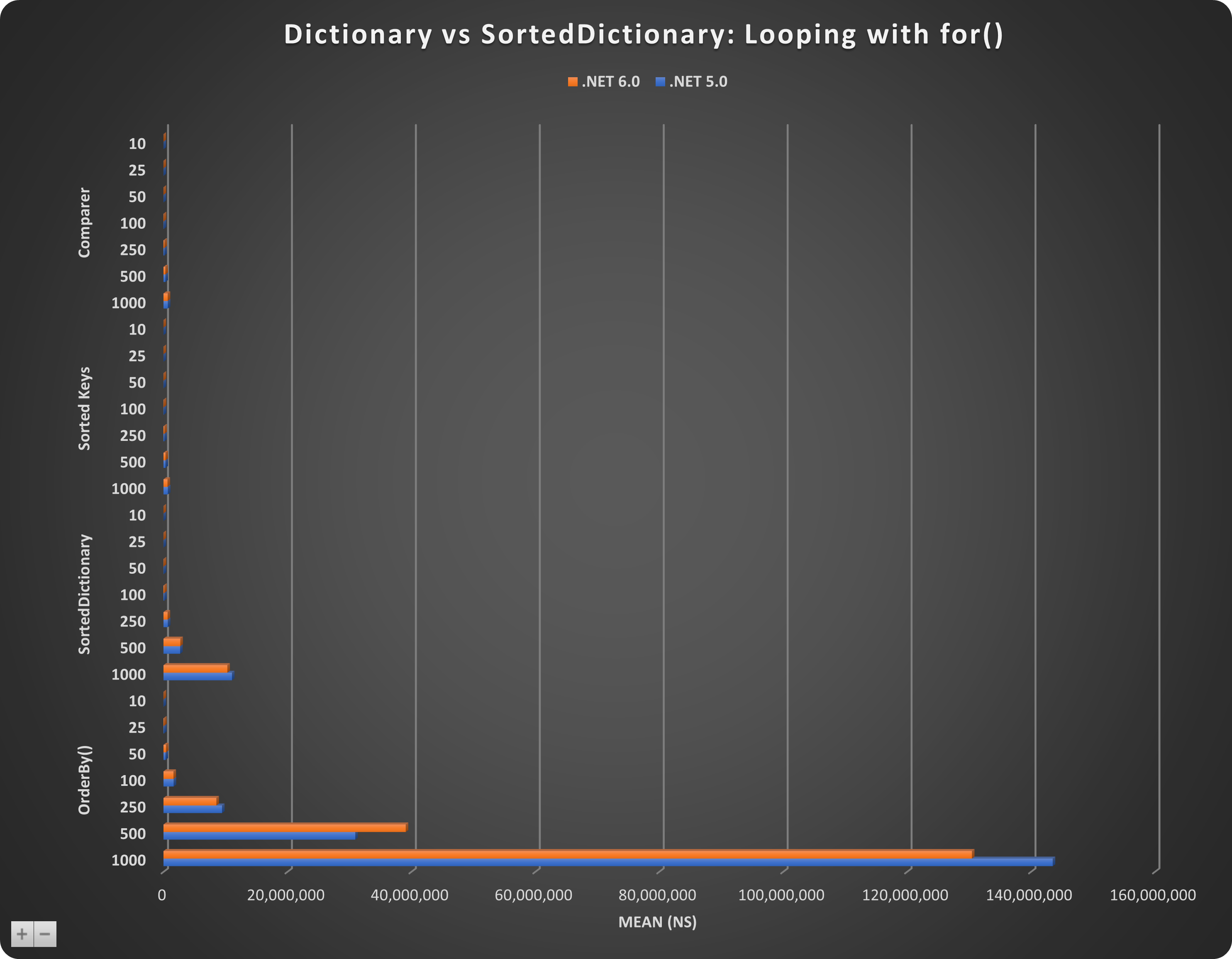
This shows that using Sort() with a comparer and using sorted keys are very close in speed and is the most performant. The performance for OrderBy() starts to degrade with collections larger than 50 and allocates a lot in memory. The allocated bytes are the following:
- Sort() + Comparer = 216 – 16,057 bytes
- Sorted Keys = 126 – 8,057 bytes
- SortedDictionary = 1,760 – 272,026 bytes
- OrderBy() = 4,120 – 28,081,588 bytes
Next, let us look at the benchmark for foreach().
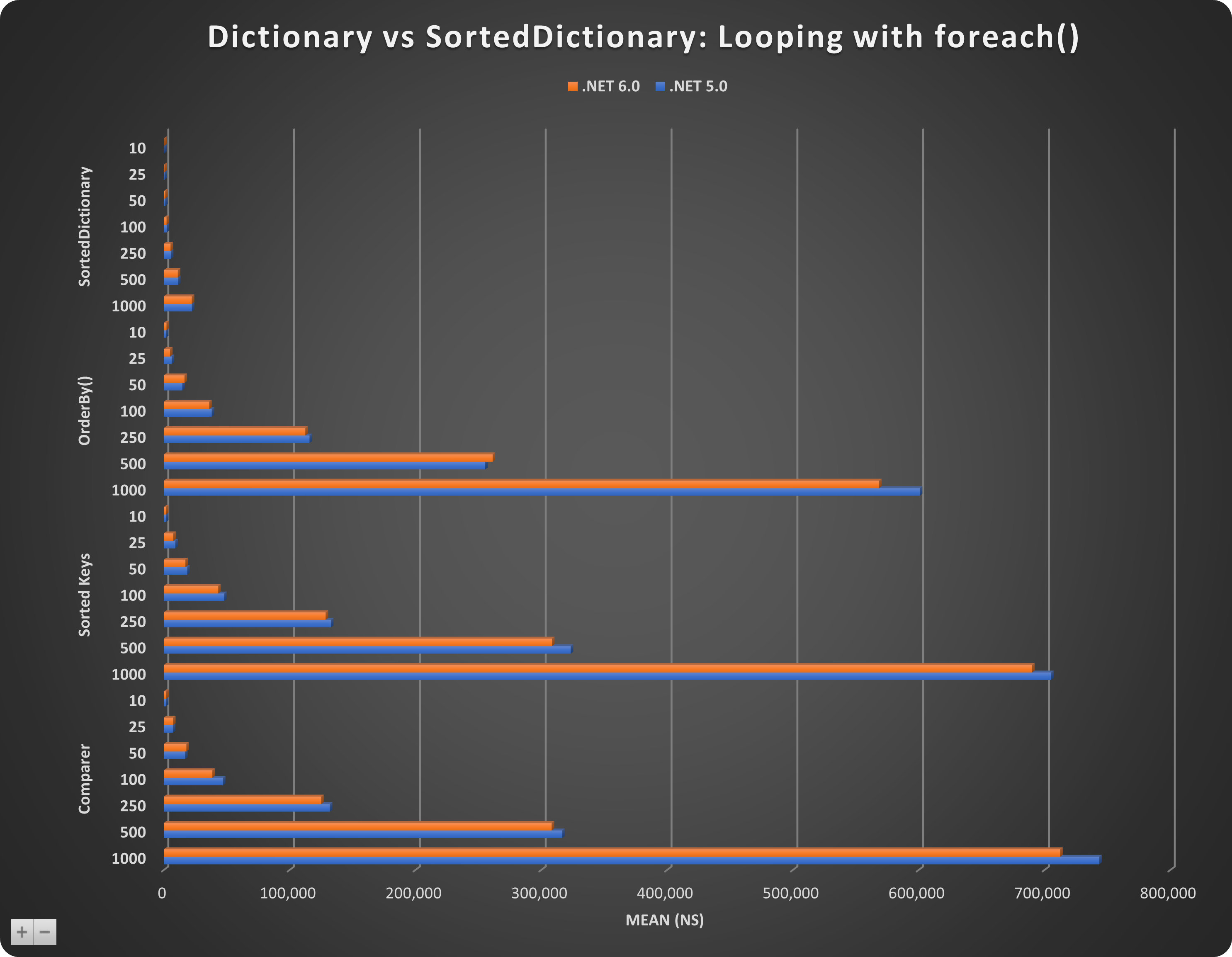
This shows that in this case, using a SortedDictionary<,> is a lot more performant than the other methods. I would like to know why. The allocated bytes are the following:
- SortedDictionary = 120 – 216 bytes
- OrderBy() = 632 – 28,353 bytes
- Sorted Keys = 136 – 8,057 bytes
- Sort() + Comparer = 216 – 16,057 bytes
Summary
Make sure you pay attention to the types of collections you are using and how you are looping through them. This customer made big gains by just changing to using Dictionary<,> and then sorting when needed. Also, make sure to keep an eye on the allocated bytes. In both cases using OrderBy() uses much more memory than the other methods.
You can find many more performance tips by going to this section of dotNetTips.com: https://dotnettips.wordpress.com/code-performance/. Do you have any questions or comments? Please make them below.
Pick up any books by David McCarter by going to Amazon.com: http://bit.ly/RockYourCodeBooks
Make a one-time donation
Make a monthly donation
Make a yearly donation
Choose an amount
Or enter a custom amount
Your contribution is appreciated.
Your contribution is appreciated.
Your contribution is appreciated.
DonateDonate monthlyDonate yearlyIf you liked this article, please buy David a cup of Coffee by going here: https://www.buymeacoffee.com/dotnetdave
© The information in this article is copywritten and cannot be preproduced in any way without express permission from David McCarter.
Discover more from dotNetTips.com
Subscribe to get the latest posts sent to your email.

 dotNetTips.com