
After delivering a keynote session on code quality at a conference in Denver, I received feedback from one of the attendees. They remarked that my session came across as “too much angry coder.” Despite receiving numerous positive comments about the session, this particular comment caught me off guard. I took some time to reflect on it and responded via Twitter:
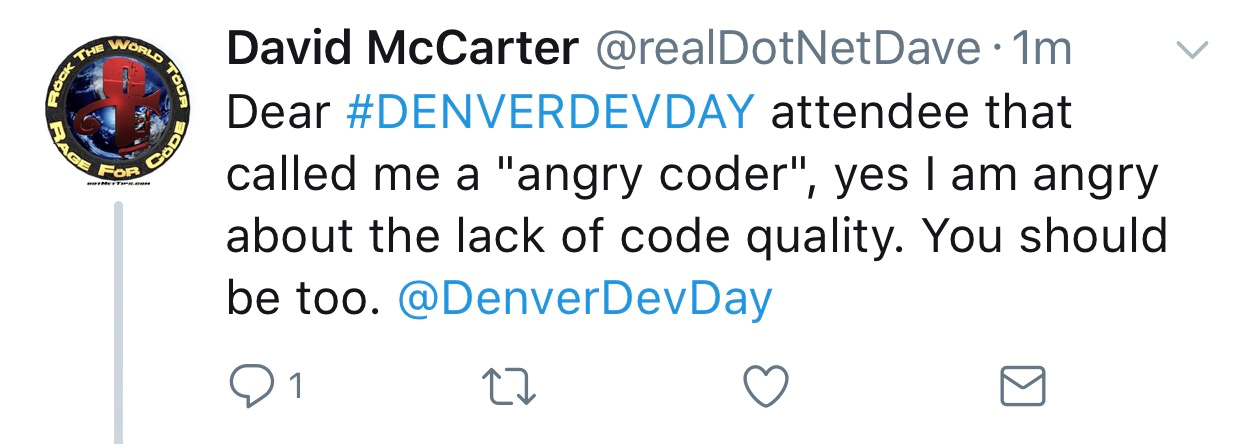
My observation is undeniably accurate; a significant portion of the code currently in production exhibits glaring deficiencies in terms of code quality, often neglecting even the fundamental principles. Regrettably, this issue extends to many of the applications I encounter as well. Because I hold such a deep commitment to addressing this problem, the overarching theme of all my code conference sessions, both now and in the foreseeable future, will be…
Improving Code Quality… One Developer At A Time™
Several years ago, I made a deliberate choice to shift my focus solely onto developers, with the aim of enhancing code quality. Every time I present at a conference, my primary objective is to inspire at least one attendee to return to their team and prioritize the integration of quality as a fundamental aspect of their software projects.
Need Evidence?
In some of my conference sessions, I present the following statistics from a live, in-production application, and they are truly astonishing.
- Critical Error Violations = 4
- Error Violations = 741
- Critical Warning Violations = 41
- Warning Violations = 22,316
- Information Violations = 1,100
The solution comprises 333,606 lines of code, which translates to a violation occurring roughly every 13.78 lines of code!
The Detailed Analysis
Let’s break down the violations by type:
- NET = 28
- NET Security = 46
- Code Style = 1,100
- Code Design = 1,254
- Exception Handling Design = 458
- Exception Handing Usage = 221
- General = 391
- Globalization = 5,378
- Interoperability = 2
- Maintainable = 73
- Naming = 8,074
- Performance = 1,180
- Security = 49
- Spelling = 5,759
- Usage = 189
Additionally, the solution also includes:
- Over 65K possible cloned lines of code.
- Average maintainability index of 77. The goal is to have an index of 100.
- Total cyclomatic complexity of 95K.
- Average inheritance depth of 1.7.
- Average class coupling of 5.76.
Let’s delve into the Cyclomatic Complexity Number. In essence, this number represents the minimum count of unit tests required solely to assess encapsulation, which happens to be the foundational pillar of Object-Oriented Programming. Astonishingly, this project only boasts 1,800 unit tests (taking over an hour to execute), and none of them are dedicated to evaluating encapsulation. This situation, as I often phrase it, resembles a precarious house of cards. Inevitably, all houses of cards are destined to collapse.
Regrettably, I encounter similar or even worse statistics in most of the code I analyze. The key to avoiding such alarming figures is either refraining from creating them initially or addressing them during the coding process. It’s unlikely that if you were to approach your manager with news of over 24,000 violations in the app, they would allocate the necessary time to rectify the situation. The numbers I’ve presented above represent an improvement from the state of the code when I first took it on, as I dedicated over a year to addressing the most critical issues.
How to Acquire Good Code Quality Practices
Unfortunately, many training platforms, such as Pluralsight, and conferences like VSLive, often neglect the crucial aspect of code quality. I have addressed this issue in my article titled “Quality of Software Is Getting Worse, Not Better, In 2017,” and I’ve also discussed the significance of soft skills in conferences in another article titled “Soft Skills – As Important if Not More Important at Conferences.” If you’re fortunate, you may find courses on this topic at a local educational institution. Consider exploring your local user group or community conference like Code Camp, as these are often led by real-world developers just like yourself.
Another effective method is to seek out a team that already embraces sound code quality practices. During my early career, I had the privilege of being part of several such exceptional teams. Naturally, my code quality improved because I found it quite unpleasant to receive bug reports from quality assurance. Fixing bugs is never enjoyable and detracts from the implementation of new features, which is what customers ultimately pay for.
Leverage the Power of Tools
Here are the tools that I wholeheartedly rely on to identify and rectify quality issues. What’s particularly beneficial about these tools, and something I believe many companies overlook, is their educational value. As these tools consistently flag issues in your code, you’ll gradually develop a keen awareness of them. You’ll instinctively begin to avoid these pitfalls without conscious effort. Below, I’ve listed the essential tools I always incorporate into my coding environment.
GhostDoc
I consistently utilize GhostDoc (available in both free and paid versions from Submain) because it simplifies the process of incorporating accurate XML comments in my code and ensuring proper headers for each file. GhostDoc effectively generates the majority of the documentation for you, provided you adhere to sound coding standards!
Analyze in Visual Studio
I perform code analysis within Visual Studio using the Analyze feature. If any issues are detected, I address them before proceeding with source control check-ins. It’s paramount to address problems during the coding phase. Delaying fixes to weeks, months, or even years later will consume more time and resources. You can access the same EditorConfig file that I use by visiting: https://bit.ly/dotNetDaveEditorConfig
CodeRush
A robust refactoring tool plays a pivotal role in expediting the development of high-quality code! In my workflow, I rely on the free extension called CodeRush from DevExpress. This refactoring tool not only simplifies the process of defect detection but also accelerates unit testing, saving considerable time. If I were to select just one tool to enhance my Visual Studio experience, it would undoubtedly be CodeRush.
Mastery of Code Quality Develops with Experience
By employing the aforementioned tools and actively participating in user group meetings, meetups or community conferences, your expertise in code quality will naturally grow and refine over time. Interestingly, the same individual who once labeled me an “angry coder” also referred to me as “old.” Here was my response to that remark…

Feel free to explore another one of my articles, titled “Politicians: Welcome to the Real World of Software Engineering.” I delve into this topic in greater depth in my book, “David McCarter’s .NET Coding Standards.“
I readily acknowledge that I may come across as a seasoned and passionate coder. How do you go about acquiring or incorporating code quality into your work? Please share your thoughts in the comments below.
September 2023 Update
While this article has garnered significant popularity, I believe that not enough software engineers have read it or have yet to prioritize code quality as a critical feature, even though it was published over 74 months ago. Allow me to illustrate this with statistics from a solution I analyzed this year.
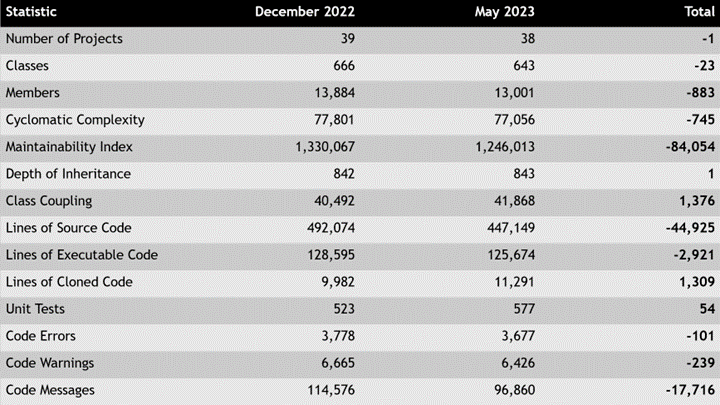
As evident from the data, this project exhibits a significantly higher number of issues compared to the one highlighted at the beginning of this article. Remarkably, this solution encounters an issue approximately every 4.1 lines of code! Such findings underscore the paramount importance of code quality, adherence to coding standards, and the use of tools to identify issues in any software solution. While it may require a bit more time during the coding process, the long-term benefits are guaranteed!
Pick up any books by David McCarter by going to Amazon.com: http://bit.ly/RockYourCodeBooks
Make a one-time donation
Make a monthly donation
Make a yearly donation
Choose an amount
Or enter a custom amount
Your contribution is appreciated.
Your contribution is appreciated.
Your contribution is appreciated.
DonateDonate monthlyDonate yearlyIf you liked this article, please buy David a cup of Coffee by going here: https://www.buymeacoffee.com/dotnetdave
© The information in this article is copywritten and cannot be preproduced in any way without express permission from David McCarter.
Discover more from dotNetTips.com
Subscribe to get the latest posts sent to your email.

 dotNetTips.com